
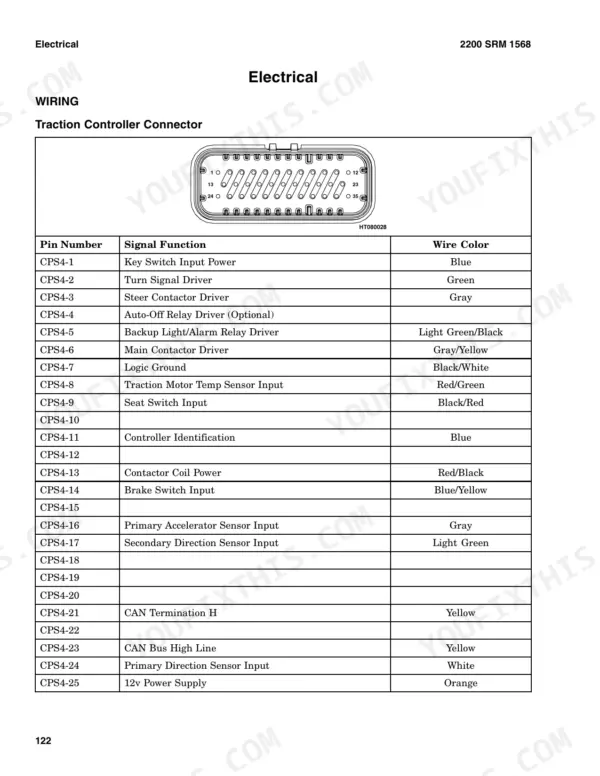
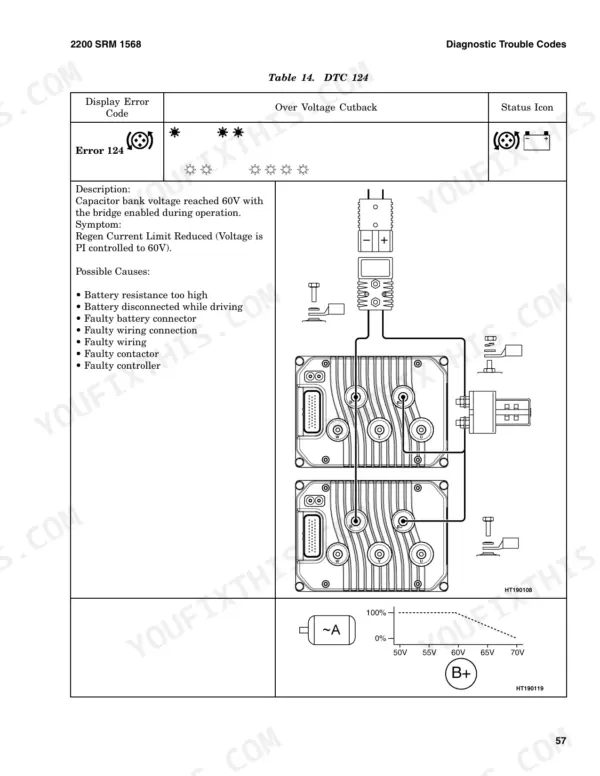
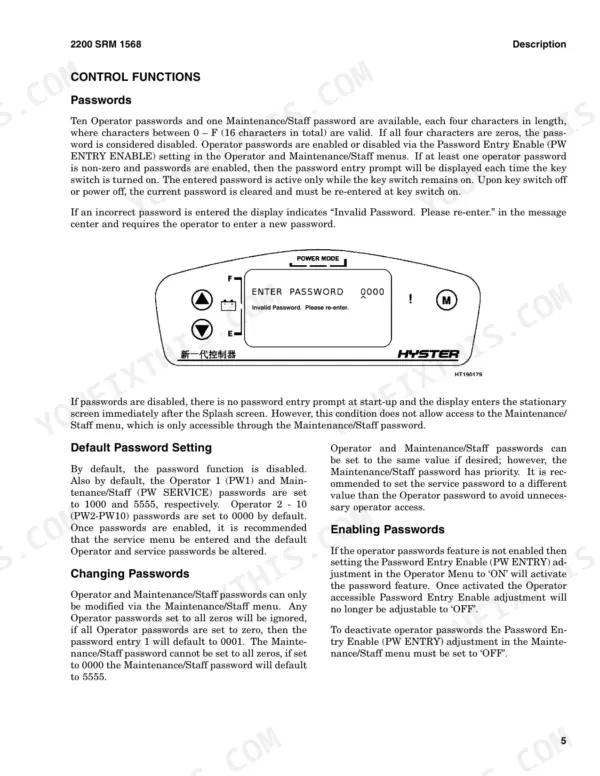
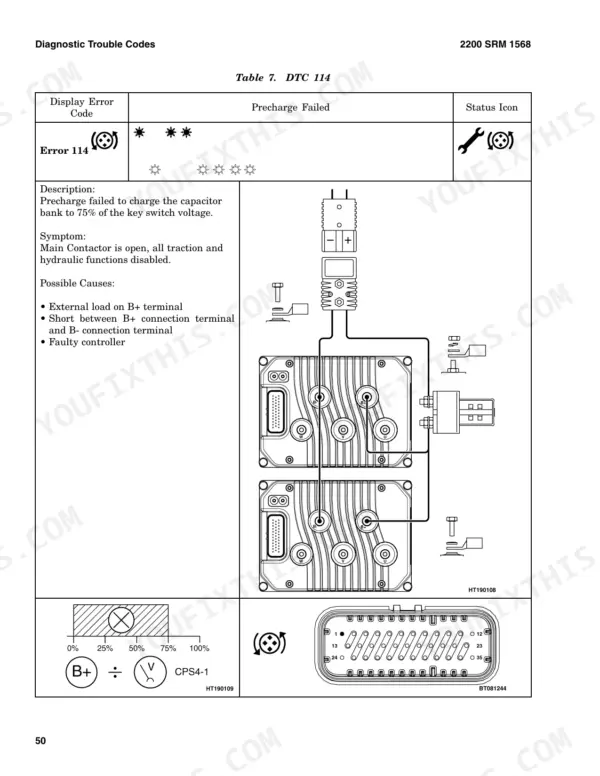
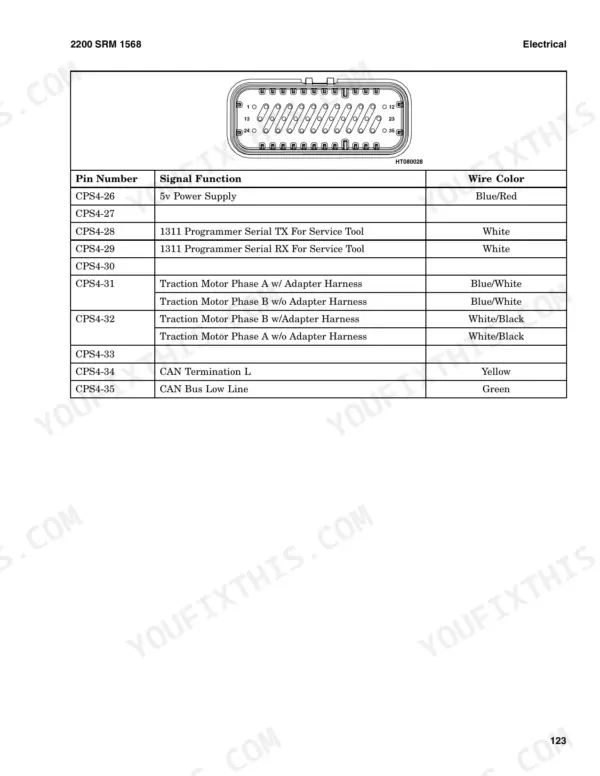
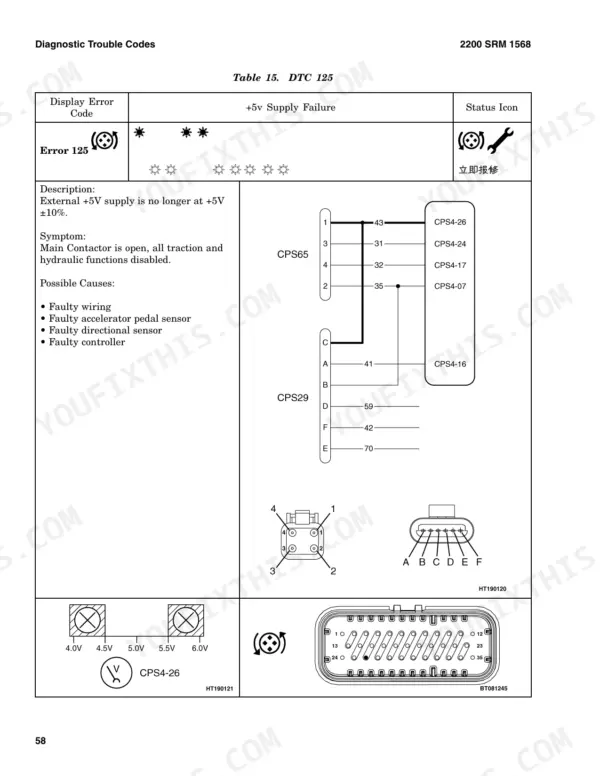
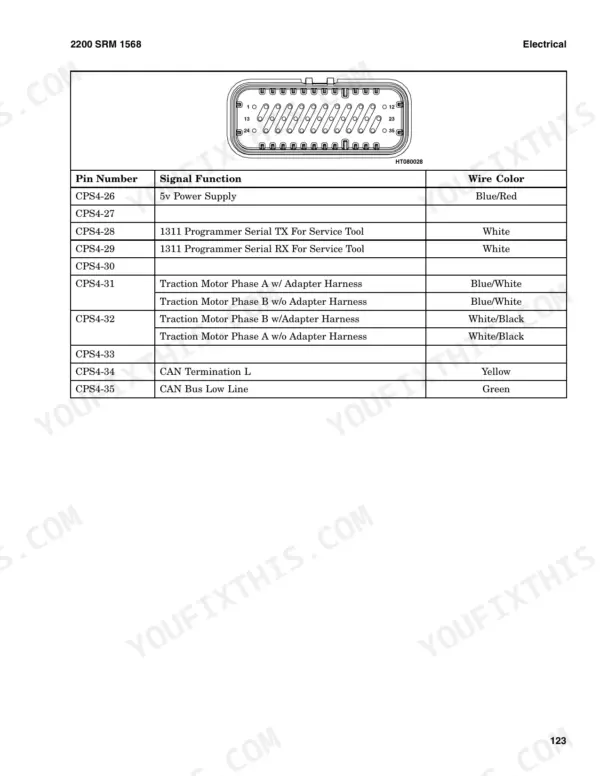
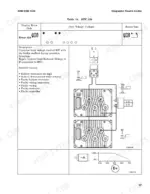
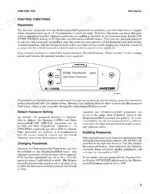
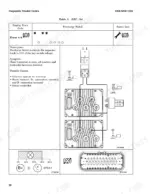
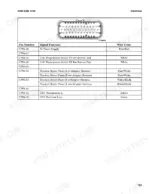
Tracing a controller fault to the exact connector pin is what the 304 pages of this Hyster J1.50EX service manual PDF (OEM ID 4046067) are built for, across four electric lift truck variants from the J1.50EX to the J2.50EX. Connector pinouts for the traction controller, hydraulic controller, display and motor speed and thermal sensors lead into electrical schematics for work lights, turn signals, brake lights and the steering pump motor. Trouble codes are grouped by controller, with Precharge Failed and Watchdog Timeout under traction and Encoder Fault and lift throttle wiper faults under hydraulics. Check thermal cutback first. The traction motor begins cutback at 150°C with the adapter and 170°C without, while the hydraulic motor begins at 160°C. Your job might be changing or enabling operator passwords through the Maintenance/Staff Menu. Bookmarks and a searchable text layer take you to the right code, so each fault trace ends against Hyster's own figures.
What's Inside This Hyster J1.50EX, J1.75EX, J2.00EX, J2.50EX Manual
| System | Pages | Key Topics |
|---|---|---|
| Troubleshooting | 1 | Troubleshooting Guidelines |
| Safety Precautions | 2 | |
| Control Functions | 11 | Passwords, Default Password Setting, Changing Passwords, Enabling Passwords |
| Thermal Management | 14-16 | Traction Motor Temperature, Traction Controller Heat Sink Temperature, Hydraulic Motor Temperature, Hydraulic Controller Heat Sink Temperature, Cutback Temperature |
| Diagnostic Trouble Codes | 17-100 | Controller Error Codes, Diagnostic Trouble Codes List, Hydraulic Controller Fault Codes |
| Display | 101-121 | Display Layout, Display Screens, Status Icons, Character Messages, Advisory Windows |
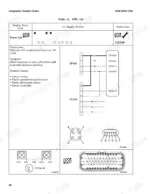
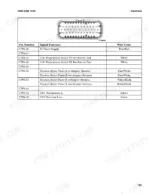
| Electrical | 122-150 | Wiring (Traction Controller Connector, Hydraulic Controller Connector, Display Main Connector) |
| Troubleshooting Guidelines | 151-152 | Safety Precautions, Digital MultiMeter Usage, Harness-Related Problems, Error Code Verification |
| Diagnostic Trouble Codes - General | 153-197 | Message Center, Fault Log, LED Controller Fault Indicator, Handheld Service Tool |
| Controller Layouts | 198-199 | 1.5-1.75 Ton Controller Layout, 2.0-2.5 Ton Controller Layout |
| Status Icons and Definitions | 200-202 | Wrench Icon, Traction System Icon, Hydraulic System Icon, Temperature Icon, Battery Icon |
| Diagnostic Trouble Codes - Traction Controller | 203-251 | No Power, Programming Mode, Watchdog Timeout, Over Current, Current Sensor Fault, Precharge Failed, Under/Over Voltage, Thermal Management |
| Diagnostic Trouble Codes - Hydraulic Controller | 252-279 | Controller Overcurrent, Current Sensor Fault, Under/Over Voltage, Thermal Management, Encoder Fault, Lift Throttle Wiper Faults |
| Electrical Wiring and Schematics | 280-304 | Traction Controller Connector, Hydraulic Controller Connector, Display Connectors, Accelerator Sensor, Directional Sensor, Work Lights, Turn Signals, Brake Lights |
Quick Reference Specifications
| Specification | Value | Page |
|---|---|---|
| Traction Motor Temperature Begin Cutback (With Adapter) | 150°C | p. 14 |
| Traction Motor Temperature Begin Cutback (Without Adapter) | 170°C | p. 14 |
| Traction Motor Temperature End Cutback (With Adapter) | 160°C | p. 14 |
| Traction Motor Temperature End Cutback (Without Adapter) | 180°C | p. 14 |
| Hydraulic Motor Temperature Begin Cutback | 160°C | p. 14 |
| Hydraulic Motor Temperature Cutoff | 171°C | p. 14 |
| Hydraulic Motor Temperature End Cutback | 180°C | p. 14 |
| Traction Controller Temperature Begin Cutback | 80°C | p. 14 |
| Traction Controller Temperature End Cutback | 95°C | p. 14 |
| Pump Controller Temperature Begin Cutback | 80°C | p. 14 |
| Pump Controller Temperature Cutoff | 86°C | p. 14 |
| Pump Controller Temperature End Cutback | 90°C | p. 14 |
Hyster J1.50EX, J1.75EX, J2.00EX, J2.50EX Common Problems This Manual Covers
Hyster J1.50EX to J2.50EX main and steer contactors will not close, no travel or hydraulic functions after key on
Check each startup condition on page 12 in order: key switch on, seat switch closed if fitted, accelerator pedal fully released, and direction select in neutral. Verify a valid password is entered when passwords are enabled, the controller pre-operational checks have completed, and no inhibiting fault is showing. Confirm the Auto-Off timer has not expired.
Manual Section: Traction Interlocks p. 12Traction acceleration fades and Over Temperature icon with Traction icon appears on display during long shifts
Check the thermal cutback limits on page 14 before chasing a drive fault. Traction controller heat sink cutback begins at 80°C and reaches zero acceleration at 95°C. Traction motor cutback begins at 150°C with adapter or 170°C without. The icon appears at 25% performance reduction and clears below 23%, so let the truck cool and recheck.
Manual Section: Thermal Management p. 14Lift flow stops and Over Temperature icon with Hydraulic icon shows on display under heavy cycling
Check hydraulic motor and pump controller temperatures against the limits on page 14. Lift flow is cut at 171°C hydraulic motor temperature or 86°C pump controller temperature, with a 5 degree hysteresis before it returns. Pump controller cutback begins at 80°C and hydraulic motor cutback at 160°C. Allow the system to cool, then verify lift resumes.
Manual Section: Thermal Management p. 14Display shows DTC 139 main contactor did not close, all traction and hydraulic functions disabled
Disconnect the battery connector before doing any work on the contactor, as page 2 requires. Inspect the main contactor tips for oxidation, burning, or poor contact following page 47, and check whether additional equipment has been installed on the truck. Do not use a file on the contacts and do not lubricate them (page 10).
Manual Section: Diagnostic Trouble Codes (Traction Controller) p. 47DTC 137 traction motor open code, main contactor open and truck will not travel or lift
Test the motor phase connections for an open circuit with a DMM, starting with vehicle power off and park brake set as page 151 directs. Check for a faulty wiring connection first, then faulty wiring, before condemning the motor or controller listed on page 45. Disconnect the battery connector before any repair work (page 2).
Manual Section: Diagnostic Trouble Codes (Traction Controller) p. 45Display reads Truck Disabled, Turn Key Off and buzzer sounds for 10 seconds after sitting idle
Cycle the key switch to restart; this is the Auto-Off function on page 16, not a fault. It triggers after 15 minutes with no input from the steer encoder, lift lever, accelerator pedal, brake switch, turn signals, display buttons, or traction motor speed above 50 RPM. Verify those inputs register if the truck shuts down while in use.
Manual Section: Auto-Off Function p. 16Frequently Asked Questions
What are the replacement specifications for the 48V traction battery on the Hyster J1.50EX, J1.75EX, J2.00EX, J2.50EX?
The system is designed for a 48V flooded lead-acid battery. When the key is turned on, if the battery voltage is above 50.2V, the available battery charge percentage is reset to 100%. p. 107
What is the procedure for resetting the trip odometer?
To reset the trip odometer, navigate to the trip odometer display in the advisory window. Once displayed, hold the DOWN Arrow button for more than two seconds to reset the value. p. 106
What is the normal steer motor command signal voltage range on a Hyster J1.50EX, J1.75EX, J2.00EX, J2.50EX?
The normal operating values for the steer motor command signal are between 010 and 040, which correspond to 1.0 to 4.0 volts, respectively. p. 121
What is the normal operating range for the traction motor speed?
The normal operating range for the traction motor speed is from 0000 to 3900 RPM. p. 124
What is the procedure for clearing a fault code?
Fault codes are stored in the fault log. If an error code is cleared during power cycling, it may not have been a hard failure. If the error code persists, the fault must be corrected before the code will clear from the message center. p. 151
Do I get instant access to this Hyster J1.50EX Service Manual?
A 304-page Service Manual in searchable PDF format, available the moment you complete checkout. View on computer, tablet, or phone, with no shipping wait.
Is this Hyster J1.50EX manual print-friendly?
Yes. Print a single page or a chapter for your own shop use, on letter or A4.


Reviews
There are no reviews yet.