
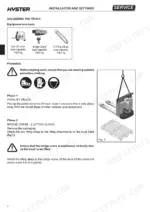
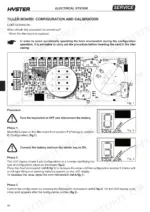
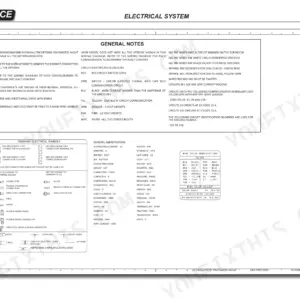
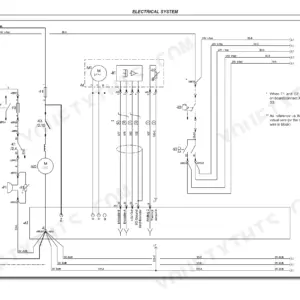
A fault stored in the Combi module's Faults Menu sends you to the diagnostics chapter of this Hyster P2.0 service manual PDF, a 192-page factory document (OEM ID 1669216) for four pallet truck variants from the P1.8 through the P2.2. Electrical wiring diagrams trace the tiller board, controls and battery charge level indicator, while hydraulic diagrams map the pressure control valves, directional valves, cartridge solenoid valves and lifting cylinder. Mechanics come next. Drive wheel, traction motor and tiller work is covered, and the reduction unit runs from removal through disassembly to an oil change. Hydraulic fittings get exact values: an M12x1.5 rotary metric female connector takes 15-25 Nm, an M52x2 takes 280-380 Nm. For electromagnetic brake adjustment, your target is a 0.35 mm friction disc to brake plate distance. Chapter bookmarks take you to Diagnostics, Hydraulic System or Planned Maintenance in one click, and the text layer finds a term like Faults Menu just as quickly.
What's Inside This Hyster P1.8, P2.0, P2.0L, P2.2 Manual
| System | Pages | Key Topics |
|---|---|---|
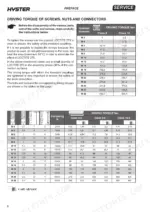
| Preface | 2-12 | General Safety Standards, Bolt Torque Values, Hose and Connector Fitting |
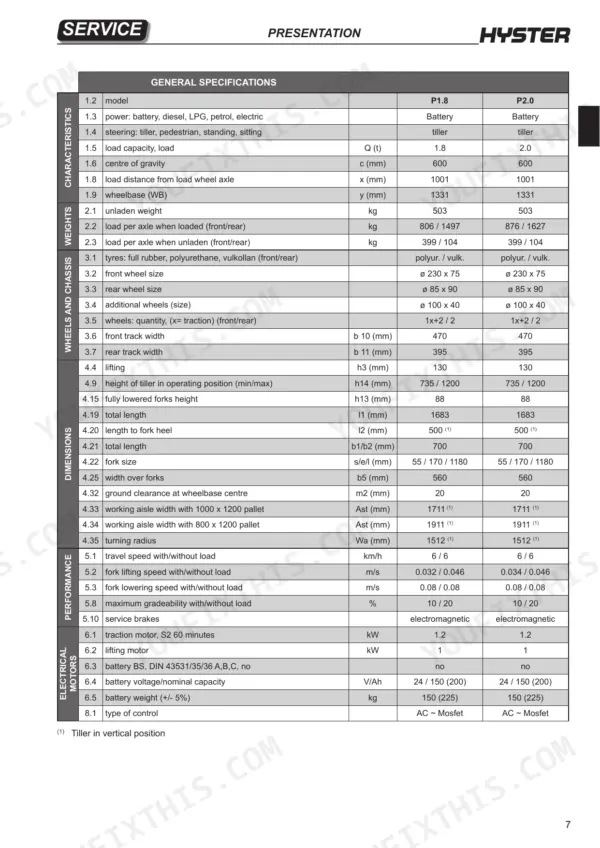
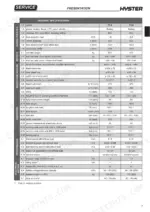
| Presentation | 13-22 | Truck Presentation, Views of the Truck, Truck and Load Identification Data, Truck Serial Number, Location of Documentation, General Specifications |
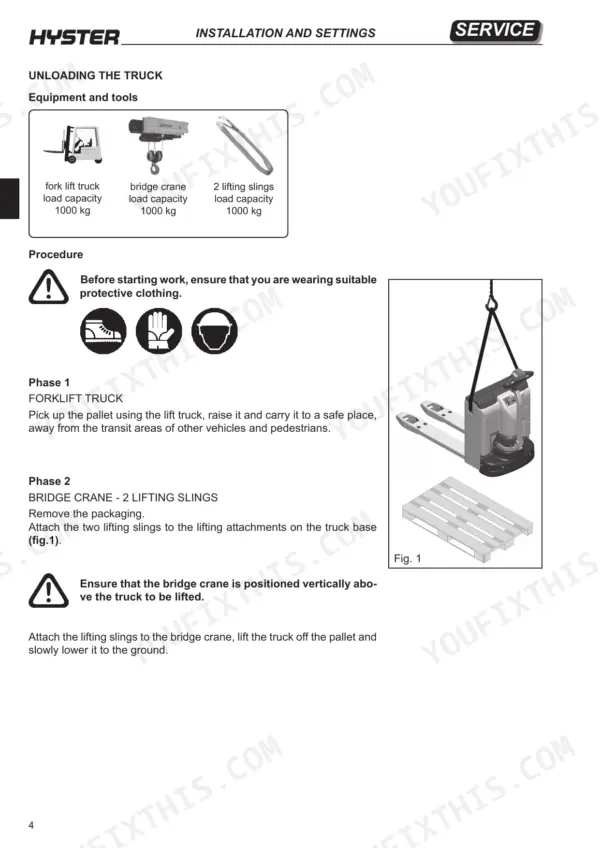
| Installation and Settings | 23-32 | Before Installation, Weight Table, Truck Assembly, Unloading the Truck, Topping Up the Oil Reservoir, Installation of the Battery |
| Diagnostics and Measurements | 33-56 | Description of Module Connectors, Combi Module, Monitor Menu, Faults Menu, Controller Information Menu, Electrical Component Measurements |
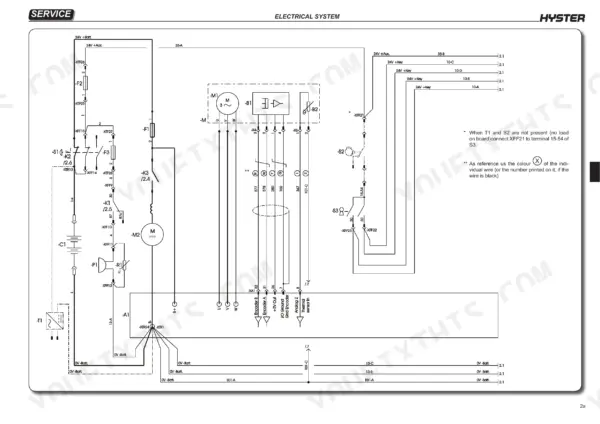
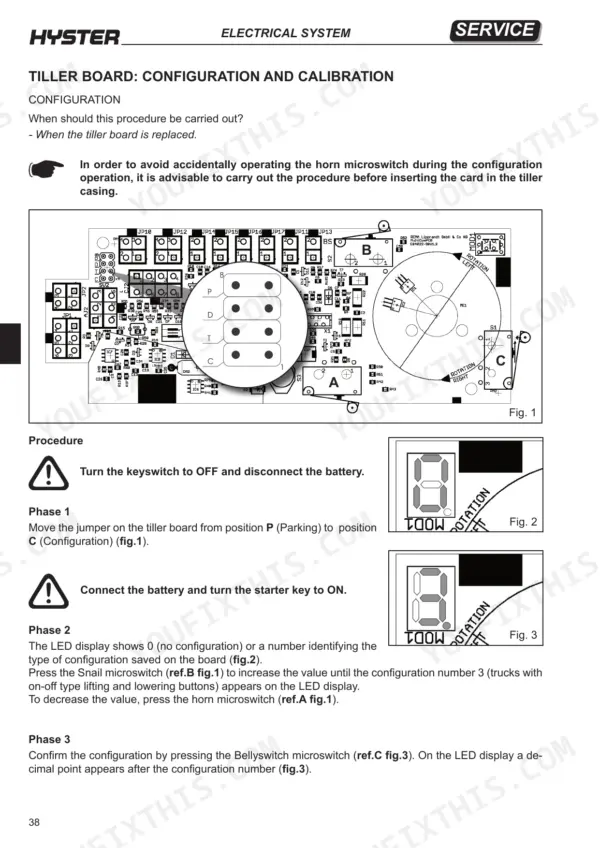
| Electrical System | 57-110 | Electrical Wiring Diagrams, Electrical Components, Tiller Board, Controls, Battery Charge Level Indicator, Truck Functions |
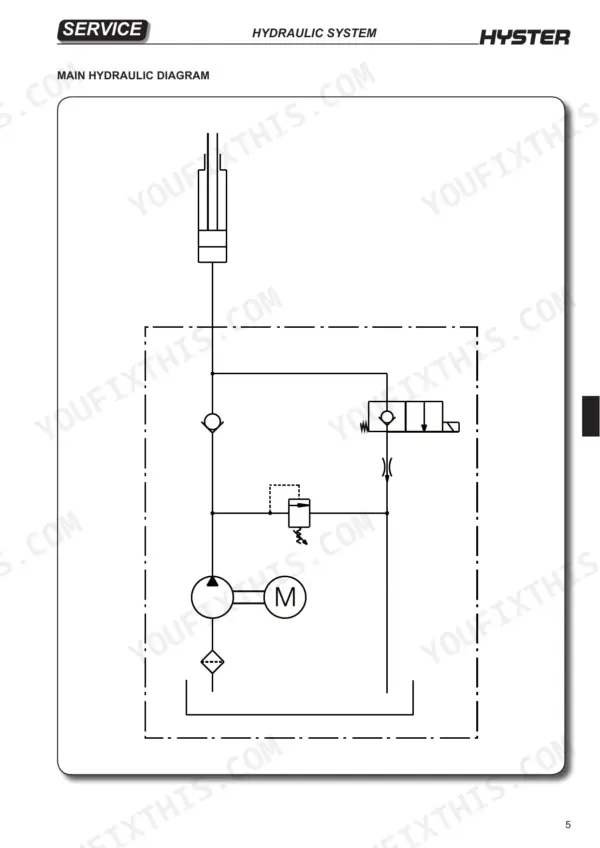
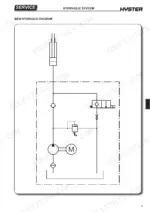
| Hydraulic System | 111-138 | Hydraulic Functions, Pressure Control Valves, Directional Valves, Hydraulic Diagrams, Cartridge Solenoid Valves, Lifting Cylinder |
| Mechanics | 139-166 | Drive Wheel, Pivoting Wheel Assembly, Load Wheels, Linkage, Tiller, Traction Motor |
| Reduction Unit | 167-178 | Key to Reduction Unit Components, Removal of the Reduction Unit, Disassembly of the Reduction Unit, Changing the Reduction Unit Oil |
| Braking System | 179-184 | Key to the Electromagnetic Brake Components, Operation, Braking Systems, Removal of the Electromagnetic Brake, Electromagnetic Brake Adjustment |
| Ordinary Maintenance | 185-192 | Oils and Lubricants, Products for the Cleaning, Planned Maintenance |
Quick Reference Specifications
| Specification | Value | Page |
|---|---|---|
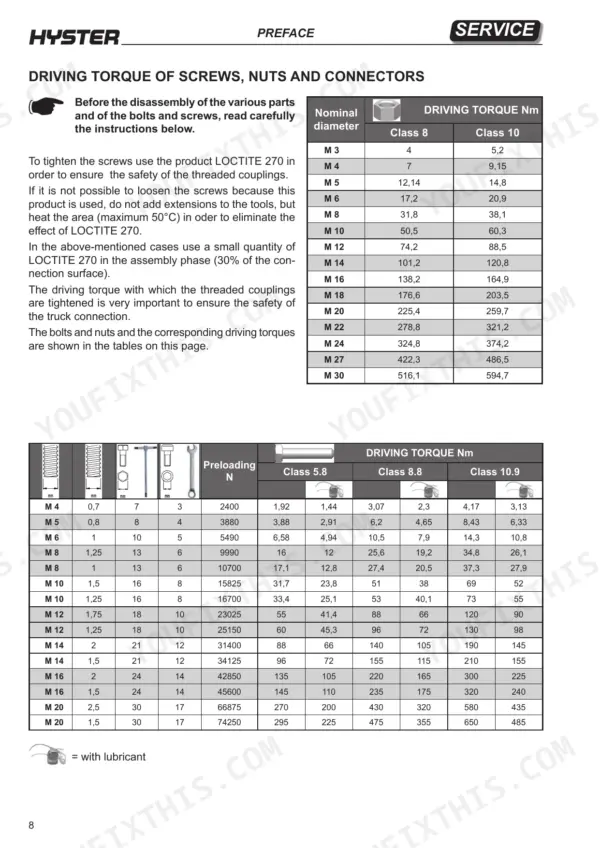
| Driving torque for M3 Class 8 bolts | 4 Nm | p. 8 |
| Driving torque for M3 Class 10 bolts | 5.2 Nm | p. 8 |
| Driving torque for Rotary Metric Female Connector M12x1.5 | 15-25 Nm | p. 9 |
| Driving torque for Rotary Metric Female Connector M52x2 | 280-380 Nm | p. 9 |
| Electromagnetic brake friction disc to brake plate distance | 0.35 mm | p. 184 |
| Pump to flange nuts torque | 5 Nm | p. 136 |
| Temperature Hot | 115°C | p. 82 |
| Temperature Max | 140°C | p. 82 |
| Traction wheel retaining nuts torque | 85 Nm | p. 141 |
| Pivoting wheel nut torque | 85 Nm | p. 144 |
| Lifting motor power | 1 kW | p. 19 |
| Solenoid valve Q1 resistance | 27 Ohm | p. 55 |
Hyster P1.8, P2.0, P2.0L, P2.2 Common Problems This Manual Covers
Hyster P1.8/P2.2 pallet truck alarm 12 controller overcurrent, truck dead with electromagnetic brake activated
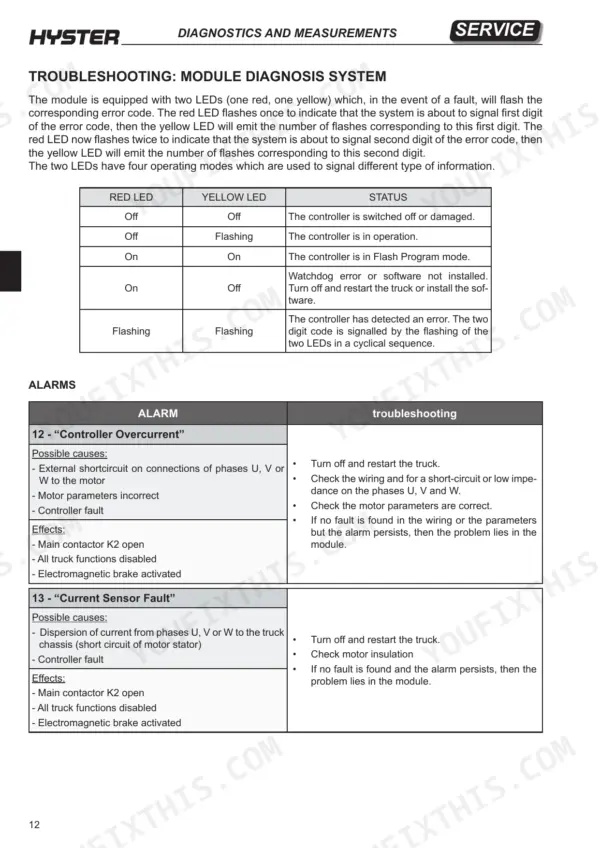
Turn the truck off and restart it first. If alarm 12 returns, disconnect the battery and discharge the capacitors before touching the electric compartment, as page 186 requires. Check the wiring on phases U, V and W for a short circuit or low impedance, then verify the motor parameters following page 44. If the wiring and parameters are good and the alarm persists, the problem lies in the module.
Manual Section: Module Diagnosis System Alarms p. 44Module LEDs flashing alarm 23 undervoltage cutback with truck drive performance reduced
Check MAIN MENU MONITOR / Battery / capacitor Voltage and bring the capacitor voltage above the minimum permitted value, following page 46. A discharged battery alone will trigger this cutback. Verify the battery parameters, then check the battery wiring, the fuses (including the positive feed to the key switch) and the main contactor status. When disconnecting the battery cables, do not produce sparks (page 186) and never short-circuit the terminals (page 5).
Manual Section: Module Diagnosis System Alarms p. 46Module flashing alarm 39 main contactor did not close, all truck functions disabled
Read MONITOR / Battery / capacitor Voltage first. Then disconnect the battery and discharge the capacitors before working in the electric compartment (page 186). Check the main contactor power wiring, clean the connectors and confirm the fastons are firmly seated, following page 50. Look for oxidised or burned contacts, but never file or lubricate the remote control switch contacts. Check the fuse on the positive feed to the keyswitch.
Manual Section: Module Diagnosis System Alarms p. 50Alarm 32 EM brake driver open/short, truck stops with electromagnetic brake activated
Check the electromagnetic brake wiring for damage and clean the brake contacts. A dirty connector or damaged wiring on the pin 5 brake coil driver sets this alarm (page 48). Disconnect the battery and discharge the capacitors before working in the electric compartment, per page 186. Reconnect, then turn the truck off and restart. If the wiring is good and the alarm persists, the problem lies in the module.
Manual Section: Module Diagnosis System Alarms p. 48Electromagnetic brake friction disc to brake plate gap too wide, braking action poor
Disconnect the battery first; page 186 forbids maintenance with it connected. Measure the distance between the friction disc and the brake plate following the electromagnetic brake adjustment on page 184. Adjust until the gap is no greater than 0.35 mm, because anything wider costs you braking action. Recheck the gap after adjustment, then reconnect the battery and test the brake.
Manual Section: Electromagnetic Brake Adjustment p. 184Alarm 34 coil 4 driver open/short with solenoid valve Q1 driver stopped
Check the solenoid valve Q1 wiring and clean the connectors following page 48, then turn the truck off and restart. If the alarm returns, disconnect the battery and discharge the capacitors before working in the electric compartment (page 186). Measure the Q1 coil resistance against 27 Ohm per page 55. If the wiring checks out and the alarm persists, the chart points to the module.
Manual Section: Module Diagnosis System Alarms p. 48Frequently Asked Questions
How do I clear a Hyster P2.0 controller fault?
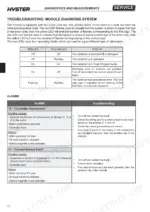
To clear a fault, you must first identify the error code using the two LEDs on the module. Once the cause is addressed, turn off the truck and restart it to clear the alarm. If the alarm persists, the problem may lie within the module itself, as detailed in the troubleshooting section for each specific alarm code (e.g., code 12 on page 44). p. 44
What are the torque specifications for Hyster P1.8/P2.0/P2.0L/P2.2?
The driving torque for screws, nuts, and connectors depends on the nominal diameter and the class of the bolt. For example, an M8 Class 8.8 bolt requires a torque of 25.6 Nm, while an M10 Class 8.8 bolt requires 51 Nm. Detailed tables for various bolt classes (5.8, 8.8, 10.9) and diameters are provided on page 8. p. 8
How do I read Hyster P2.0 status codes?
The module uses two LEDs (one red, one yellow) to flash error codes. The red LED flashes once to indicate the first digit, followed by the yellow LED flashing the number of times corresponding to that digit. The red LED then flashes twice to indicate the second digit, followed by the yellow LED flashing the number of times for the second digit. p. 44
What is the procedure for bleeding air from the lifting cylinder?
To bleed the lifting cylinder, wear oil-resistant gloves and use a 10 mm socket wrench with a flexible handle to loosen the air bleed screw (ref.B fig.1) on page 129. Connect the battery, turn the starter key to ON, and lift the forks using the tiller button until oil flows out of the air bleed valve. Tighten the bleed screw and wipe the cylinder clean. p. 129
What is the required torque for the pressure relief valve on the Hyster P1.8, P2.0, P2.0L, P2.2?
When installing the pressure relief valve, it must be tightened to a torque of 13 Nm. After replacement, the valve must be calibrated by placing a load equivalent to the truck's rated capacity on the forks and adjusting the screw until the pressure is sufficient to lift the load. p. 120
Do I get instant access to this Hyster P1.8 Service Manual?
You download the Service Manual yourself: 192 pages, searchable PDF, available immediately. Keep a copy on every device you use.
Is this Hyster P1.8 manual print-friendly?
You can. Print the sections you want for your own use and keep the file as your backup.


Reviews
There are no reviews yet.