
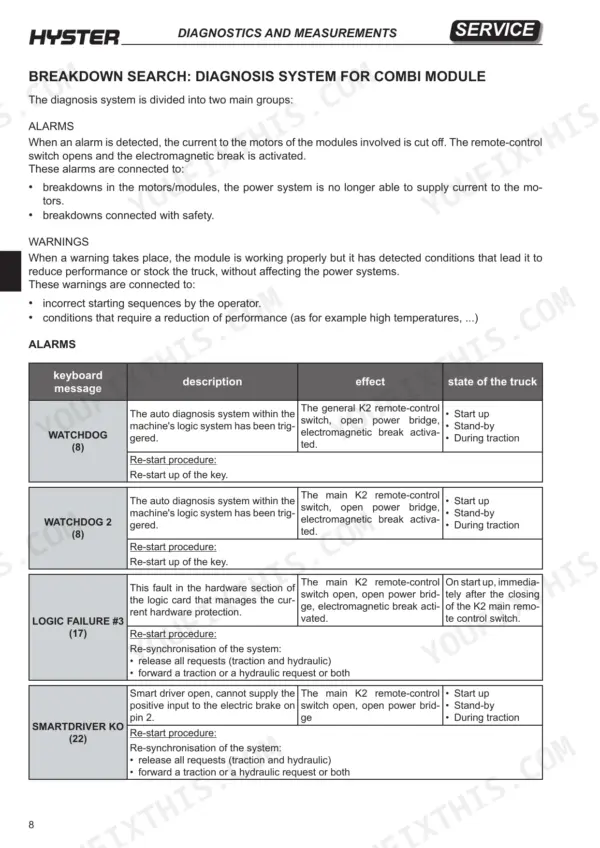
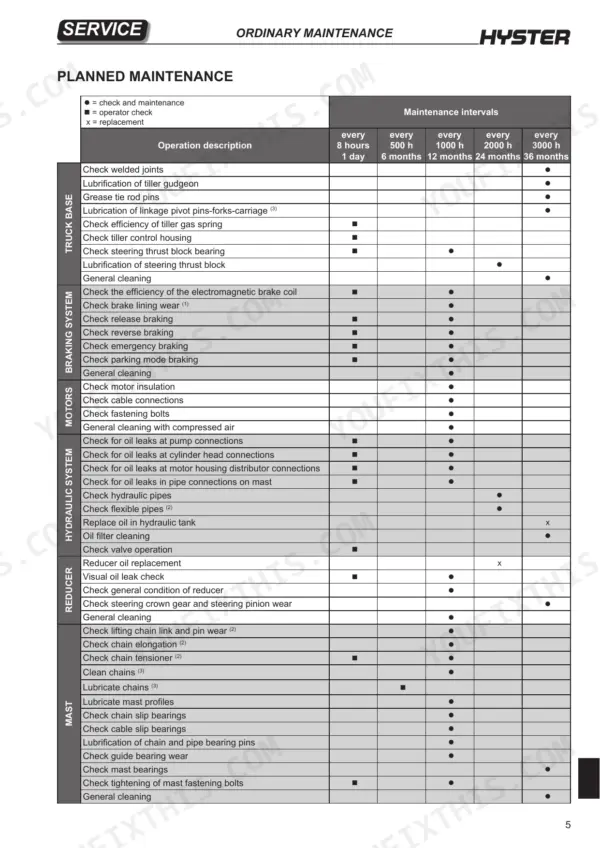
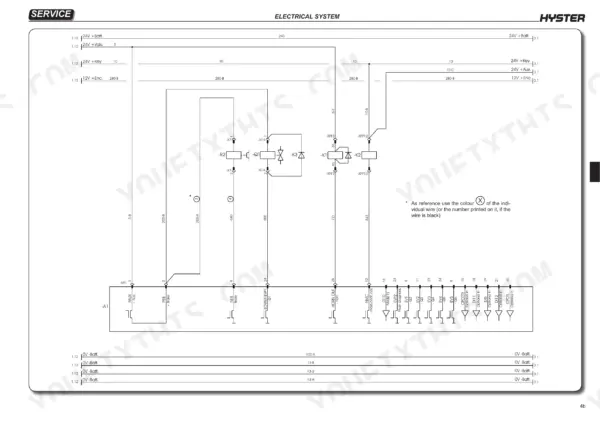
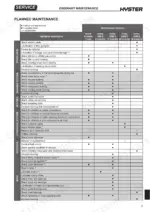
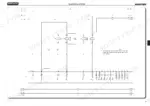
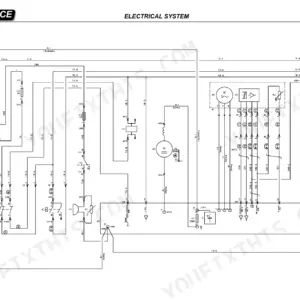
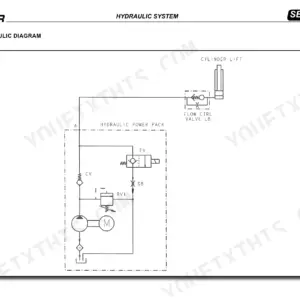
An alarm or warning from the Combi AcO electronic control system is one of the faults this 317-page Hyster S1.0-S1.6 series service manual PDF (OEM ID 1668891) helps you trace across six tiller lift truck variants, including the I.L. versions. Wiring diagrams map the tiller controls, display and truck functions, while hydraulic schematics show how the hydraulic functions are laid out. Diagnostics cover module connectors, the menu tester and breakdown search. Size lifting tackle for 1000 kg, and tighten a JIC 37° 7/16-20 rotary female connector to 15 Nm, inside its 9 to 21 Nm window. Your job may begin at the truck and mast serial number stamps and the residual load plate, confirming which variant you are servicing. Bookmarked and text-searchable, the PDF travels on a laptop or tablet to wherever the truck is working.
What's Inside This Hyster S1.0–S1.6 Series Manual
| System | Pages | Key Topics |
|---|---|---|
| Truck Presentation | 2 | Traction Motor, Pump Motors, Tiller Guidance System |
| Truck Views | 3 | |
| Truck and Load Identification Data | 4 | Truck Identification Data Plate, Residual Load Plate |
| Truck and Mast Serial Number Stamp | 5 | Truck Serial Number, Mast Serial Number |
| Data Location | 5 | Truck Identification Data Plate, Residual Load Plate, Truck Documentation |
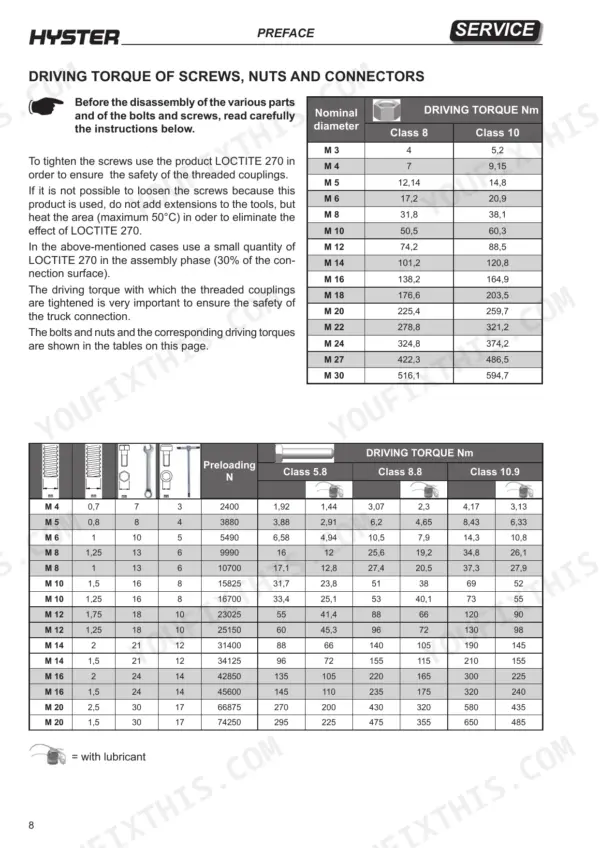
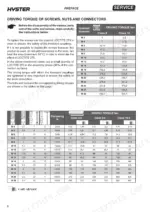
| Driving Torque of Screws, Nuts and Connectors; Lifting and Safety Data | 6-12 | Rope Capacity, Band Capacity, Hanging Rope Capacity, Driving Torque, Female Connector Application, Hydraulic System Maintenance |
| Presentation | 13-26 | Section Index, Truck Presentation, Truck Views, Identification Data, General Specifications |
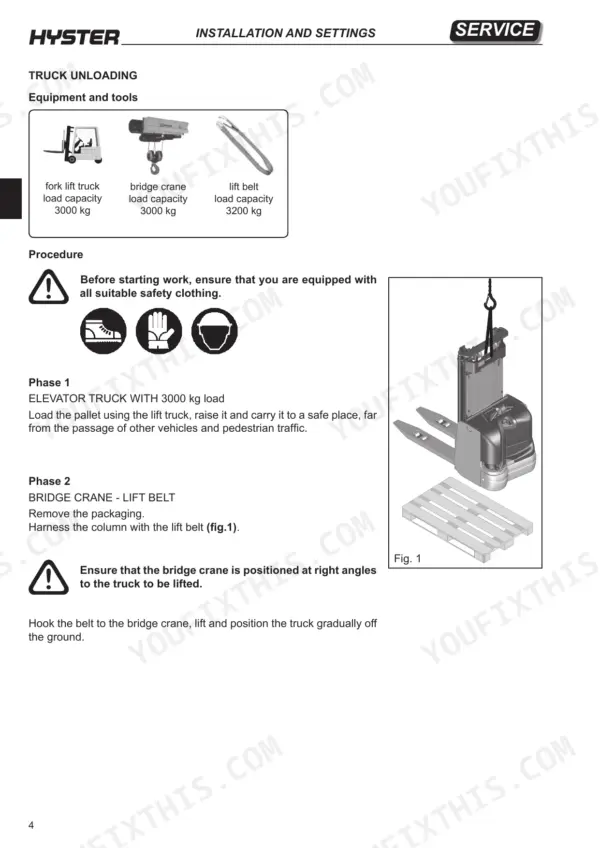
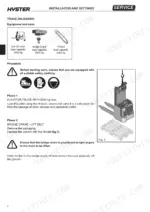
| Installation and Settings | 27-38 | Before Installation, Machine Assembly, Truck Unloading, Topping Up Oil, Battery Installation, Battery Voltage Setting |
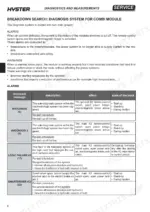
| Diagnostics and Measurements | 39-72 | Module Connectors, Menu Tester, Breakdown Search, Alarms, Warnings, Electrical Component Measurements |
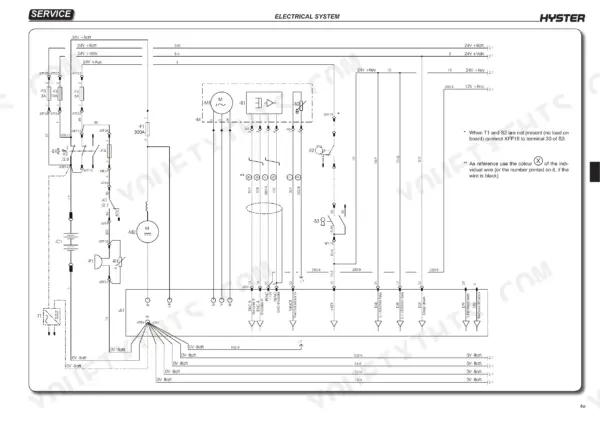
| Electrical System | 73-141 | Wiring Diagrams, Electrical Components, Tiller Controls, Display, Truck Functions, Configuration Parameters |
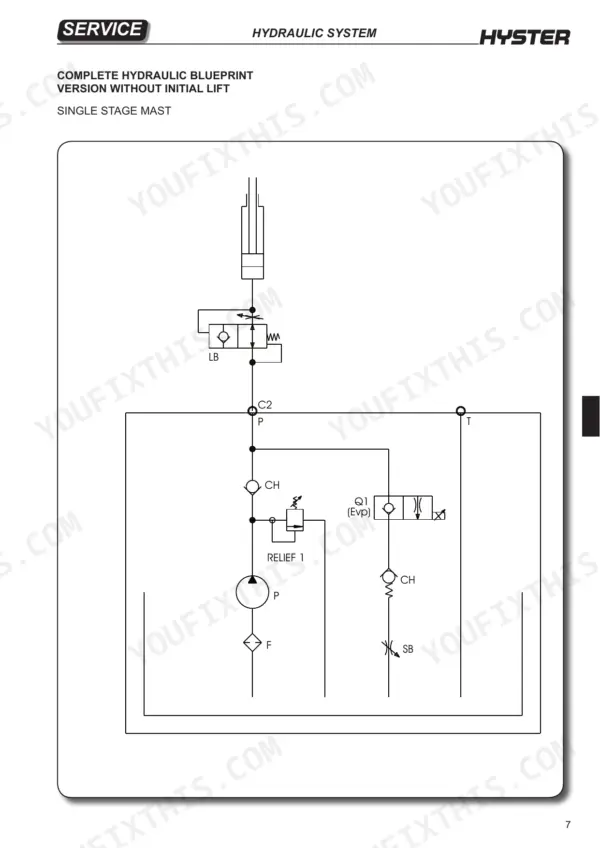
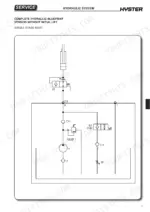
| Hydraulic System | 142-213 | Hydraulic Functions, Cylinder Maintenance |
| Frame Mechanics | 214-291 | Traction Wheel, Tiller Dismantling |
| Reduction Gear | 292-301 | Reducer Oil Replacement |
| Braking System | 302-307 | Brake Adjustment |
| Ordinary Maintenance | 308-317 | Planned Maintenance |
Quick Reference Specifications
| Specification | Value | Page |
|---|---|---|
| Driving torque for M3 Class 8 | 4 Nm | p. 8 |
| Driving torque for M3 Class 10 | 5.2 Nm | p. 8 |
| Rotary Metric Female Connector JIC 37° 7/16-20 torque | 15 Nm (min 9 Nm, max 21 Nm) | p. 9 |
| Rotary Metric Female Connector JIC 37° 1/2-20 torque | 20 Nm (min 13 Nm, max 27 Nm) | p. 9 |
| Tackle load capacity | 1000 kg | p. 287 |
| Hexagonal T section spanner size for tiller card replacement | 2.5 - 5 mm | p. 134 |
| Hexagonal T section spanner size for tiller button replacement | 5 mm | p. 135 |
| Parachute valve set value | 80 litres/min | p. 145 |
| Fixed spanner size for hydraulic pipe connectors | 19 - 22 mm | p. 208 |
| Traction wheel fastening nut torque | 85 Nm | p. 217 |
| Pivoting wheel fastening nut torque | 85 Nm | p. 220 |
| Wooden beams dimensions | 100x100x500 mm | p. 290 |
Hyster S1.0–S1.6 Series Common Problems This Manual Covers
Hyster S1.0 S1.2 S1.4 S1.6 display shows WRONG BATTERY alarm (41) at start up and truck stays immobilized
Measure battery voltage with a multimeter and compare it to the COMBI main tester menu battery voltage parameter, as page 55 directs. The alarm trips below 80% or above 120% of nominal voltage (page 47). If the readings differ, run the Battery Voltage Setting procedure in Installation and Settings. Never short the terminals or test charge with metal jumpers (page 5).
Manual Section: Breakdown Search: Diagnosis System for Combi Module p. 47Electromagnetic brake gives weak braking with excessive gap between ferode and brake plate
Disconnect the battery first, because page 309 forbids maintenance with it connected. Measure the distance between the ferode and the brake plate and adjust the ferode distance following page 307. The gap must not be greater than 0.35 mm for good braking. Recheck the gap after adjustment before putting the truck back on the floor.
Manual Section: Electromagnetic Brake Adjustment p. 307AUX DRIV. SHRT (40) or AUX DRIV. OPEN (42) alarm with electromagnetic brake applied
Discharge the capacitors before checking anything in the electric compartment (page 309). Code 40 means the brake semiconductor has shorted; code 42 means the brake coil driver is damaged, per page 47. Measure the electromagnetic brake coil using the Electrical Component Measurements procedure. Release all traction and hydraulic requests, then forward a new request. If a shorted brake driver persists, the fault is inside the module: replace the module (page 55).
Manual Section: Breakdown Search: Diagnosis System for Combi Module p. 47CONTACTOR OPEN (77) alarm at start up with main K2 remote-control switch not closing
Discharge the capacitors before checking any electric compartment component, and never file or lubricate the remote-control switch contacts (page 309). Check the K2 coil circuit: CONTACTOR DRIVER (75) on page 49 flags an open coil, while CONTACTOR OPEN (77) on page 50 means the switch will not close. Re-synchronise by releasing all traction and hydraulic requests, then forward a new request.
Manual Section: Breakdown Search: Diagnosis System for Combi Module p. 50EMERGENCY alarm (80) on display with no traction and electromagnetic brake applied
Check the emergency button and its contact first. Page 50 traces this alarm to the open emergency button contact removing the positive feed to the main K2 remote-control switch. Reset the button, then re-synchronise: release all traction and hydraulic requests and forward a new traction or hydraulic request.
Manual Section: Breakdown Search: Diagnosis System for Combi Module p. 50Air trapped in lift cylinders and initial lift cylinders after hydraulic pipe or cylinder service
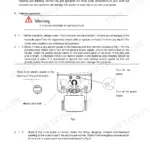
Discharge residual fork lift circuit pressure by opening valve A with the supplied Allen key before servicing, as page 10 requires, and close it when finished. Check the oil level using TELLUS T32 or AEROSHELL FLUID 41 (page 311); never enable the pump with insufficient fluid (page 309). Then bleed the lift cylinders and initial lift cylinders using the Air Bleeding procedure.
Manual Section: Lift Cylinders: Air BleedingFrequently Asked Questions
How do I reset the service indicator on a Hyster S1.4 I.L. or S1.6 I.L.?
After performing the required maintenance, you must reset the service indicator by setting the 'check up done' parameter to 'ON'. This is done via the COMBI / main adjustment menu on the programmer. p. 66
How do I program or initialize the battery and controller on a Hyster S1.0-S1.6?
If a non-factory battery is installed, you must set the battery voltage on the COMBI model. Connect the programmer, turn the machine ON, and select 'COMBI / config menu adjustment / adjust battery'. Use a tester to check the exact voltage between the negative pole (-Batt) and positive pole at pin 10 of connector A, and set the parameter to this value. p. 36
What is the correct torque for tightening the traction wheel fastening nut on a Hyster S1.0-S1.6 Series?
The traction wheel fastening nut must be tightened using a torque wrench set to 85 Nm. p. 217
What is the required torque for the reducer-to-chassis mounting screws on the Hyster S1.0-S1.6 Series?
When reassembling the reducer to the chassis, the securing screws must be tightened to a torque of 45 Nm. p. 296
What is the procedure for bleeding the initial lift cylinder?
To bleed the initial lift cylinder, wear oil-resistant gloves, loosen the air bleed screw (ref.B fig.1) using a 10mm open-ended spanner, and connect the battery. Lift the straddle legs using the tiller button until oil flows out of the bleed valve, then stop lifting and tighten the bleed screw. p. 186
Is this Hyster S1.0–S1.6 Series manual a PDF I download?
Immediate download of the complete 317-page searchable Service Manual. Access it on any device, from a laptop at your desk to a phone in the field.
Am I able to print pages from this Hyster S1.0–S1.6 Series manual?
Yes. Print a chapter or just the pages for the job at hand, for use in your own shop. Any home or office printer works.


Reviews
There are no reviews yet.