
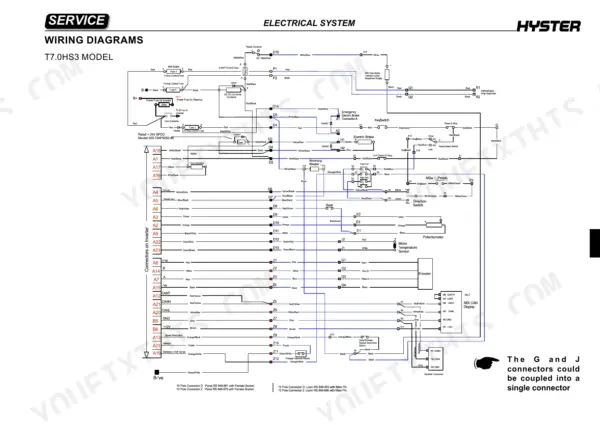
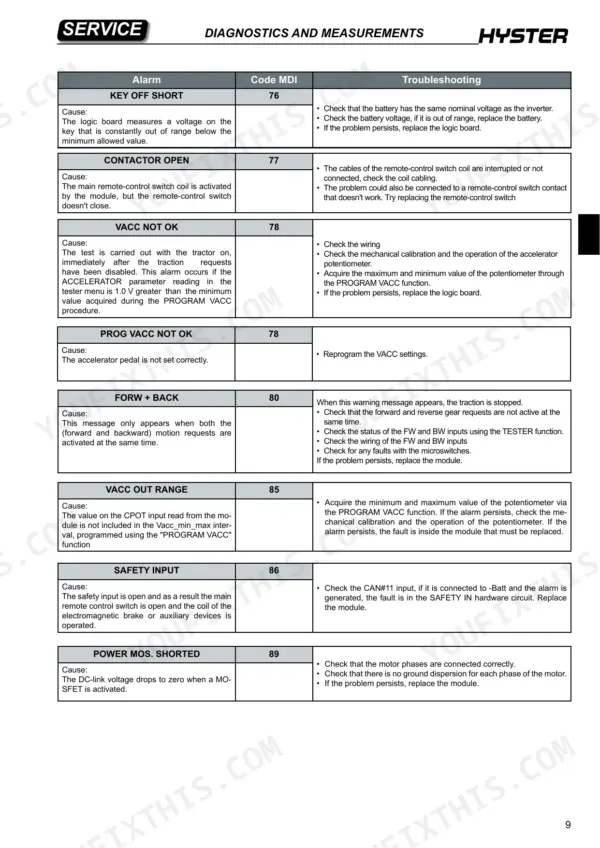
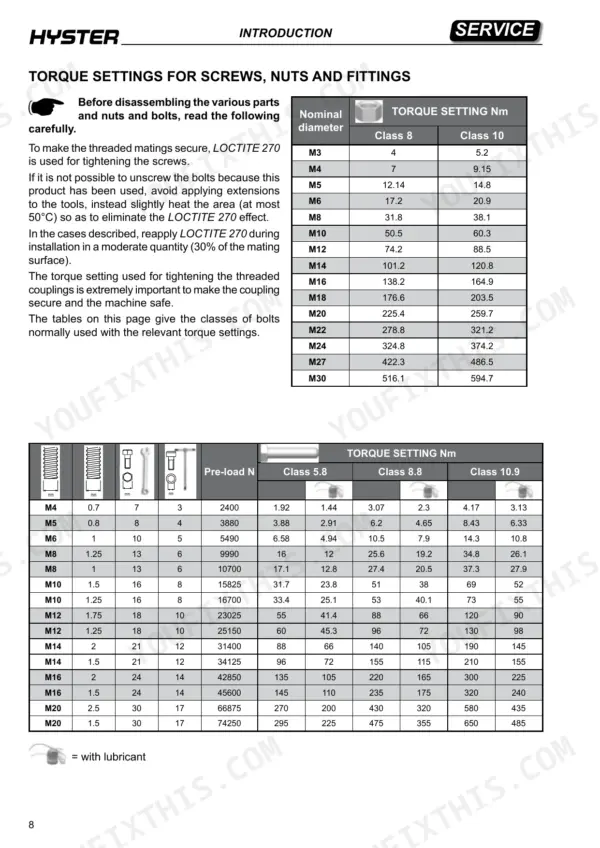
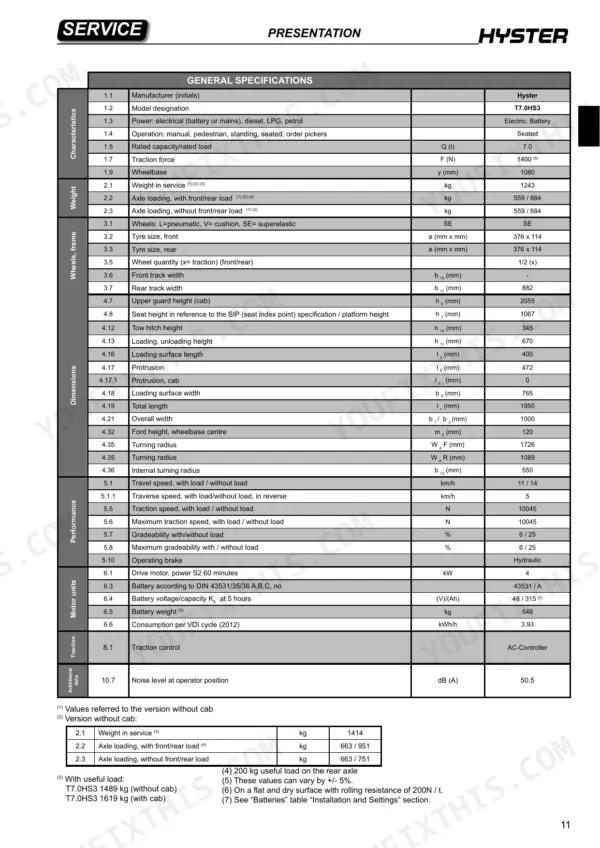
Carrying Hyster factory document number 4211122, this Hyster T7.0HS3 service manual PDF runs 157 pages and covers the T7.0HS3 and T8.0HS4 towing tractors, from unloading and battery installation through cab dismantling and scheduled maintenance. Wiring diagrams lay out the electrical system next to component identification, MDI display details and the configuration parameters you set on the controller. Diagnostics cover the ACE2 module connectors, the tester menu, alarm troubleshooting and a motor insulation test, while the mechanical chapters take in the rear axle, brakes, steering assembly, seat and tow hook. Clean with air at 1 bar maximum. Torque M3 Class 10 fasteners to 5.2 Nm. Ordering a replacement traction battery for your T7.0HS3 means matching the listed 48 V / 315 Ah rating (K5 at 5 hours) and planning for its 548 kg weight. Bookmarked and text-searchable, the PDF goes wherever the tractor is, so the brake and rear axle pages sit right beside the machine.
What's Inside This Hyster T7.0HS3, T8.0HS4 Manual
| System | Pages | Key Topics |
|---|---|---|
| Warnings | 2-3 | Battery Safety, Hydraulic System, Electrical Components, Personal Protective Equipment, Lifting Operations |
| Oils and Lubricants | 4 | |
| Cleaning Products | 4 | |
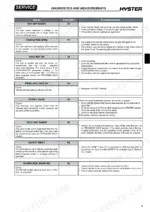
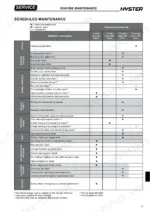
| Scheduled Maintenance | 5 | |
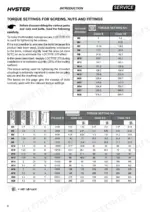
| Introduction: Technical Data Tables | 6-12 | Belt Capacity Table, Rope Capacity Table, Suspension Element Capacity Table, Torque Settings, Female Fitting Application |
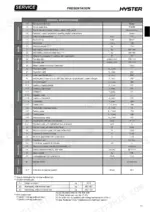
| Presentation | 13-26 | Tractor Models, Identification Data, General Specifications, T7.0HS3 Dimensions, T8.0HS4 Dimensions |
| Installation and Settings | 27-41 | Unloading Procedures, Battery Installation, Parking Brake Release, Battery Voltage Setting, Controller Configuration |
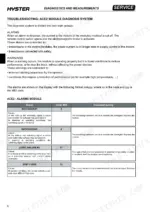
| Diagnostics and Measurements | 42-55 | ACE2 Module Connectors, Tester Menu, Alarm Troubleshooting, Electrical Component Measurements, Motor Insulation Test |
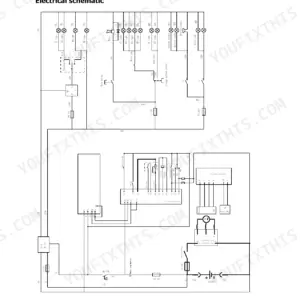
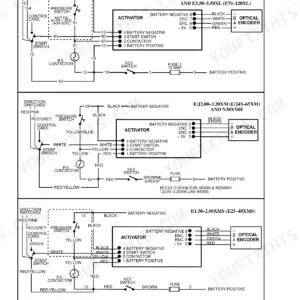
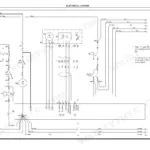
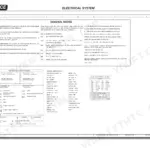
| Electrical System | 56-97 | Wiring Diagrams, Electrical Component Identification, MDI Display, Configuration Parameters, Component Replacement Procedures |
| Basic Truck Mechanics and Routine Maintenance | 98-157 | Cab Dismantling, Seat Assembly, Tow Hook, Rear Axle, Brakes, Steering Assembly, Maintenance Intervals, Tire Safety |
Quick Reference Specifications
| Specification | Value | Page |
|---|---|---|
| T7.0HS3 | ||
| Battery voltage/capacity K5 at 5 hours | 48 / 315 (V)/(Ah) | p. 23 |
| Battery weight | 548 kg | p. 23 |
| Nominal towing capacity | 7000 kg | p. 14 |
| All Models | ||
| Maximum air pressure for cleaning | 1 bar | p. 4 |
| Torque setting M3 Class 8 | 4 Nm | p. 8 |
| Torque setting M3 Class 10 | 5.2 Nm | p. 8 |
| Torque setting M30 Class 10 | 594.7 Nm | p. 8 |
| Drive motor power S2 60 minutes | 4 kW | p. 23 |
| Electromagnetic brake coil resistance | 15 Ohm | p. 54 |
| Inverter maximum current (48V) | 350A (RMS) for 2 minutes | p. 81 |
| T8.0HS4 | ||
| Nominal towing capacity | 8000 kg | p. 14 |
Hyster T7.0HS3, T8.0HS4 Common Problems This Manual Covers
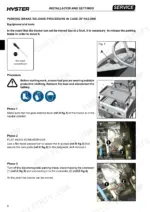
Hyster T7.0HS3 T8.0HS4 tow tractor stuck with electromagnetic parking brake applied after a fault, will not move
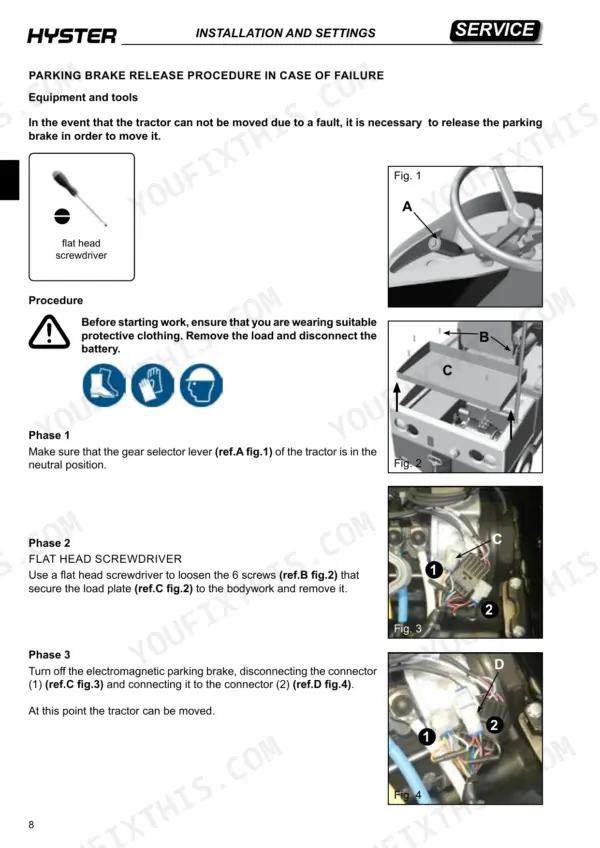
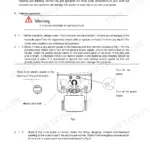
Remove the load and disconnect the battery first; page 4 forbids any maintenance with the battery connected. Put the gear selector lever in neutral, then loosen the 6 screws on the load plate with a flat head screwdriver following page 34. Unplug connector 1 from the electromagnetic parking brake and plug it into connector 2. The tractor can then be moved.
Manual Section: Parking Brake Release Procedure p. 34ACE2 module shows LOGIC FAILURE #1 alarm 54 after acceleration or a hydraulic request
Check the battery charge status and the electrical connections. This alarm flags an under voltage condition, with a limit of 11 V for 36/48V modules (page 48). Disconnect the battery before working on any connection, as page 5 requires. Remove external loads that pull down the key input, such as relays, contactors or solenoid valves switching. If no voltage reaches the supply line and the alarm returns at every key turn, replace the module.
Manual Section: Troubleshooting ACE2 Module Diagnosis System p. 48Traction current cuts back and stops with ACE2 TH.PROTECTION alarm 62 on the display
Check the temperature of the control first. Per page 48, the module starts reducing current once the heat sink passes 85°C and reaches 0 A at 105°C, so a hot control is protecting itself. If alarm 62 shows while the module is cold, the thermal sensor or the logic card has failed. Replace the control in that case.
Manual Section: Troubleshooting ACE2 Module Diagnosis System p. 48ACE2 CAPACITOR CHARGE alarm 60 at key on, remote-control switch will not close
Check for an external load wired in parallel with the capacitors, such as a lamp, dc/dc converter or auxiliary load, that drags down the pre-charge current. Discharge the capacitors before inspecting anything in the electric compartment (page 151). Add a power resistance over the remote-control switch terminals. If the alarm clears, the module's internal charge resistance is damaged. Replace the module per page 48.
Manual Section: Troubleshooting ACE2 Module Diagnosis System p. 48Remote-control switch power contacts stuck with ACE2 CONTACTOR CLOSED alarm 75 at start up
Inspect the remote-control switch power contacts and replace the remote-control switch if they are blocked, per page 49. Discharge the capacitors before touching any component in the electric compartment. Do not file or lubricate the contacts: page 151 warns this makes them stick and can cause loss of control.
Manual Section: Troubleshooting ACE2 Module Diagnosis System p. 49Battery charge indicator reads below 100% after full charge on a non-factory battery
Measure the exact battery voltage at the traction controller with a tester, first between -Batt and pin 10 of connector A, then between -Batt and +Batt. Following page 40, enter those values in the COMBI adjust key volt. and adjust battery parameters with the programmer. Save, then cycle the key. If the indicator still reads low, increase bat. max adj. to suit the battery.
Manual Section: Battery Voltage Setting p. 40Frequently Asked Questions
What do the Hyster T7.0HS3 and T8.0HS4 error codes mean?
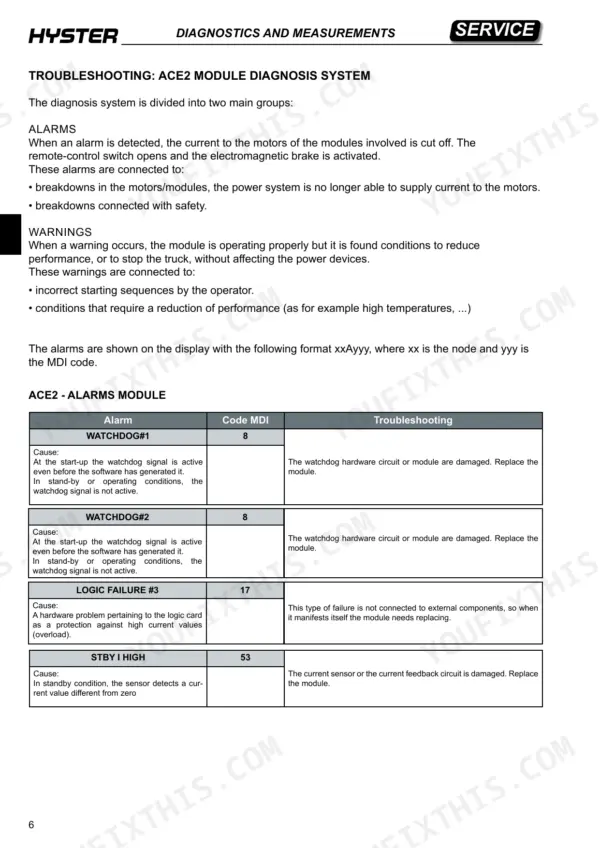
The error codes are displayed in an 'xxAyyy' format, where 'xx' is the node and 'yyy' is the MDI code. For example, code 8 (WATCHDOG#1 or #2) indicates the watchdog hardware circuit or module is damaged and requires replacement. p. 47
How can I clear a controller fault on a Hyster HS tow tractor?
Many faults, such as 'WRONG RAM MEMORY' (code 71) or 'LOGIC FAILURE #1' (code 54), require specific actions like switching the tractor off and back on, or checking electrical connections and battery charge status. If the fault persists, the module must be replaced as described in the troubleshooting tables on pages 47-53. p. 49
What is the correct torque setting for an M8 bolt, Class 8.8, on the Hyster T7.0HS3, T8.0HS4?
For an M8 bolt (1.25 pitch) of Class 8.8, the torque setting is 25.6 Nm. If the bolt is used with lubricant, the torque setting is 19.2 Nm. p. 8
What is the required maintenance interval for changing the rear axle oil on the Hyster T7.0HS3, T8.0HS4?
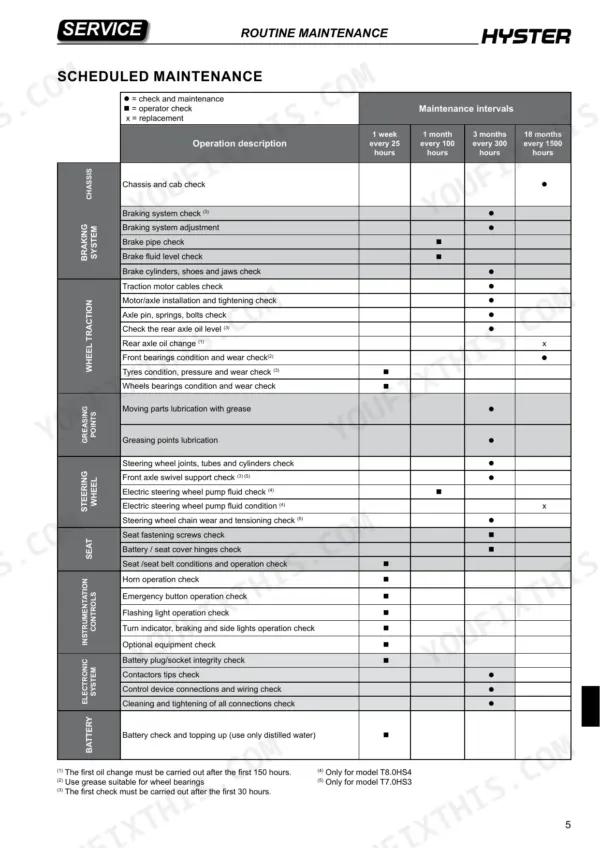
The rear axle oil should be changed every 1500 hours (18 months). Note that the first oil change must be carried out after the first 150 hours. p. 154
What is the correct procedure for tightening female fittings with an O-ring?
To ensure a reliable seal for female fittings with an O-ring, you must screw on the nut by hand and then tighten it by another half turn using a wrench. p. 9
How is this Hyster T7.0HS3 Service Manual delivered?
Straight to your device: 157 pages of searchable Service Manual, downloadable the moment payment goes through.
Can I print pages of this Hyster T7.0HS3 manual for my own shop?
Yes. Print the sections you need to take out to the shop for your own use. Standard letter or A4 paper works.

Reviews
There are no reviews yet.