
Need the factory operating guidelines for your tracked excavator? This 280-page JCB JS330 operator manual pdf (OEM #9821/1800) breaks down every daily inspection, safety protocol, and cab control for the JS240, JS260, JS330, and JS360 models. Inside, you get complete routine maintenance schedules, fluid capacity tables, and step-by-step guides for safely connecting optional hydraulic attachments. Open to the troubleshooting section to quickly decode monitor display fault messages, or review the exact operating procedures before firing up the engine for a long shift. Torque the JS330 travel motor to 923 Nm, and make sure you swap the hydraulic return filter every 800 hours. Stop guessing what that flashing dashboard warning light means. Grab this bookmarked manual on your tablet, find the correct fluid specs right in the cab, and keep the dirt moving.
Complete the set for your JS240, JS260, JS330…
Other editions of this manual
- JCB JS130–JS460 Series Tracked Excavator Operator Manual Original price was: $30.99.$19.99Current price is: $19.99.
- JCB JS110–JS330 Series Tracked Excavator Operator Manual Original price was: $28.99.$19.99Current price is: $19.99.
What's Inside This JCB JS240, JS260, JS330, JS360 Operator Manual
| System | Pages | Key Topics |
|---|---|---|
| Safety Notices | 9-10 | Important Information, Operator Manual, Safety Warnings |
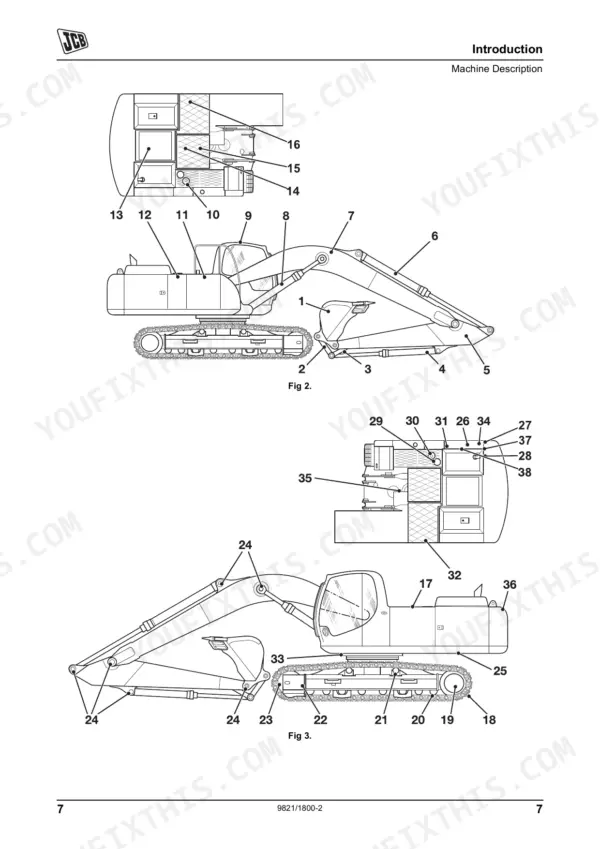
| Introduction | 11-36 | Machine Model and Serial Number, Using This Manual, Left Side, Right Side, Cross References, Machine Description (JCB Tracked Excavator, Intended Use), Component Location |
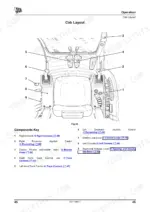
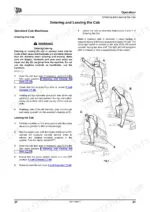
| Operation | 37-132 | Before Entering the Cab, Entering and Leaving the Cab, Emergency Exit, Doors and Windows, Opening and Closing the Front Lower Window, Door Sliding Window |
| Routine Maintenance | 133-211 | Service Requirements, Fit for Purpose Tests for Lifting Equipment, Health and Safety, Battery, Service Schedules, Pre Start Cold Checks, Service Points and Fluid Levels |
| Troubleshooting | 212-220 | Engine and Related Area, Monitor Display - Fault Messages, Operations, Hydraulic Pump, Working Attachments, Travel, Slew |
| Optional Attachments | 221-232 | Attachments for Your Machine, Connecting/Disconnecting Hydraulic Hoses, Disconnecting the Hydraulic Hoses, Quick Release Couplings, Operating Attachments |
| Specifications | 233-272 | Static Dimensions, JS240 - Triple Articulated Boom, JS330 - Monoboom, JS330 - Triple Articulated Boom, JS330 - Me Monoboom, JS360 - Standard Monoboom |
| Warranty Information | 273-276 | Machine Service Record Sheet, Registration Information |
| European Community Standards | 277-280 | Ec Declaration of Conformity, Explanation of the Ec Declaration of Conformity |
Quick Reference Specifications
| Specification | Value | Page |
|---|---|---|
| JS240, JS260 | ||
| Travel Motor Tightening Torque (JS240, JS260) | 259-288 Nm (191-212 lbf ft) | p. 174 |
| JS330, JS360 | ||
| Travel Motor Tightening Torque (JS330, JS360) | 923 Nm (681 lbf ft) | p. 175 |
| All Models | ||
| Return Filter Replacement Interval (Less than 10% use) | Every 800 hrs | p. 146 |
| Suction Filter Cleaning Interval (Less than 10% use) | Every 800 hrs | p. 146 |
| Air Cleaner Outer Element Replacement | Renewed immediately if warning light illuminates; more frequently in dusty conditions. (Table indicates change at 250, 500, 1000, 2000, 4000, 5000 hrs) | p. 186 |
| Air Cleaner Inner Element Replacement | Change every other time outer element is changed | p. 186 |
| EGR Cooler Plug Tightening Torque | 25 Nm | p. 181 |
| Battery Electrolyte Level Check (Low Maintenance Batteries) | Check (10, 50, 250, 500, 1000, 2000, 4000, 5000 hrs) | p. 140 |
| Battery Terminals Condition and Tightness Check | Check (10, 50, 250, 500, 1000, 2000, 4000, 5000 hrs) | p. 140 |
| All Electrical Equipment Operation Check | Check (10, 50, 250, 500, 1000, 2000, 4000, 5000 hrs) | p. 140 |
| Controller Outputs 1-6 Fuse Rating | 15A | p. 171 |
| Lever Link Lubrication | Grease | p. 216 |
JCB JS240, JS260, JS330, JS360 Common Problems This Manual Covers
Air filter warning light illuminates on JCB JS240 dash monitor during heavy digging operation
Stop the machine and turn off the engine immediately. Inspect the air filter housing for heavy dust accumulation. Replace the outer element immediately as detailed on page 186, or at the standard 250-hour interval. Change the inner element every other time the outer is replaced.
Manual Section: Routine Maintenance p. 186Machine will not start or crank over when turning the ignition key in cold weather
Inspect the battery bay components and wiring connections. Check the main battery fuse ratings on page 172 and verify each fuse is intact. Clean the battery terminals to remove corrosion and check the electrolyte level at the standard 50-hour maintenance interval to ensure proper voltage.
Manual Section: Routine Maintenance p. 172Engine coolant temperature warning message displays on monitor and engine derates under load
Check the engine fan belt tension on page 185. Press the belt midway between pulleys and verify the slack is within the specification listed in the manual. If the belt is loose, adjust the tensioner immediately. Inspect the radiator fins for debris and clean them out to restore cooling airflow.
Manual Section: Routine Maintenance p. 185Hydraulic functions operate slowly and the dashboard warning system indicates a restricted fluid return filter
Stop hydraulic operation to prevent system contamination. Replace the return filter, servo filter, and plexus filter at the standard interval of every 800 hrs as specified on page 146. Tighten the plexus filter bolts to the torque specified on page 146 during the reassembly process.
Manual Section: Routine Maintenance p. 146Hydraulic fluid leaking from the main boom ram lines during normal trench digging operations
Lower the attachments to the ground and relieve hydraulic pressure. Inspect the boom ram hoses for severe wear. Replace these hoses every 2 years or every 4000 hours, whichever comes first, according to page 147. Always replace the O-rings and gaskets at the same time.
Manual Section: Routine Maintenance p. 147Frequently Asked Questions
How to reset JCB JS240 excavator error codes?
To clear warning messages or error codes on the JCB JS240 excavator, press the ACK button on the monitor. This action will acknowledge the warning, clear the message from the display, and cancel any accompanying warning buzzer, though it will not extinguish warning lamps. p. 63
How to reset JCB JS330 excavator ECU / service light?
To reset the service light on the JCB JS330 excavator, which illuminates when a service is required, press the ACK switch on the monitor. This will cancel the warning when a minor service (250 hours) is due. For continuous illumination indicating a major service (500 hours), contact your JCB dealer. p. 64
What do JCB JS240 / JS330 / JS360 error codes mean?
The JCB JS240, JS330, and JS360 excavators display various fault messages on the monitor, each indicating a specific issue. For example, a 'WATER TEMP' message indicates water leakage, a soiled or elongated belt, or a defective radiator. A 'LOW OIL PRESS' message points to low engine oil, oil leakage at connections, or a defective engine oil pressure sensor. p. 215
What are the replacement specifications for Hydraulic filters?
Hydraulic filter replacement intervals vary based on the frequency of breaker, crusher, or pulverizer use. For example, a Return Filter (1) should be changed every 100 hours if breaker/crusher/pulverizer use exceeds 75% of operating hours, or every 800 hours if use is less than 10%. Suction, Drain, Servo, Plexus, and Breaker In-Line filters also have specific intervals ranging from 100 to 800 hours depending on usage intensity. p. 146
What are the replacement specifications for Engine air filter?
For the engine air filter, the outer element should be changed every 500, 1000, 2000, 4000, or 5000 hours, or more frequently in dusty conditions, or immediately if the warning light illuminates. The inner element should be changed every 2000 or 4000 hours, or every other time the outer element is changed. p. 140
How will I receive this JCB JS240–JS360 Series Operator Manual?
Immediate download of the complete 280-page searchable Operator Manual. Access it on any device, from a laptop at your desk to a phone in the field.
Am I able to print pages from this manual?
Yes. Print a chapter or just the pages for the job at hand, for use in your own shop. Any home or office printer works.
Reviews
There are no reviews yet.