
Every one of the 392 pages in this JCB JS115–JS235 Series Operator Manual PDF (OEM #9821/9950) focuses on keeping your JS series excavators (JS115, JS130, JS145, JS160, JS180, JS190, JS200, JS210, JS220, JS235) out of the shop and in the dirt. Walk-around inspection checklists, detailed cab control layouts, and clear interval schedules for your daily service routine are all here. Open the file to find dashboard error code translations, heavy lifting load charts, and exact fluid capacity requirements. Inspect the Livelink 2 ECU 5A ignition fuse on page 363 and confirm hydraulic pressure is discharged at the tank breather before starting any service prep. Ignoring basic upkeep costs you serious money. Download this bookmarked document, pull it up on your tablet right inside the cab, and get back to work.
Complete the set for your JS115–JS235 Series
Other editions of this manual
- JCB JS130–JS460 Series Tracked Excavator Operator Manual Original price was: $30.99.$19.99Current price is: $19.99.
- JCB JS110–JS330 Series Tracked Excavator Operator Manual Original price was: $28.99.$19.99Current price is: $19.99.
What's Inside This JCB JS115–JS235 Series Operator Manual
| System | Pages | Key Topics |
|---|---|---|
| Acronyms Glossary | 12 | Auxiliary Relief Valve, Construction Equipment Security and Registration, Diesel Exhaust Fluid, Engine Control Module, Falling Object Guard System, Roll-Over Protective Structure |
| Introduction | 13-18 | Safety (- Yours and Others) |
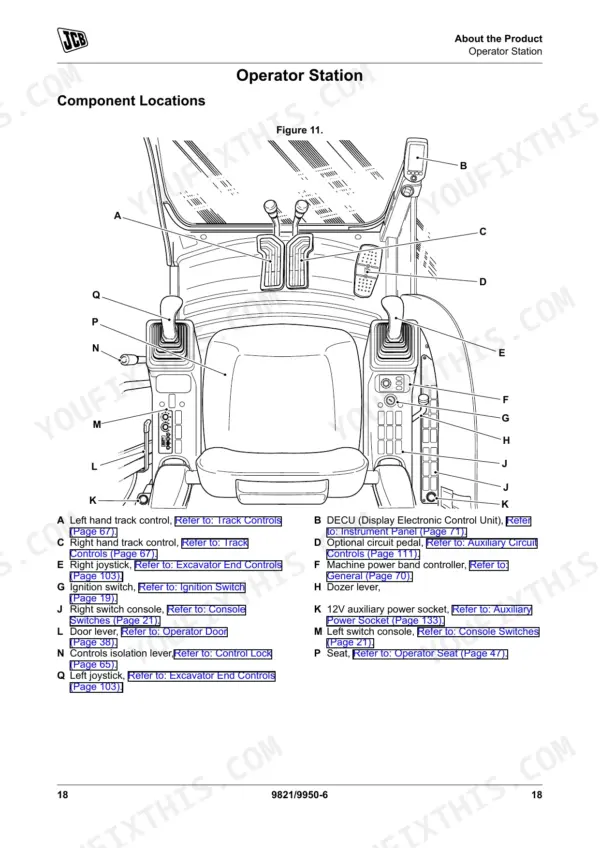
| About the Product | 19-36 | Product Compliance, Main Component Locations, Operator Protective Structure, Safety Label Identification, Interior Switches, Console Switches |
| Operation | 37-192 | Operating Safety, Walk-Around Inspection, Entering and Leaving the Operator Station, Starting the Engine, Operating Levers/Pedals, Lifting and Loading |
| Maintenance | 193-258 | Maintenance Safety, Maintenance Schedules, Maintenance Positions, Service Points, Access Apertures, Body and Framework |
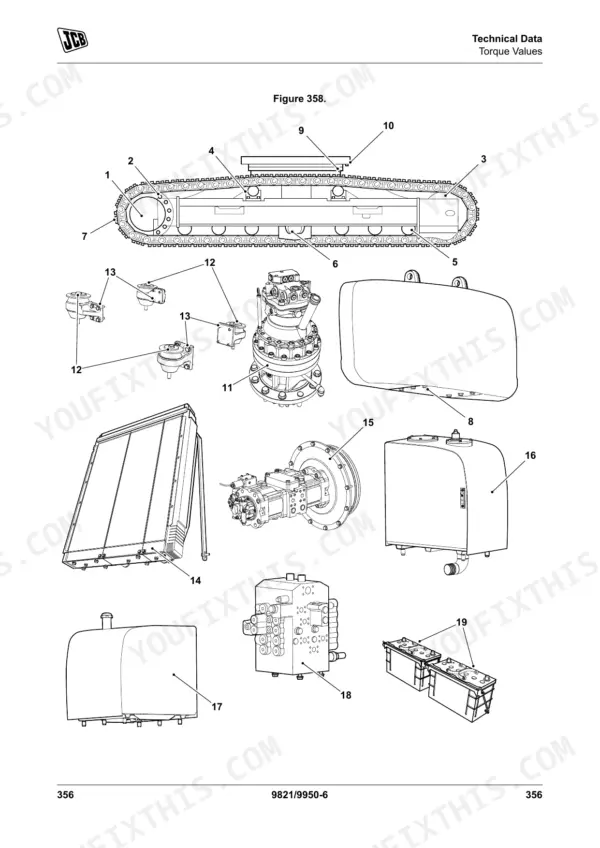
| Technical Data | 259-392 | Static Dimensions, Performance Dimensions, Noise Emissions, Vibration Emissions, Fluids, Lubricants and Capacities, Torque Values |
Quick Reference Specifications
| Specification | Value | Page |
|---|---|---|
| JS115, JS130, JS145, JS200, JS210, JS220, JS235 | ||
| Hydraulic Pump Tightening Torque | 60 N.m | p. 361 |
| All Models | ||
| Livelink 2 ECU (Electronic Control Unit) Ignition Fuse Rating | 5 A | p. 363 |
| Livelink 2 ECU Ground Fuse Rating | 3 A | p. 351 |
| Livelink 2 ECU B+ Fuse Rating | 3 A | p. 351 |
| Display ECU Fuse Rating | 5 A | p. 363 |
| Operator Manual Requirement | Do not operate the machine without an Operator's Manual, or if there is anything on the machine you do not understand. | p. 3 |
| Pre-service Safety Procedure | Stop the engine. Remove the ignition key. Release the hydraulic pressure and the tank pressure. Isolate the battery to prevent the accidental operation of the engine. | p. 125 |
| Specialist Service Requirement | many essential service checks must only be done by a JCB trained specialist competent person. JCB dealer service engineers have been trained by JCB to do such specialist tasks, and are equipped with the necessary special tools and test equipment to do such tasks, thoroughly, safely, accurately and efficiently. | p. 193 |
| JS115, JS130, JS145 | ||
| Engine (Engine Mount) Tightening Torque | 290 N.m | p. 361 |
| Engine (Engine Mount) Checking Torque | 265 N.m | p. 361 |
| Lifting hook capacity (JS115, JS130, JS145) | 5 t | p. 246 |
| JS200, JS210, JS220, JS235 | ||
| Lifting hook capacity (JS200, JS210, JS220, JS235) | 12.5 t | p. 349 |
JCB JS115–JS235 Series Common Problems This Manual Covers
JCB JS220 engine running during service prep, need to isolate systems before daily maintenance.
Stop the engine and remove the ignition key before starting maintenance. Release the hydraulic pressure and tank pressure as detailed on page 125. Isolate the battery to prevent accidental operation. Fill the DEF tank to its 54 L capacity before returning the excavator to service.
Manual Section: Operation p. 125Warning light flashing on dashboard display panel with active emissions system fault code.
Check the DECU display faults screen to read the specific error code. Press enter on the display panel to acknowledge all active faults. Inspect the Livelink 2 ECU ignition fuse on page 363 and replace it if blown with a new 5 A fuse.
Manual Section: Technical Data p. 363Hydraulic oil return filter requires routine replacement during scheduled preventive maintenance interval.
Replace the hydraulic return filter at the 250h, 500h, 1000h, 2000h, or 4000h mark based on the schedule on page 192. Drain the old fluid and install the new filter element securely. Verify the hydraulic oil level is correct before operating the machine.
Manual Section: Operation p. 192Engine cranks slowly or fails to start during cold weather morning inspection.
Inspect the Engine ECM Supply 1 fuse location detailed on page 363. Replace the component with a 10 A fuse if the filament is broken. Drain water from the fuel separator and bleed the fuel system lines to remove trapped air before attempting another start.
Manual Section: Technical Data p. 363Excavator struggles to hoist heavy concrete barriers or large pipes during deep trenching operations.
Verify your load weight does not exceed the lifting hook capacity. Limit loads to 5 t for smaller models as listed on page 246, or 12.5 t for larger variants. Inspect the quickhitch mechanism for unsuccessful pin engagement before lifting any suspended loads.
Manual Section: Maintenance p. 246Frequently Asked Questions
How do I reset the service light on a JCB JS115/JS130/JS145/JS160/JS180/JS190 excavator?
The service event symbol and fault indicator, which illuminate amber when a service is required, can only be cancelled by your JCB dealer. The operator cannot reset this light. p. 102
How do I reset fault codes on a JCB JS200/JS210/JS220/JS235 excavator?
To acknowledge active fault codes, press the control wheel on the active error log screen. For service events, the symbol and fault indicator can only be cancelled by your JCB dealer. For an engine oil change event, the operator can cancel the symbol and fault indicator by pressing the enter button, which will set the time for the next service event. p. 99
How do I clear hydraulic pressure or ECU codes after maintenance on a JCB JS excavator?
To release residual hydraulic pressure, turn the ignition key to the on position, lower the controls isolation lever, push the controls isolation switch, and then operate the hand controllers in all directions. Additionally, push the rubber boot on the hydraulic tank breather to release pressure from the tank. For ECU codes, the manual describes acknowledging active faults by pressing the enter button on the error log screen, but a general procedure for clearing all ECU codes after maintenance is not provided for the operator. p. 249
What are the torque specs for track roller bolts on JCB JS115 JS130 JS145 JS160 JS180 JS190?
For JCB JS115, JS130, JS145, JS160, JS180, and JS190 models, the lower (track) roller bolts (M16 diameter) require a tightening torque of 290 N.m, with a checking torque of 265 N.m. A 24 mm wrench is used for these bolts. It is recommended to use JCB Threadlocker and sealer (High Strength) and tighten to the listed torque. p. 355
What are the replacement specifications for hydraulic components?
The manual specifies replacement intervals for various hydraulic components. For example, the hydraulic return, suction, drain, and servo filters should be replaced at intervals ranging from 100 to 800 hours depending on use frequency. Hydraulic tank breathers should be replaced every 1000 hours. Hydraulic hoses, such as pump exit, boom ram line, dipper ram line, and bucket ram line hoses, should be replaced every 2 years or 4000 hours, whichever comes first. Replacement hoses must be of the same size and standard. p. 201
How will I receive this JCB JS115–JS235 Series Operator Manual?
A 392-page Operator Manual in searchable PDF format, available the moment you complete checkout. View on computer, tablet, or phone, with no shipping wait.
Can I print pages of this manual for my own shop?
Yes. Print the pages or sections you need for your own shop use. Any standard printer works.
Reviews
There are no reviews yet.