
Part of the JCB Repair Manuals.
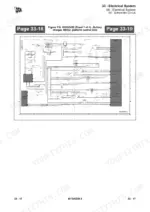
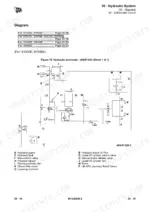
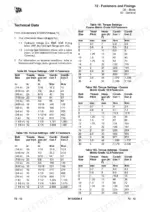
Looking for the factory service procedures for your JCB S1530–S4550 Series scissor lift? This 566-page PDF (OEM #9813/8200-3) covers all nine models in the lineup: S1530E, S1930E, S2032E, S2046E, S2632E, S2646E, S3246E, S4046E, and S4550E. Open to the electrical section for full wiring schematics and fault-code tables, or jump to the hydraulic section for circuit diagrams and lift-cylinder procedures. The manual also covers body and framework, brake system, steering, driveline, consumables, and a dedicated fasteners and fixings section with torque specifications. Confirm the chassis safe tilt limit stays below 3° front-to-back and torque the zinc M8 internal hexagon headed capscrews to 46 N·m. Grab this bookmarked download, open it on your tablet in the basket, and fix the machine right the first time.
What's Inside This JCB S1530–S4550 Series Manual
| System | Pages | Key Topics |
|---|---|---|
| Machine | 5-58 | Acronyms, Glossary, Technical Overview |
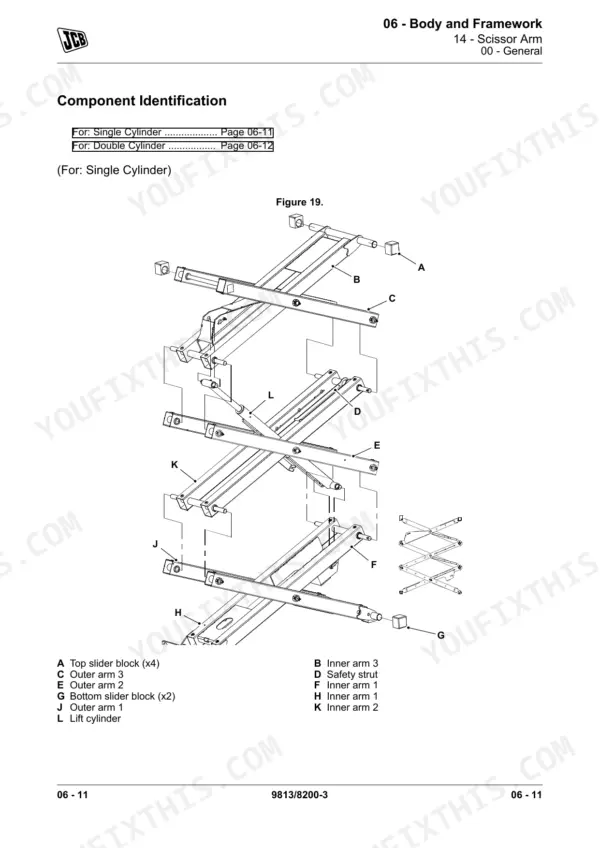
| Body and Framework | 59-130 | Platform Extension, Guardrail, Structural Components, Levelling |
| Brake System | 131-140 | Operation, Remove and Install, Disassemble and Assemble, Safety Checks |
| Steering System | 141-148 | Component Identification, Operation, Lubrication |
| Driveline | 149-172 | Wheel, Wheel Drive Motor, Tyre |
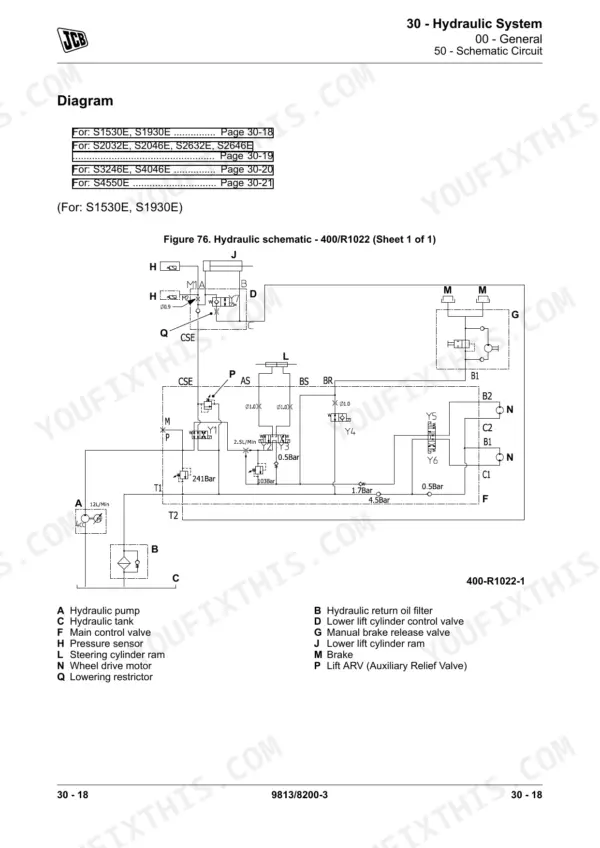
| Hydraulic System | 173-244 | Schematic Symbols, Schematic Circuit, Lift Cylinder, Control Valve, Hydraulic Fluid |
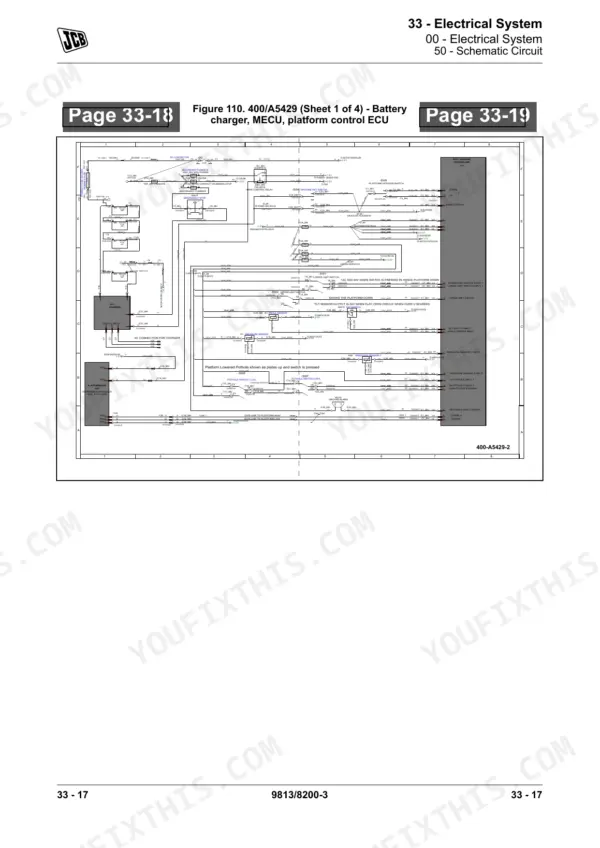
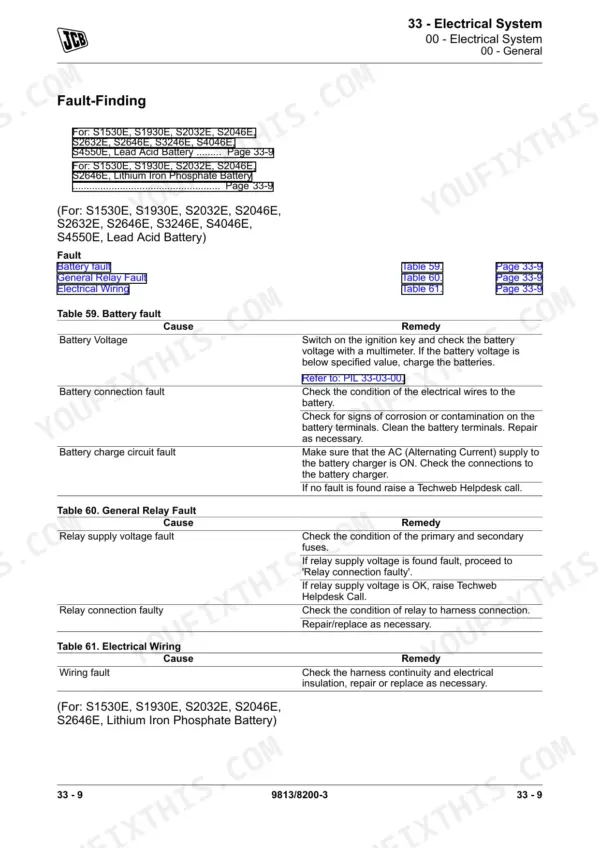
| Electrical System | 245-490 | Schematic Circuit, Chassis Wiring, Control Panel, Battery Systems, Fault Codes, Contactor |
| Fasteners and Fixings | 491-506 | JCB Fasteners (Before September 2017), JCB Fasteners (After September 2017), Tightening Method, Screws, Bolts |
| Consumable Products | 507-542 | Grease, Fluids, Locking Fluids, Solvents and Primers, Adhesive, Sealant |
| After Sales | 543-566 |
Quick Reference Specifications
| Specification | Value | Page |
|---|---|---|
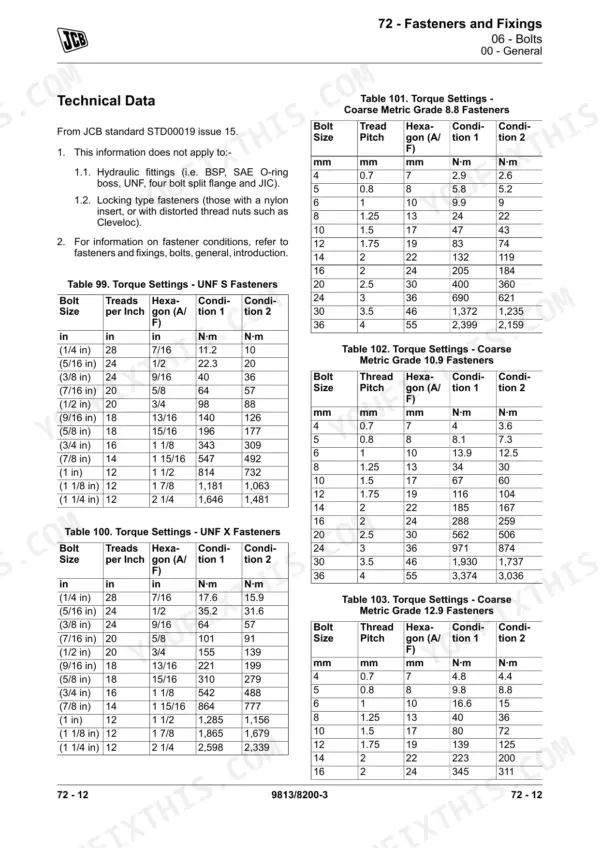
| General Torque Settings - Internal Hexagon Headed Capscrews (Zinc) - M8 bolt | 46 N·m | p. 500 |
| General Torque Settings - Coarse Metric Grade 8.8 Fasteners - M8 bolt | 24 N·m | p. 504 |
| Battery Quantity (Lead Acid) | 4 | p. 297 |
| Battery Voltage (Lead Acid) | 6V each | p. 253 |
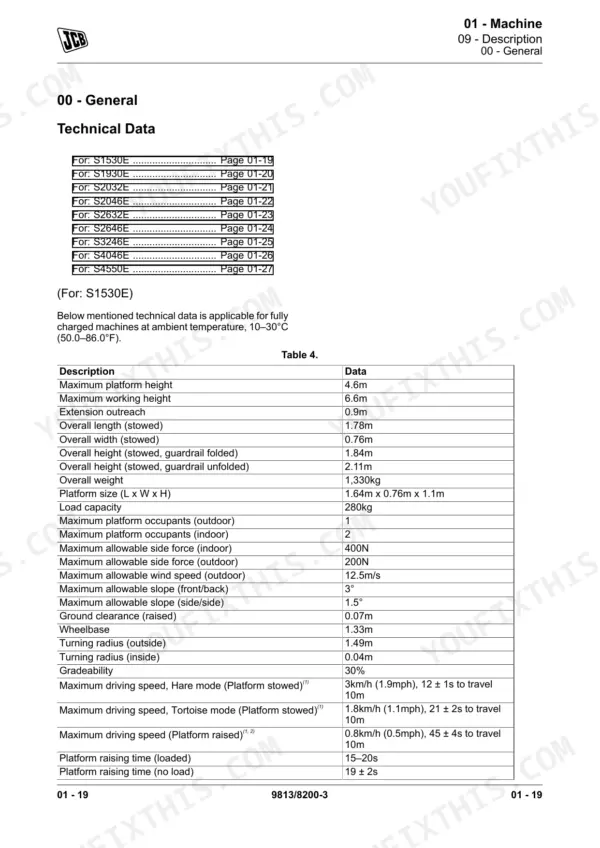
| Chassis safe tilt limit (front-to-back) | below 3° | p. 463 |
| Chassis safe tilt limit (side-to-side) | below 1.5° | p. 463 |
| Lift cylinder control valve capscrews torque | 35 ± 3 Nm | p. 234 |
| Main control valve block adaptors torque | 70 ± 5N·m | p. 238 |
| Platform Controller calibration duration | 3s | p. 425 |
| DC Contactor Terminal nut torque | 8–9.5 Nm | p. 325 |
| Wiring Splice (0.5-1.5mm Red) replacement | consumable | p. 343 |
| Wiring Splice (1.5-2.5mm Blue) replacement | consumable | p. 343 |
JCB S1530–S4550 Series Common Problems This Manual Covers
JCB S1530E lift and drive functions disabled with 01 system initialization fault code on display
Inspect the wiring harness connectors and enable circuit components for damage. Torque the DC contactor terminal nuts to 8–9.5 Nm as instructed on page 325. Examine the wiring splices closely and replace any damaged 0.5–1.5mm red splices with new consumable units. Clear the fault code.
Manual Section: Electrical System p. 325Platform lift speed very slow or enters limp mode showing fault code 36 on the display
Measure the battery voltage to diagnose limp mode. Verify each lead acid battery reads 6V. Inspect the battery pack and check the electrolyte level as described on page 301. Clear the fault and recharge the batteries fully before returning to service.
Manual Section: Electrical System p. 301Overload alarm OL sounds and platform is completely stuck with no raise or lower response
Remove excess weight from the platform to clear the overload alarm. Inspect the lift cylinder and check the hydraulic system pressure against the specification on page 26. Torque the lift cylinder control valve capscrews to 35 ± 3 Nm to prevent leaks.
Manual Section: Hydraulic System p. 26Display error code 32 angle sensor fault while driving with the platform elevated
Lower the platform completely and move the machine to a firm, level surface. Calibrate the angle sensor zero position to 0° as described on page 464. Confirm the chassis safe tilt limit stays below 3° front-to-back to prevent further motion lockouts during operation.
Manual Section: Electrical System p. 464Frequently Asked Questions
How do I reset a JCB S1530–S4550 Series fault code?
For many fault codes, the remedy is to restart the machine. If the machine reports an error while driving with the platform raised, lower the platform and move the machine to a smooth, firm, level surface. For persistent faults, contact your local JCB dealer. p. 33
What do the JCB scissor lift error codes mean?
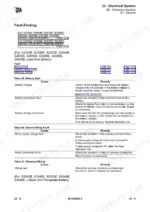
The Diagnostic Trouble Codes (DTCs) are displayed on the platform control and ground control displays. Table 89 provides a list of display codes, their descriptions, the machine's lift reaction to the fault, and operator instructions for remedy. For example, 'Display 01' indicates a 'System initialization fault' requiring a machine restart. p. 456
How do I clear limp mode on a JCB electric scissor lift?
To clear limp mode, which is indicated by 'Display 36', the machine will operate at a slow lift speed to an elevated position. The operator instructions specify to check that the batteries are fully charged. p. 33
How do I reset the charger on a JCB electric scissor lift?
To reset the charger for faults like 'Charger High Temperature Protection' (Fault 3) or 'Battery High Temperature Protection' (Fault 4), disconnect the charger and wait for 15–20 minutes. Then, reconnect it for charging. p. 307
Is this Service Manual a digital download?
This is a 566-page searchable PDF ready for immediate download. Works on any device, so pull it up on your phone while you're under the hood. No shipping, no waiting.
Can I print specific sections of this Service Manual?
Yes. Print individual pages or full chapters for your own shop use, on letter or A4 paper.
Can I find hydraulic circuit diagrams in this JCB S1530–S4550 Series manual?
Full hydraulic system diagrams are included, covering circuits, valve locations, and hydraulic component specs for the JCB S1530–S4550 Series.
Reviews
There are no reviews yet.