
Part of the JCB Repair Manuals.
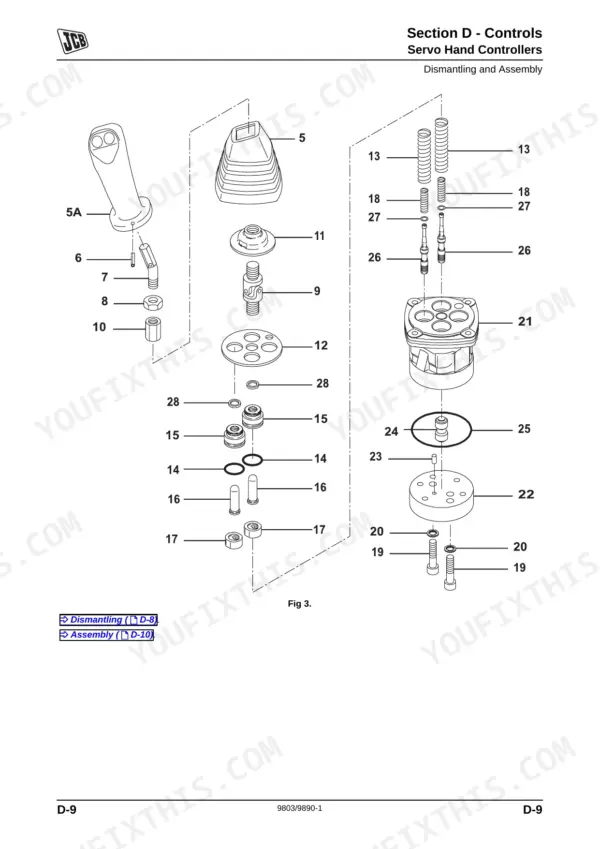
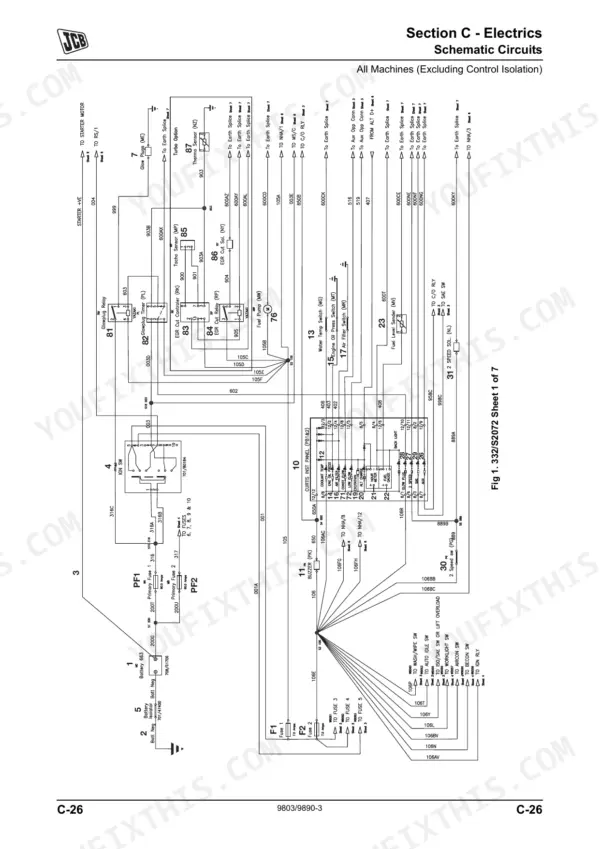
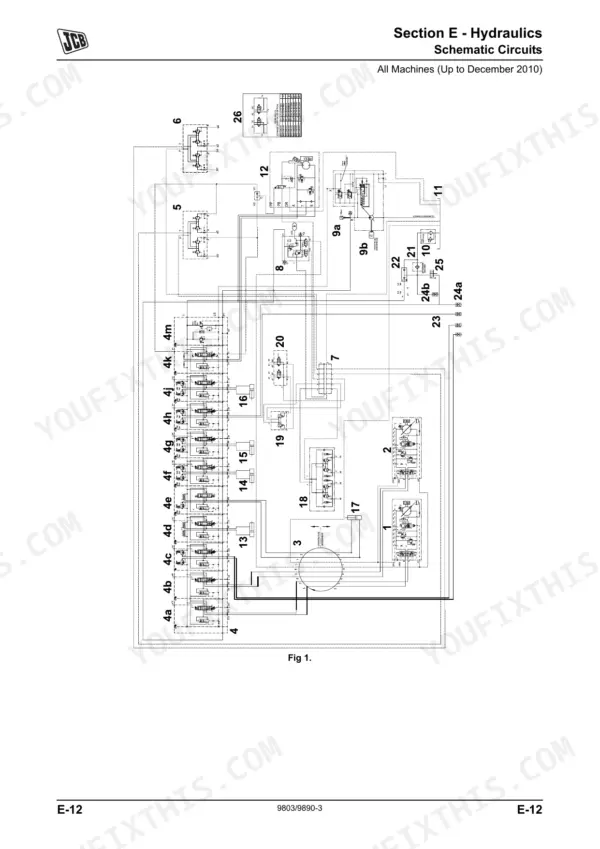
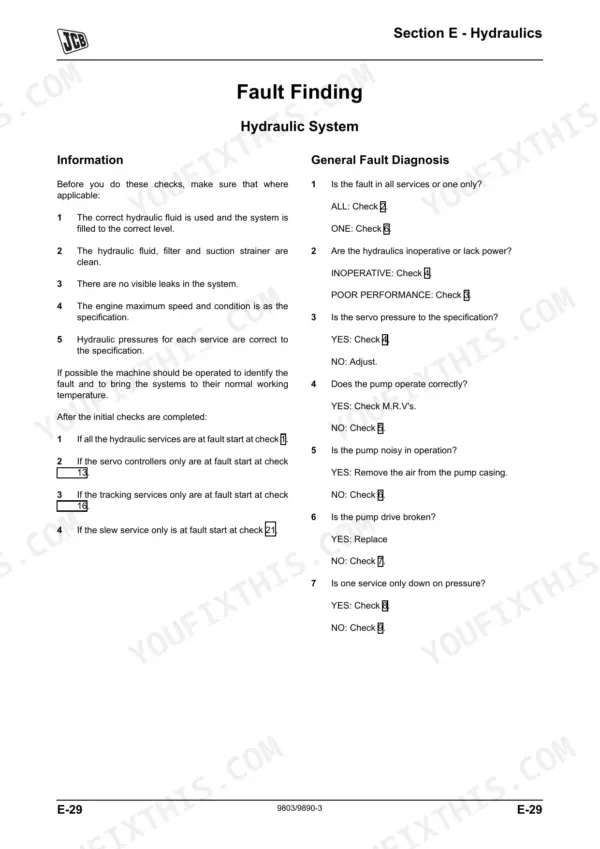
Need the exact factory diagnostic data for your JCB excavator? This 407-page JCB 8055, 8065 service manual pdf (OEM #9803/9890-3) breaks down every track roller, hydraulic valve, and electrical circuit on your machine. Complete wiring diagrams and full hydraulic schematics are included to trace faults fast. Open to the hydraulics section for step-by-step rebuilds of the main relief valve, or check the troubleshooting charts to isolate servo hand controller issues. Lock down your track gearboxes using the dedicated metric Grade 10.9 fastener torque tables, and confirm the exact fuel pre-filter service intervals before firing up the engine. Stop relying on guesswork when your heavy equipment acts up. Download this bookmarked file directly to your tablet, tap the section you need, and get your excavator back in the dirt.
Other edition of this manual
- JCB 8055, 8040, 8045, 8050, HP 404C-22 (Tier 2), GN 404D-22 (Tier 3) Mini Excavator Service Manual (incl. Wiring) Original price was: $59.99.$39.99Current price is: $39.99.
What's Inside This JCB 8055, 8065 Manual
| System | Pages | Key Topics |
|---|---|---|
| Care and Safety | 38-57 | Safety Notices, Safety Check List, Safety Labels |
| Maintenance | 58-115 | Routine Maintenance, Service Schedules, Fluids, Lubricants and Capacities, Tools, Prepare the Machine for Maintenance, Cleaning the Machine, Checking for Damage |
| Attachments | 116-137 | Introduction, Mechanical Quickhitch, Connecting/Disconnecting Hydraulic Hoses, Buckets, Quickhitch Rockbreaker |
| Body and Framework | 138-165 | Service Procedures, Kingpost, Dipper, Bucket Ram Pivot and Linkage, Boom, Slew Ring |
| Electrics | 166-241 | Technical Data, Service Procedures, Alternator, Starter Motor, Schematic Circuits, Harness Data |
| Controls | 242-265 | Fault Finding, Servo Hand Controllers, Track Levers, Dozer Lever, Engine Throttle |
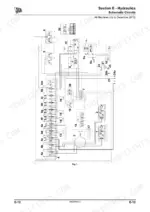
| Hydraulics | 266-365 | Technical Data, Basic System Operation, Service Procedures, Schematic Circuits, Fault Finding, Main Relief Valve, Pressure Maintenance Valve, Auxiliary Relief Valves |
| Gearboxes | 366-375 | Technical Data, Track Gearbox |
| Track and Running Gear | 376-401 | Tracks and Running Gear, Steel Track, Rubber Track, Track Guides, Track Rollers, Idler and Recoil Unit, Track Roller Metallic Face Seals, Driven Sprocket |
| Engine | 402-407 | General |
Quick Reference Specifications
| Specification | Value | Page |
|---|---|---|
| All Models | ||
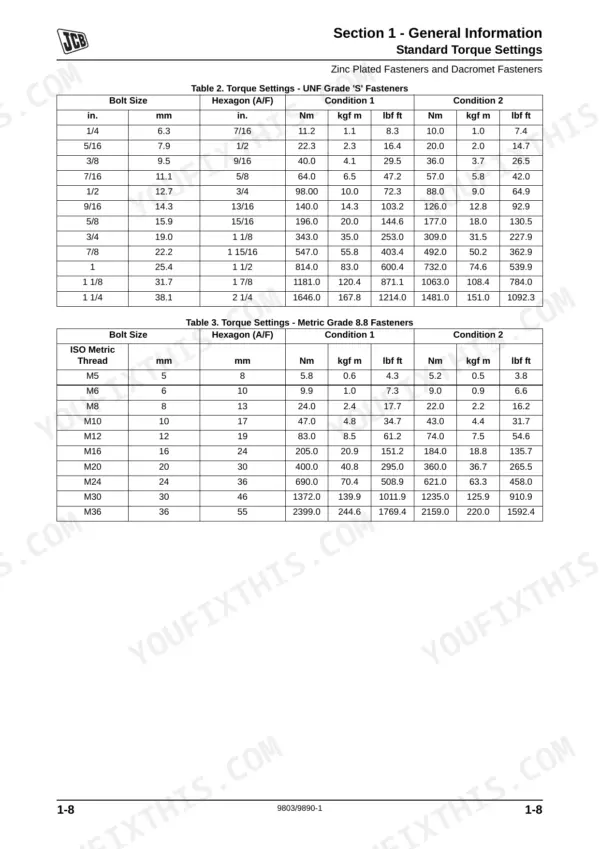
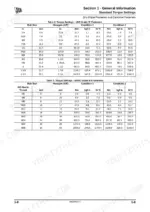
| Standard Torque Settings tables | Table 2. Torque Settings - UNF Grade 'S' Fasteners, Table 3. Torque Settings - Metric Grade 8.8 Fasteners, Table 4. Metric Grade 10.9 Fasteners, Table 5. Metric Grade 12.9 Fasteners, Table 6. Torque Settings - Rivet Nut Bolts/Screws, Table 7. Torque Settings - Internal Hexagon Headed Cap Screws (Zinc), Table 8. Torque Settings - BSP Adaptors, Table 9. Torque Settings - SAE Connections, Table 10. BSP Hose - Torque Settings, Table 11. BSP Adaptors with Bonded Washers - Torque Settings, Table 12. BSP `Torque Stop' Hose - Torque Settings | p. 13 |
| Fuel Pre-Filter/Sedimenter Element service interval | Change | p. 70 |
| Primary Fuel Filter service interval | Change | p. 70 |
| Fuel Sedimenter service interval | Drain and Clean | p. 70 |
| Fuel Pre-Filter/Sedimenter Element replacement | Re-assemble new filter to bowl and refit to filter head | p. 106 |
| Fan belt deflection | 7mm (0.28 in) approx. for a finger force of 49 Nm (11 lbf, 5 kgf) approx. | p. 101 |
| Track Gearbox oil capacity (each) | 0.8 (0.18) Litres (UK Gal) | p. 73 |
| Track Gearbox oil type | JCB SAE 30 Engine Oil (Not Multigrade) | p. 73 |
| Air Cleaner Element (Dusty Conditions only) service interval | Change | p. 70 |
| Air Cleaner Outer Element service interval | Change | p. 70 |
| 8055 | ||
| Hydraulic System Tank Only capacity, 8055 | 55 (12) Litres (UK Gal) | p. 73 |
| 8065 | ||
| Hydraulic System Tank Only capacity, 8065 | 59 (12.98) Litres (UK Gal) | p. 73 |
JCB 8055, 8065 Common Problems This Manual Covers
Boom lifts slowly and bucket lacks breakout force during heavy digging operations
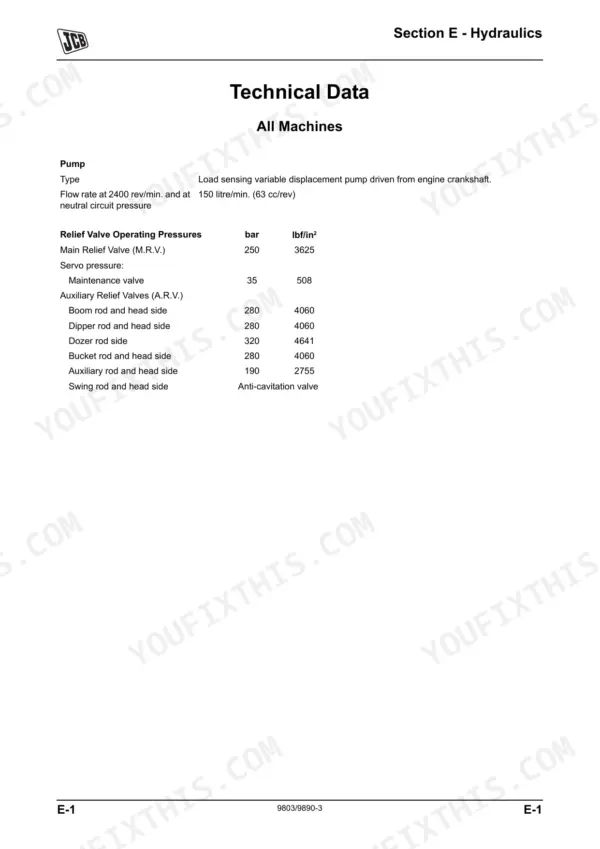
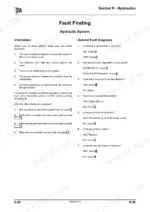
Review the hydraulic troubleshooting procedures for inoperative or slow functions. Verify the main relief valve pressure reaches 250 bar (3625 lbf/in2) for the 8055 model on page 305. Change the hydraulic return filter element and clean the suction strainer to restore proper flow.
Manual Section: Hydraulic System - General Fault Diagnosis p. 300Dashboard oil pressure warning light stays illuminated or fails to go out during initial engine cranking
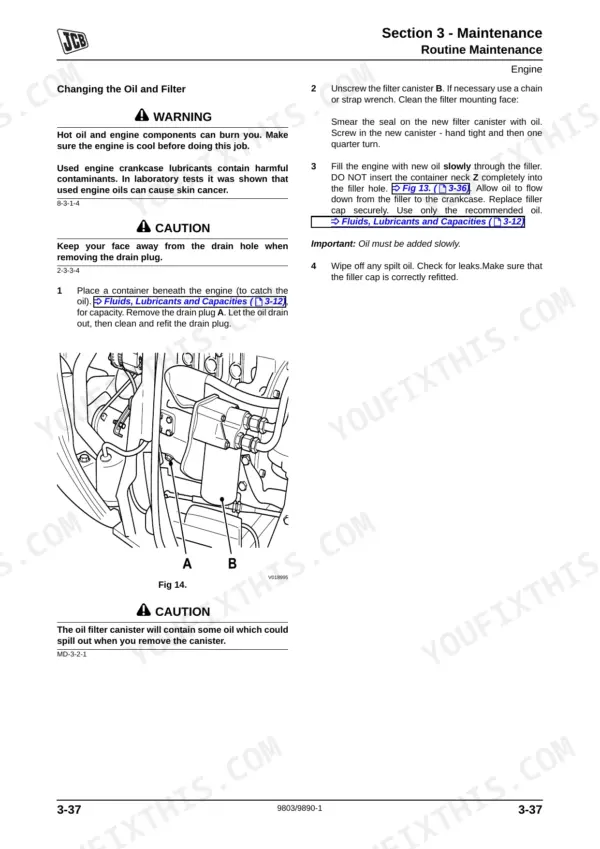
Stop the engine immediately and investigate the lubrication system as directed on page 176. Verify the crankcase oil level and fill to the 9 Litres (1.98 UK Gal) total capacity shown on page 73. Inspect the sender wiring for shorts to ground before replacing the pressure switch.
Manual Section: Electrics p. 176Machine pulls to one side during travel and track tension feels excessively loose on uneven ground
Inspect the undercarriage components and adjust the track tension. Measure the idler and recoil unit spring compression length on steel tracks to exactly 263mm (10.5in) as shown on page 397. Torque the track roller A bolts to 184 Nm (136 lbf ft) on page 389 to prevent shifting.
Manual Section: Track and Running Gear p. 397Frequently Asked Questions
How do I clear the hydraulic lockout or safety interlock on a JCB 8055/8065?
To release hydraulic pressure for maintenance, first park the machine on level ground with the excavator lowered, then stop the engine and remove the starter key. Operate the controls to remove hydraulic pressure from service hose lines, and for electrical services, turn the starter key to the ON position, operate controls several times, then set the starter switch to OFF and remove the starter key. Finally, carefully remove the hydraulic tank filler cap to vent residual tank hydraulic pressure, then install the cap. p. 111
How do I calibrate the controls after maintenance on a JCB 8055/8065?
For the engine throttle, the system is self-calibrating. However, cable adjustment involves ensuring the throttle cable is correctly attached at the injector pump and throttle motor sides. Position the locknuts on the outer throttle cable so they are centred, and set the throttle motor actuator to a vertical position. Use the cable locknuts to adjust the injector pump actuator to a central position between the throttle stops, and set the idle speed at 1400 RPM using a tachometer. p. 264
What are the replacement specifications for Fuel filter?
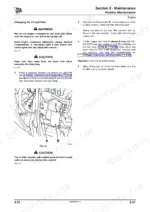
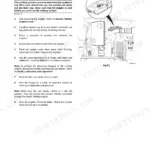
The manual describes the procedure for replacing the fuel pre-filter element, which involves disconnecting the battery, draining the sediment bowl, unscrewing the collar, and installing a new filter cartridge with new seals. However, specific replacement specifications such as a part number or micron rating for the fuel filter itself are not provided in this section. p. 106
How do you fix JCB 8055 engine cranks over fine but refuses to start after sitting or completing routine filter service?
Inspect the fuel system for air intrusion and verify the starter circuit. Check the battery terminal voltage in the start position on page 179, ensuring it remains above the 9.5V minimum permissible limit. Drain and clean the sedimenter bowl, then fit a new filter cartridge using new seals. p. 179
How will I receive this Service Manual?
You get a 407-page searchable PDF that downloads instantly after checkout. Open it on your laptop, tablet, or phone, and bring it right to the shop floor.
Can I print pages of this manual for my own shop?
Yes. Print a chapter or just the pages for the job at hand, for use in your own shop. Any home or office printer works.
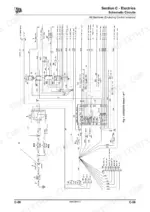
Are electrical wiring diagrams included in this JCB 8055 Service Manual?
Yes. You'll find full electrical schematics with wire routing diagrams, connector identification, and circuit descriptions.
Reviews
There are no reviews yet.