
Part of the JCB Operator Manuals.
Knowing exactly how to run your generator set starts with the right factory data. This 140-page JCB G130–G220 Series Operator Manual PDF (OEM #9811/2850) breaks down every daily check, digital control panel setting, and service schedule for the G144, G175, G220, and R-series variants. The manual covers the JCB digital control panel in full, including ATP7 operation, automatic modes, and peak current monitoring. A complete alarm list, detailed wiring diagrams, and step-by-step routine maintenance procedures show you exactly how to keep the power flowing without unexpected downtime. Drain the water separator and engine fuel filter every 10 hours, and verify your battery acid level stays within spec on page 102. Don't let a simple fault code leave your job site in the dark. Open this bookmarked file on your tablet, find the exact maintenance interval, and keep your generator running.
What's Inside This JCB G 130–220 Series Operator Manual
| System | Pages | Key Topics |
|---|---|---|
| Introduction | 7-10 | About This Manual, Cross References, Component Identification, Dataplate |
| Installation | 11-13 | Unpacking, Site Installation |
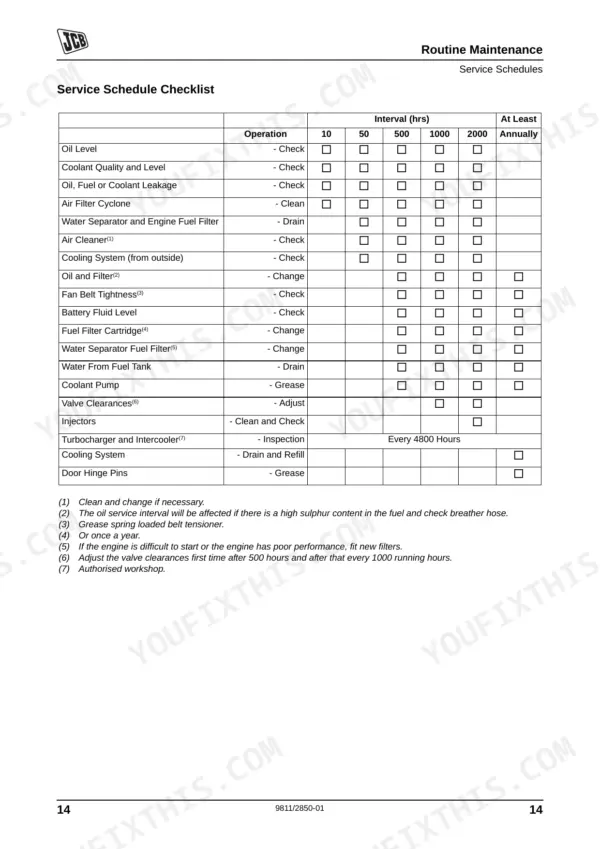
| Routine Maintenance | 14-26 | Service Requirements |
| JCB Digital Control Panel | 27-34 | Top Level Screen, Application Modes (Standard Operation, ATP7 Operation), Start and Stop the Machine (Manual Mode, Manual ATP7 Operation, Automatic Mode) |
| Information Screens | 35-140 | Top Level Screen, Mains Overview Screen, Generating Set Overview Screen, Mains Value Details, Generator Peak Currents, Analogue Inputs |
Quick Reference Specifications
| Specification | Value | Page |
|---|---|---|
| Cylinder head bolts torque | 80 Nm + 90° + 90° | p. 116 |
| Main bearing bolts torque | 200 Nm | p. 116 |
| Battery acid level clearance | 8 - 15 mm above the battery plates | p. 21 |
| 12V battery charging voltage | below 12.50V | p. 21 |
| Water Separator and Engine Fuel Filter drain interval | 10 hours | p. 19 |
| Water Separator and Engine Fuel Filter change interval | 500 hours | p. 20 |
| Oil and Filter change interval | 500 hours | p. 20 |
| Oil filter capacity | 0.7 ltr | p. 100 |
| Air Filter Cyclone cleaning interval | 10 hours | p. 19 |
| Air Cleaner check interval | 50 hours | p. 19 |
| Fan Belt Tightness check interval | 500 hours | p. 20 |
| Fan belt deflection | 15 to 20mm | p. 119 |
JCB G 130–220 Series Common Problems This Manual Covers
JCB G144 generator fails to start or crank and the emergency stop is fully out
Inspect the battery fluid level on page 102 to ensure it is 5 to 10mm above the cell plates. Verify the charging voltage stays below 12.50V for a 12V system or 24.5V for a 24V system. Top up with demineralised water if needed.
Manual Section: Engine Troubleshooting - Engine cannot be cranked p. 102Engine runs intermittently or stops short after startup with a surging idle
Drain the water separator and engine fuel filter immediately. Check page 19 to confirm this is done at the correct 10 hours interval. Verify the 3-way valve is completely open and inspect the main tank for contaminated diesel. Bleed the air from the system.
Manual Section: Engine Troubleshooting - Engine starts but stops after a short while p. 19Water temperature level 1 warning light flashing on control panel during heavy load
Check the coolant level on page 96 to ensure it sits between the MAX and MIN lines on the expansion tank. Verify the cooling mixture contains exactly 40 to 60% ethylene/propylene-glycol based antifreeze. Inspect all hoses and clamps for visible leaks or damage.
Manual Section: Engine Troubleshooting - Engine overheats p. 96Engine does not develop full power and exhaust emits dark smoke or soot
Clean the air filter element using compressed air set to a maximum of 5 bar as directed on page 91. Inspect the safety filter element and replace it if the machine has reached the 1200 hour intervals mark. Verify the air intake is clear.
Manual Section: Engine Troubleshooting - Engine does not develop full power p. 91Coolant temperature increases rapidly and fan belt squeals during normal running operation
Measure the fan belt tension deflection directly at the longest span. Ensure the belt has exactly 15 to 20mm of play as shown on page 119. Check the belt for severe glazing or cracks. Adjust the tensioner bracket to restore proper tension and retest.
Manual Section: Engine Troubleshooting - Engine overheats p. 119Frequently Asked Questions
How do I reset the alarm on a JCB G144 generator set?
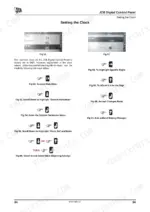
To reset an alarm on your JCB G144 generator set, you must first acknowledge it. The alarm list is accessible from the 'top level' screen by pressing soft key !. Once acknowledged, the indicator light stops flashing and the horn is reset, allowing the alarm to be cleared. Refer to Fig 24 on page 33 for visual guidance. p. 33
What does error code mean on a JCB G175Q generator?
The manual lists various possible alarms and their meanings for the JCB G175Q generator. For example, 'Overspeed 1' indicates the engine is currently in an overspeed condition, while 'Batt.Undervolt.1' alerts the user that the starting battery voltage is below the expected level. For a comprehensive list of alarm messages and their descriptions, refer to the 'Possible Alarms' section starting on page 36. p. 36
How do I clear a fault on a JCB G220Q generator?
To clear a fault on your JCB G220Q generator, you must first acknowledge the alarm. The alarm list is accessible from the 'top level' screen by pressing soft key !. After acknowledging, the indicator light will stop flashing and the horn will reset, allowing the alarm to be cleared. Refer to Fig 24 on page 33 for the 'Press Again to Reset and Acknowlegded Alarm' action. p. 33
What are the torque specs for the JCB G130R maintenance bolts?
The manual provides specific tightening torques for various engine components. For example, cylinder head bolts require 80 Nm + 90° + 90° of tightening, while main bearing bolts need 200 Nm. Injector attaching nuts (on studs) should be tightened to 15 Nm. A comprehensive list of torque specifications can be found in the 'Tightening Torques' table on page 116. p. 116
What do I get after purchasing this JCB G130–G220 Series manual?
Instant PDF download. You get the full 140-page searchable Operator Manual immediately after payment. Open it on your laptop, tablet, or phone right in the shop.
Am I able to print pages from this manual?
Yes. Print a chapter or just the pages for the job at hand, for use in your own shop. Any home or office printer works.
Can I find wiring schematics in this JCB G130–G220 Series manual?
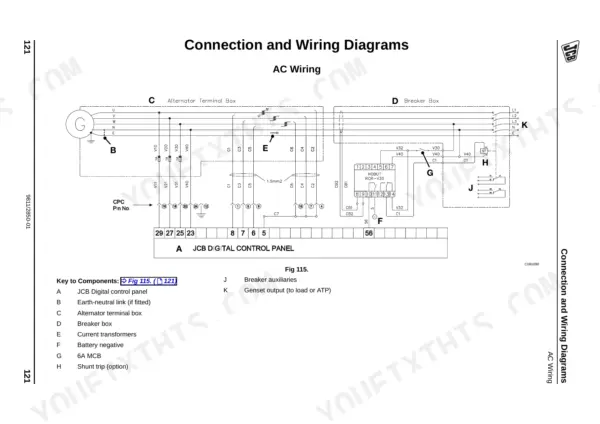
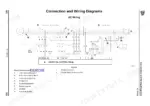
A wiring diagram for the JCB G130–G220 Series electrical system is included.










Reviews
There are no reviews yet.