
Part of the JCB Operator Manuals.
Before you put your tracked excavator to work, grab this 233-page JCB 220LC Xtra Operator Manual PDF (OEM #9831/2050) to master every control and daily service check. You get complete walk-around inspection checklists, detailed fluid capacity tables, and a full breakdown of the operator station switches. Open up the maintenance section to find exact replacement schedules for your air filters based on harsh job site conditions. Secure the undercarriage M20 shoe bolts to 840-890 Nm and verify the overload warning system resets automatically when the lift is lowered. A flashing warning light shouldn't sideline your shift. Download this bookmarked file right to your phone, jump straight to the correct dashboard indicator chart, and get back in the dirt.
What's Inside This JCB 220LC Xtra Operator Manual
| System | Pages | Key Topics |
|---|---|---|
| Acronyms Glossary | 11-12 | Arv, Decu, Ecm, ECU, EGR, HVAC |
| Introduction | 13-16 | Safety |
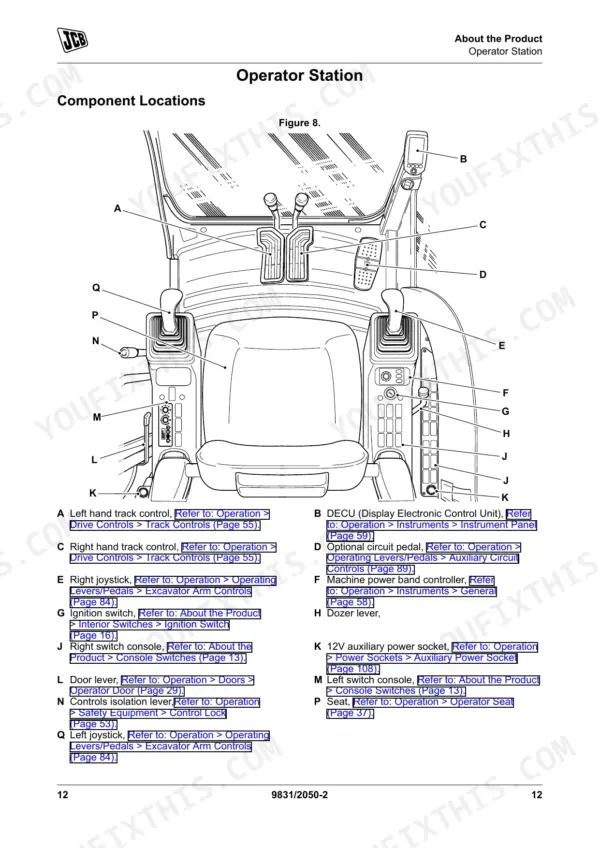
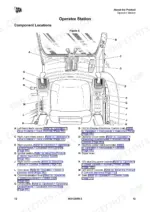
| About the Product | 17-30 | Description (General, Intended Use, Log Moving/Object Handling, Optional Equipment and Attachments, Danger Zone, Main Component Locations) |
| Operating Procedures | 31-170 | Operating Safety (General, Worksite Safety, Risk Assessment), Walk-Around Inspection, Entering and Leaving the Operator Station, Emergency Exit, Instrument Panel and Controls, Lifting and Loading |
| Maintenance Schedules | 171-228 | Suction Filter, Return Filter, Engine Fuel Filter, Main Fuel Filter/Sedimenter, Pump Exit Hose, Boom Ram Line Hose, Air Filter (Outer and Inner), Drive Sprocket Bolt Torque, Shoe Bolt Torque |
| Technical Specifications | 229-233 | Track Tension (Minimum 25mm), Fuel Tank Capacity, Tightening Torques |
Quick Reference Specifications
| Specification | Value | Page |
|---|---|---|
| Overload warning system reset | System resets automatically when the lift is lowered | p. 104 |
| Drive Sprocket Bolt (M20) Tightening Torque | 506-562 Nm | p. 226 |
| Shoe Bolt (M20) Tightening Torque | 840-890 Nm | p. 226 |
| Air filter (outer) replacement | Replace (intervals vary from 500h to 4000h depending on conditions) | p. 173 |
| Air filter (inner) replacement | Replace (intervals vary from 500h to 4000h depending on conditions) | p. 173 |
| Main fuel filter/sedimenter replacement | Replace (intervals vary from 250h to 4000h depending on conditions) | p. 172 |
| Engine fuel filter replacement | Replace (intervals vary from 250h to 4000h depending on conditions) | p. 172 |
| Return filter replacement | Replace (intervals vary from 100h to 4000h depending on conditions) | p. 171 |
| Suction filter replacement | Replace (intervals vary from 100h to 4000h depending on conditions) | p. 171 |
| Pump exit hose replacement interval | Every 2 years or every 4000 hours, whichever comes first | p. 172 |
| Boom ram line hose replacement interval | Every 2 years or every 4000 hours, whichever comes first | p. 172 |
| Minimum Track Tension | 25mm | p. 233 |
JCB 220LC Xtra Common Problems This Manual Covers
JCB 220LC Xtra abnormal track wear and excessive chain slack during operation
Clean debris from the undercarriage. Measure the track sag. Adjust the grease valve until track tension meets the minimum specification on page 233. Verify the M20 shoe bolts are tightened to 840-890 Nm as specified on page 226.
Manual Section: Track System IssuesDashboard overload warning active and lift function disabled during heavy object handling
Lower the lift immediately to reset the overload warning system automatically as detailed on page 104. Verify the load does not exceed the rated lifting hook capacity specified in the manual. Inspect the boom and bucket ram hoses for fluid leaks before resuming work.
Manual Section: Machine Faults and Error LogEngine overheating warning light flashing and poor acceleration during heavy load operation
Check the error code reference. Inspect the cooling pack for debris buildup and clean the radiator fins. Verify the cooling system is completely full to the specified capacity. Replace the outer air filter if the interval exceeds 500 hours as indicated on page 173.
Manual Section: Cooling System IssuesEngine cranks slowly or fails to start during the morning walk-around inspection
Inspect the primary fuel lines for leaks. Verify the fuel tank is filled to the capacity listed in the specifications. Replace the main fuel filter and sedimenter if the operating hours exceed the 250-hour minimum interval specified on page 172. Drain the separator bowl.
Manual Section: Fuel System IssuesFrequently Asked Questions
How do I reset error codes on a JCB 220LC Xtra excavator?
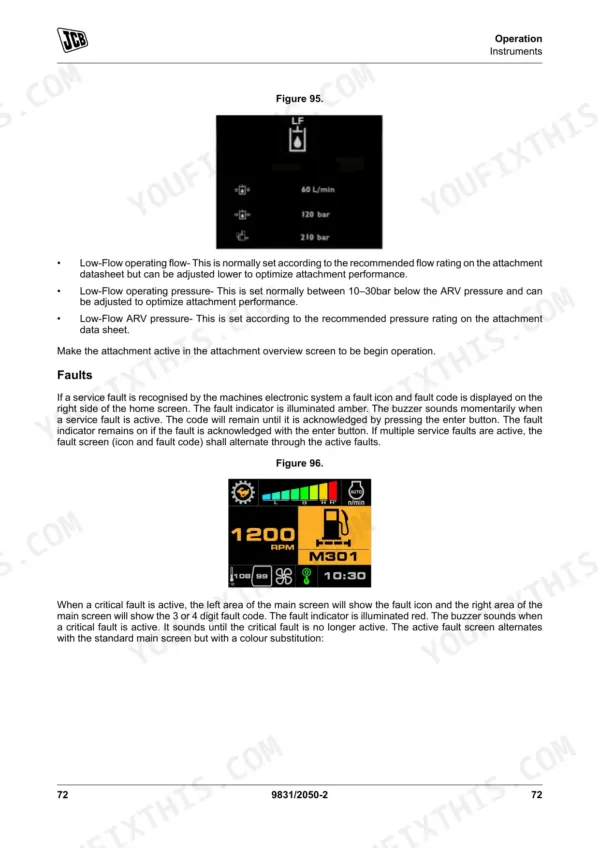
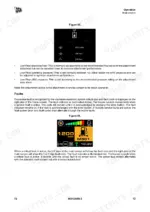
To acknowledge and clear active fault codes, go to the active error log screen by pressing the control wheel. Once on this screen, press the enter button to acknowledge all active faults. The fault indicator will remain on if the fault is acknowledged but not yet cleared. p. 73
How to reset JCB 220LC Xtra service interval
For an engine oil change event, the operator can cancel the service symbol and fault indicator by pressing the enter button on the display. Once pressed, the display will automatically set the time for the next service event. p. 88
How to reset JCB 220LC Xtra hydraulic warning
The overload warning system, which triggers a buzzer and a red hook notification symbol when safe operating lift limits are exceeded, resets automatically. This occurs once the operator takes the necessary action to lower the lift and the machine is in a safe position. p. 104
What are the replacement specifications for Air filter element?
The outer air filter element should be replaced every 500 hours under normal conditions, or every 100 hours in dusty conditions. The inner air filter element should be replaced every 1000 hours under normal conditions, or every 200 hours in dusty conditions. p. 173
What are the replacement specifications for Fuel filters?
The main fuel filter/sedimenter, engine fuel filter, and primary fuel filter should all be replaced every 500 hours. These intervals are specified in the maintenance schedules for the fuel system. p. 173
What do I get after purchasing this JCB 220LC Xtra manual?
This is a 233-page searchable PDF ready for immediate download. Works on any device, so pull it up on your phone while you're under the hood. No shipping, no waiting.
Can I print pages of this manual for my own shop?
Yes. Many mechanics print the section they need for their own shop and bring it to the bench.











Reviews
There are no reviews yet.