
Part of the JCB Operator Manuals.
Getting familiar with your cab and daily service routines starts with this 226-page JCB 426, 436, 456 (Tier 2) operator manual PDF (OEM #EN - 9811/3400). Inside, you get complete operating procedures spanning from initial walkarounds to advanced bucket and attachment controls. Packed with factory maintenance intervals, the guide shows you exactly when to grease pivot pins and swap filters, plus clear fluid capacity charts to keep your wheeled loader running cool under heavy loads. Confirm the 426 and 436 engines hold exactly 14 liters of oil, then torque the front and rear wheel nuts to 600 Nm before hitting the job site. Avoid costly downtime caused by missed daily checks or ignored dashboard warnings. Grab this bookmarked file, open it directly on your tablet, and keep your machine earning money.
What's Inside This JCB 426, 436, 456 (TIER 2) Operator Manual
| System | Pages | Key Topics |
|---|---|---|
| Operator's Manual | 1-10 | Safety Warnings, Machine Description, Drive Controls, Switches and Instruments, Operating Levers, Service Schedules, Static Dimensions |
| Safety Notices | 11-12 | Important Information, Operator Manual, Safety Warnings |
| Introduction | 13-32 | Machine Description (JCB Wheeled Loader, Intended Use, Component Location), Safety Check List (Safety - Yours and Others, Operating Safety, Maintenance Safety) |
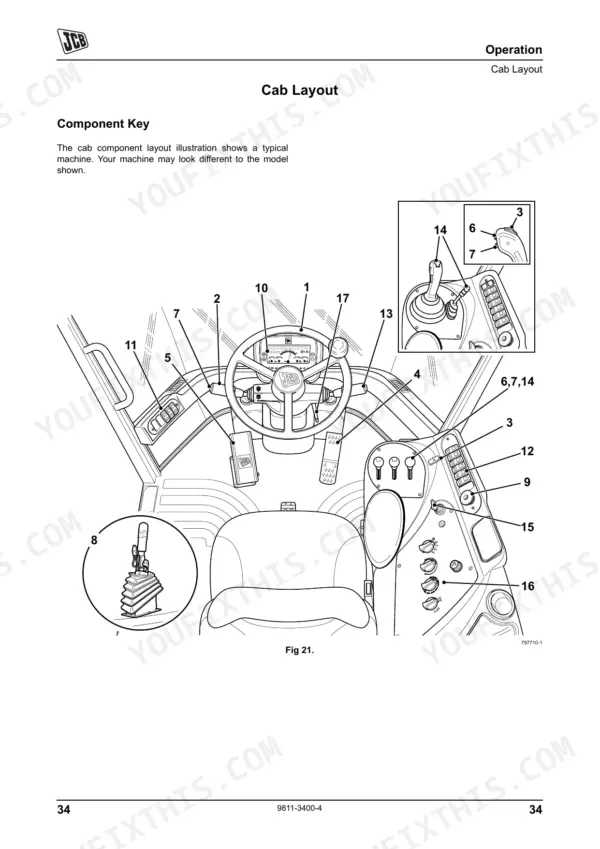
| Operation | 33-103 | Before Entering the Cab, Entering and Leaving the Cab, Emergency Exit, Doors and Windows, Seat Controls, Air Suspension Seat, Console Arm Rest, Seat Belt |
| Storage of the Machine | 104-106 | Storage Area, Take the Machine Out of Storage |
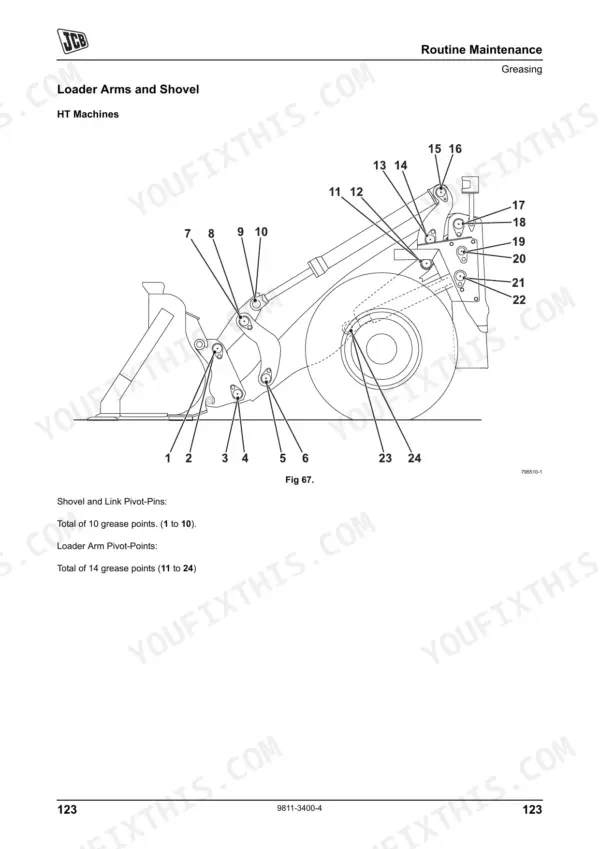
| Routine Maintenance | 107-192 | Service Requirements, Health and Safety, Service Schedules, Fluids, Lubricants and Capacities, Tools, Prepare the Machine for Maintenance |
| Optional Attachments | 193-204 | Attachments for Your Machine, Connecting/Disconnecting Hydraulic Hoses, Quick Release Couplings, Quickhitch Control, Work Platforms |
| Specifications | 205-222 | Static Dimensions, Working Capacity, Maximum Travel Speeds, Tyre Sizes and Pressures, Noise Data, Vibration Data |
| Warranty Information | 223-226 | Machine Service Record Sheet, Registration Information |
Quick Reference Specifications
| Specification | Value | Page |
|---|---|---|
| All Models | ||
| Wheel Nut Torque (Front and Rear) | 600 Nm (443 lbf ft) | p. 189 |
| ROPS/FOPS Mounting Bolt Torque | 330 Nm | p. 133 |
| Seat Belt Replacement Interval | 3 years | p. 41 |
| 426 | ||
| Tyre Pressure (426, 20.5-25 tyre, Front) | 2.75 bar (39.9 psi) | p. 217 |
| Tyre Pressure (426, 20.5-25 tyre, Rear) | 2.5 bar (36.3 psi) | p. 217 |
| 426, 436 | ||
| Engine Oil Capacity (426, 436) | 14 Litres | p. 120 |
| Engine Coolant Capacity (426, 436) | 35 Litres | p. 120 |
| 456 | ||
| Engine Oil Capacity, 456 | 18.9 Litres | p. 120 |
| Engine Coolant Capacity, 456 | 40 Litres | p. 120 |
JCB 426, 436, 456 (TIER 2) Common Problems This Manual Covers
JCB 426 wheel loader feels unstable during load cycles with excessive uneven front tire wear
Check the tire pressures before the start of shift. Inflate the front 20.5-25 tires to 2.75 bar (39.9 psi) as specified on page 217. Inspect the wheel nuts for looseness and torque all front and rear wheel nuts to 600 Nm.
Manual Section: Specifications p. 217Articulation joint steering feels loose and makes clunking noises when turning under heavy bucket loads
Inspect the center pivot pins, welds, and locking devices during your pre-start checks. Grease the center pivot daily according to the schedule. Verify the ROPS/FOPS mounting bolts are tight and torque them to 330 Nm as shown on page 133.
Manual Section: Routine Maintenance p. 133Warning light illuminates on dashboard indicating high engine temperature or unusually long warm-up times
Inspect the cooling system for leaks and restricted airflow. Drain the system and refill the engine coolant capacity to exactly 35 Litres for 426 and 436 models using the fluid guidelines on page 120. Check the dashboard indicator meaning.
Manual Section: Routine Maintenance p. 120Operator cab seatbelt fails to retract fully or shows fraying on the webbing edges
Inspect the seat belt webbing and buckle latch mechanism for damage daily. Replace the entire seat belt assembly immediately if damaged, or strictly at the mandatory 3 years replacement interval detailed on page 41. Never operate the machine without a functional restraint.
Manual Section: Operation p. 41Frequently Asked Questions
How do I reset a JCB 426/436/456 Tier 2 warning light?
The only way to cancel a warning light alarm is to set the starter to 'off'. For warning lights that trigger an automatic engine shutdown, the operator manual provides emergency procedures — consult the relevant warning light section before moving the machine. p. 60
How do I reset a JCB wheel loader service interval?
The "Service Required" warning light and message are displayed at pre-set intervals or if the diagnostic computer memory is full. To reset the service interval, the Service Required message is reset when data is downloaded by your JCB Dealer. p. 64
What does an error code mean on a JCB 426 Tier 2?
If the transmission develops a fault, the EMS will display a fault code on the top line of the display panel to aid diagnosis. An example of a fault code is shown: "ZFCB ERROR B6". A complete list of these fault codes is given in the Service Manual. p. 63
How do I clear a fault code on a JCB 436?
The manual indicates that fault codes are displayed by the EMS for diagnosis, and a complete list is available in the Service Manual. For specific fault code reset procedures, refer to the fault code section of this operator manual. p. 63
How do I reset the transmission on a JCB 456 Tier 2?
If a transmission fault occurs, the EMS will display a fault code for diagnosis, with a comprehensive list found in the Service Manual. For cold start conditions below -12°C (10.4°F) that inhibit gear selection, the transmission can be warmed up by starting the engine and running it in neutral until the EMS shows 'N'. p. 78
What format is this manual in?
You get a 226-page searchable PDF that downloads instantly after checkout. Open it on your laptop, tablet, or phone, and bring it right to the shop floor.
Can I print this manual?
Yes. Print the pages or sections you need for your own shop use. Any standard printer works.











Reviews
There are no reviews yet.