

Part of the JCB Operator Manuals.
Looking for the official factory guidelines for your compact excavator? This 208-page JCB 8018 CTS operator manual (OEM #9821/6100) also covers the 8014, 8016, and 8020 CTS variants, detailing every cab control and daily maintenance check. You get complete daily walk-around inspection checklists, dashboard indicator guides, and step-by-step operating procedures for safe worksite travel. Open to the maintenance schedules for full fluid capacity charts, exact lubrication points, and routine filter replacement intervals to keep your machine out of the repair bay. Top off the 25.4-liter hydraulic tank, confirm the 4-liter engine oil capacity, and verify your return filter is swapped at the 500-hour mark. Preventable breakdowns cost time and money. Grab this bookmarked file, pull it up on your tablet in the cab, and get to digging.
Other edition of this manual
- JCB 8018 CTS Operator Manual Original price was: $27.99.$19.99Current price is: $19.99.
What's Inside This JCB 8014 CTS, 8016 CTS, 8018 CTS, 8020 CTS Operator Manual
| System | Pages | Key Topics |
|---|---|---|
| Acronyms Glossary | 11-12 | Cesar, DEF, ECU, Ehtma, Esos, Fogs |
| Introduction | 13-18 | Safety |
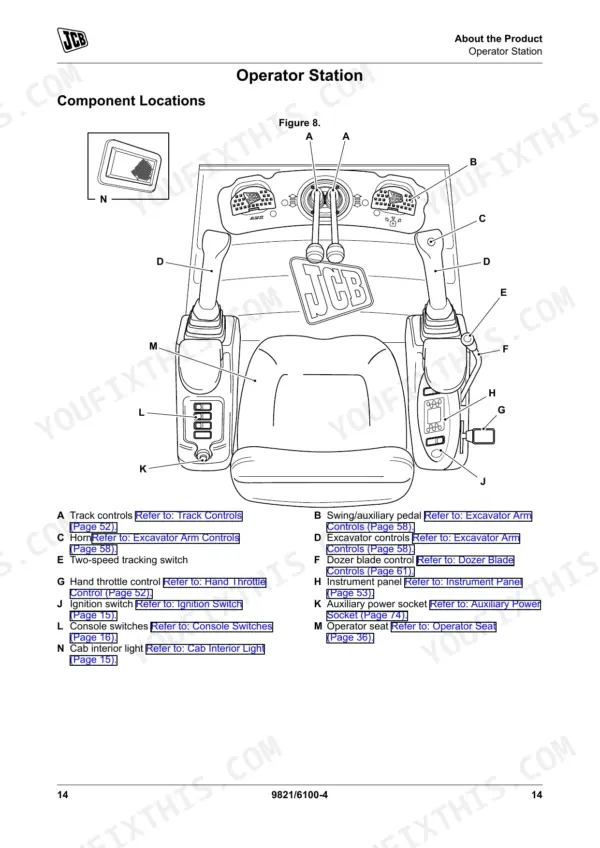
| About the Product | 19-30 | Description (General, Intended Use, Log Moving/Object Handling, Optional Equipment and Attachments, Danger Zone, Main Component Locations) |
| Windows | 31-33 | Front Window, Side Window |
| Battery Isolator | 34 | General |
| Before Starting the Engine | 35 | General |
| Operator Seat | 36-37 | General, Basic Seat, Suspension Seat |
| Seat Belt | 38-40 | General, Inertia Reel Seat Belt, Static Seat Belt |
| Starting the Engine | 41-45 | General, Immobiliser, Warming Up |
| Stopping and Parking | 46 | General |
| Preparing for Travel | 47-122 | General, Preparing for Worksite Travel |
| Maintenance | 123-166 | Maintenance Safety, Maintenance Schedules, Body and Framework, Engine, Tracks, Hydraulic System, Electrical System |
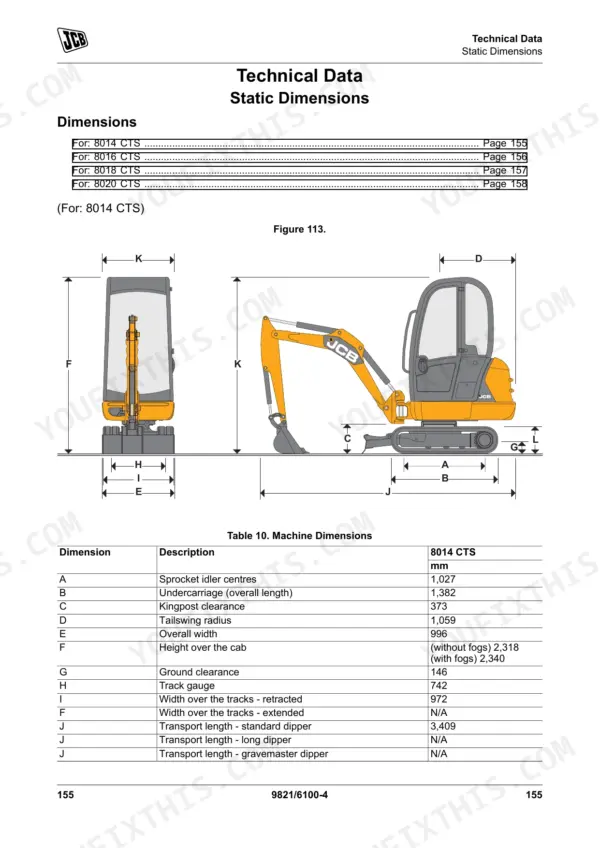
| Technical Data | 167-208 | Static Dimensions, Performance Dimensions, Fluids, Lubricants and Capacities, Declaration of Conformity, Warranty Information |
Quick Reference Specifications
| Specification | Value | Page |
|---|---|---|
| All Models | ||
| Engine Rating | 14.7 kW | p. 182 |
| Fuel Tank Capacity | 23.5 L | p. 185 |
| Engine Oil Capacity | 4 L | p. 185 |
| Hydraulic Tank Capacity | 25.4 L | p. 185 |
| ROPS (cab mounts) Bolts Torque | 70 N·m | p. 193 |
| System Voltage | 12 V | p. 194 |
| Main Fuse Rating | 15 A | p. 194 |
| Engine Drive Belt Deflection | 5 mm | p. 195 |
| Auxiliary Hydraulic Pressure | 230 bar | p. 196 |
| 8014 CTS | ||
| 8014 CTS Rubber Track Tension | 60 ± 2 mm | p. 197 |
| 8020 CTS | ||
| 8020 CTS Auxiliary Hydraulic Flow | 44 L/min | p. 196 |
JCB 8014 CTS, 8016 CTS, 8018 CTS, 8020 CTS Common Problems This Manual Covers
JCB 8014 CTS track travel slows significantly when operating the boom or arm simultaneously
Inspect the track tension and adjust it to 60 ± 2 mm as outlined on page 197. Check the hydraulic tank fluid level and verify it holds the required 25.4 L capacity. Replace the return filter if past the 500-hour interval shown on page 131.
Manual Section: Maintenance p. 197Machine shuts down during operation and engine will not turn over or start suddenly
Verify the battery isolator switch on page 34 is fully engaged. Inspect the main electrical harness and verify the 15 A main fuse is intact. Test the system voltage to ensure a steady 12 V reading before attempting to crank the starter motor.
Manual Section: Battery Isolator p. 34Engine temperature gauge spikes into the red zone and coolant boils over after heavy digging
Inspect the engine drive belt deflection and adjust it to exactly 5 mm as specified on page 195. Check the radiator fins for packed dirt and clear all debris. Verify the engine oil level is correct up to the 4 L capacity listed on page 185.
Manual Section: Maintenance p. 123Breaker attachment lacks punching power and auxiliary hydraulic flow feels weak during operation
Test the auxiliary hydraulic pressure to confirm it reaches 230 bar. For the 8020 CTS model, verify the auxiliary hydraulic flow delivers 44 L/min as shown on page 196. Inspect the quick disconnect fittings for damage and ensure the return filter is clean.
Manual Section: Technical Data p. 167Frequently Asked Questions
How to start a JCB 1-2 tonne mini excavator?
To start the engine, first ensure the machine is ready as per pre-start checks. If an immobiliser is installed, disarm it. Move the throttle lever to the half speed position. Turn the ignition key to position 2 for 6 seconds to warm combustion chambers, then turn to position 3 and hold for up to 15 seconds until the engine starts. If the engine does not start, return the key to position 0 and allow the starter to cool for a few minutes before trying again. p. 53
How do I reset the 2GO hydraulics on a JCB 8014 CTS?
The manual does not explicitly mention "2GO hydraulics" or a "reset" function for it. However, hydraulic controls are isolated when the left hand console is raised, preventing operation of excavator, track, dozer, swing, and auxiliary controls. To enable them, lower the handle to the normal position and press the control isolation switch. Additionally, hydraulic pressure can be discharged by operating controls several times after stopping the engine and removing the ignition key, then carefully removing the hydraulic tank filler cap. p. 61
What do warning lights mean on a JCB 8014 CTS?
The instrument panel displays various warning lights: a red Charge (Fault) Indicator for a fault, a red Coolant Temperature (High) Indicator for high coolant temperature, and a red Engine Oil (Low) Indicator for low oil pressure. A green Two Speed (High Engaged) Indicator lights up when high speed is engaged, and a green SAE Controls (Selected) Indicator lights up when the SAE control pattern is chosen. Yellow indicators include Air Filter (Blocked) and Glow Plugs (on). A buzzer sounds for Charge (Fault), Coolant Temperature (High), or Engine Oil (Low) faults, continuously for 180 seconds, then intermittently (1 second on, 2 seconds off). p. 65
How do I check the serial number and year of my JCB 8014 CTS?
The machine's identification plate, located as shown in Figure 4, displays the product identification number (PIN), which includes the machine serial number. The machine serial number corresponds to digits 10 to 17 of the PIN. The year of manufacture is also shown on this plate. For the engine, the engine data label on the cylinder block (Figure 5) contains the engine identification number, with digit 15 indicating the year of manufacture. p. 22
how to reset JCB 8016 CTS immobilizer
To disarm the immobiliser, insert the ignition key and turn it to position 1. Then, enter your four-digit PIN code using the keypad and push the 'ENT' button. The immobiliser arms automatically two minutes after the engine is stopped and the ignition key is removed. p. 54
How will I receive this manual?
Instant PDF download. You get the full 208-page searchable Operator Manual immediately after payment. Open it on your laptop, tablet, or phone right in the shop.
Can I print this manual?
Yes. Print individual pages or full chapters for your own shop use, on letter or A4 paper.











Reviews
There are no reviews yet.