



Part of the JCB Operator Manuals.
Before you put another hour on your mini excavator, grab this 330-page JCB 8018 CTS Operator Manual PDF (OEM #9821/2850) to lock down the exact daily service routines and operating limits for your machine. Inside, you get complete dashboard indicator explanations, full daily service schedules, and a section dedicated to proper control operation. Open up to detailed fluid capacity charts, safe lifting regulations, and step-by-step instructions for safely connecting hydraulic hoses to your optional attachments. Verify your excavator main relief pressure is sitting at exactly 230 bar, and confirm the hydraulic tank holds precisely 25.4 litres during your next routine fluid swap. Stop relying on guesswork when running daily checks. Download this bookmarked file, pull it up on your phone inside the cab, and get straight to work.
Other edition of this manual
- JCB 8014–8020 CTS Compact Excavator Operator Manual Original price was: $28.99.$19.99Current price is: $19.99.
What's Inside This JCB 8018 CTS Operator Manual
| System | Pages | Key Topics |
|---|---|---|
| Safety Notices | 17-18 | Important Information, Operator Manual, Safety Warnings |
| Introduction | 19-25 | About This Manual, Left Side, Right Side, Cab/Canopy, Machine Description, Component Location |
| Safety Check List | 26-50 | Safety - Yours and Others, General Safety, Operating Safety, Maintenance Safety |
| Safety Labels | 51-55 | Safety Label Identification |
| Identifying Your Machine | 56-60 | Machine Identification Plate, Component Identification Plates |
| Machine Security | 61-62 | Immobiliser |
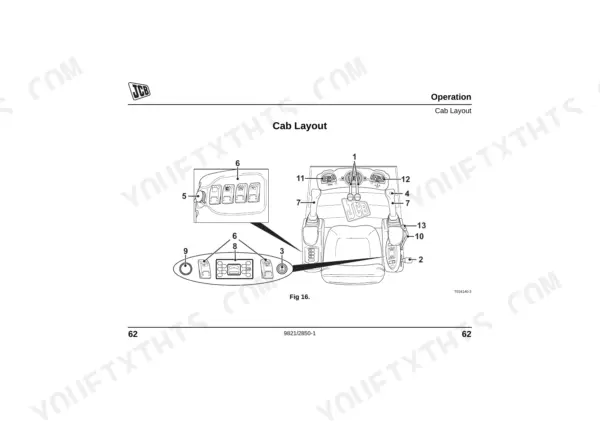
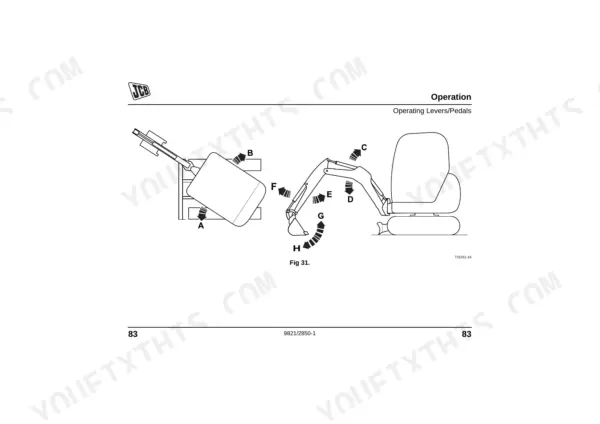
| Operation | 63-174 | Before Entering the Cab, Entering and Leaving the Cab, Emergency Exit, Doors and Windows, Opening and Closing the Front Window, Opening and Closing the Side Window, Seat Controls |
| Storage of the Machine | 175-178 | Put the Machine Into Storage, Take the Machine Out of Storage |
| Routine Maintenance | 179-266 | Service Requirements, Owner/Operator Support, Service/Maintenance Agreements, Health and Safety, Battery, Service Schedules, How to Use the Service Schedules, Calendar Equivalents |
| Optional Attachments | 267-296 | Attachments for Your Machine, Impact Protection, Connecting/Disconnecting Hydraulic Hoses, Connecting the Hydraulic Hoses, Disconnecting the Hydraulic Hoses |
| Specifications | 297-318 | Lifting (Object Handling) Regulations and Safe Working Loads, Static Dimensions, Performance Dimensions, Dozer Blade, Hydraulic System, Noise Data, All Machines, Vibration Data |
| Warranty Information | 319-324 | Machine Service Record Sheet, Registration Information |
| European Community Standards | 325-330 | Ec Declaration of Conformity, Explanation of the Ec Declaration of Conformity |
Quick Reference Specifications
| Specification | Value | Page |
|---|---|---|
| Safety lever hydraulic lock operation | Lowering the left hand console to the normal position connects the excavator controls and allows normal operation of the levers. | p. 66 |
| Accumulator hydraulic pressure | Limited amount of hydraulic pressure for use in an emergency | p. 161 |
| Hydraulic Tank Capacity | 25.4 Litres | p. 201 |
| Excavator/Track Main Relief Pressure | 230 bar | p. 311 |
| Slew Main Relief Pressure | 160 bar | p. 311 |
| Auxiliary Hydraulic Flow | 26 litres | p. 311 |
| Slew Speed | 8.1 rpm | p. 309 |
| Dozer Blade Approach Angle | 17 degrees | p. 310 |
| Whole-Body Vibration Emission (Low Idle) | 0.33 m/s² | p. 316 |
JCB 8018 CTS Common Problems This Manual Covers
JCB 8018 CTS Mini Excavator hydraulics work briefly after lowering the safety lever then stop
Check the left hand console is fully lowered to the normal position to connect excavator controls as shown on page 66. Test if the accumulator maintains limited hydraulic pressure for emergency use on page 161. Verify the hydraulic tank is filled to the 25.4 Litres capacity.
Manual Section: Operation p. 66All hydraulic controls suddenly become dead during use or fail to respond to joystick inputs
Inspect the excavator and track main relief pressure on page 311. Connect your gauge and verify the system reaches exactly 230 bar. If pressure drops, test the slew main relief pressure to ensure it maintains 160 bar before inspecting the safety interlock switch.
Manual Section: Specifications p. 311Rubber tracks slipping or popping off the idler wheel during heavy turns on uneven ground
Measure the track sag at the center roller as instructed on page 244. Adjust the track tension to the manufacturer-specified value for rubber tracks. Clean the track gearbox and check the oil level if the machine tracks poorly in either direction.
Manual Section: Tracks and Running Gear Maintenance p. 244Engine cranks normally but will not start after the glow plug heating cycle completes
Review the maintenance intervals for fuel filter replacement and inspect the sedimenter for water contamination. Check fuel delivery and verify the glow plug system is functioning correctly. Consult the Routine Maintenance section for the full pre-start inspection checklist.
Manual Section: Routine MaintenanceFrequently Asked Questions
How do I reset the safety lever/hydraulic lock on a JCB 8018 CTS?
The hydraulic controls are enabled by lowering the left hand console and handle A to the normal operating position. Raising the left armrest prevents the services from operating. To re-enable, ensure the armrest is replaced firmly to connect the excavator controls and allow normal operation of the levers. p. 66
How do I reset fault codes on a JCB 8018 CTS?
To reset fault indications on the JCB 8018 CTS, set the starter key to the OFF position. This action will reset all operations after a warning indicator has displayed a machine fault. p. 95
How do I reset the immobilizer or alarm on a JCB 8018 CTS?
To disarm the keypad immobiliser, insert the starter key and turn it to position I, then press the MD button, enter your four-digit PIN, and press the ENT button. For the unique key system, insert the starter key and start the engine normally — the immobiliser disarms automatically when the correct key is detected. p. 122
Why does the JCB 8018 CTS hydraulics stop after 1-2 seconds when the safety lever is down?
The manual states that when the left hand console and handle A (safety lever) are in the *raised* position, the excavator controls cannot be operated, thus disabling the hydraulics. If the hydraulics stop when the safety lever is *down*, it suggests the lever might not be fully engaged in the normal operating position, or there could be a malfunction in the safety interlock system. p. 66
How will I receive this JCB 8018 CTS Operator Manual?
You get a 330-page searchable PDF that downloads instantly after checkout. Open it on your laptop, tablet, or phone, and bring it right to the shop floor.
Can I print pages of this manual for my own shop?
Yes. Print the pages you need for the job in your own shop, and bin them when they get greasy.











Reviews
There are no reviews yet.