
Part of the JCB Operator Manuals.
Every detail of this 178-page JCB G20–G45 series operator manual PDF (OEM #9831/0650 ISSUE 3) focuses on keeping your generator fleet running smoothly. Inside, you get complete daily maintenance schedules, fluid capacity charts, and full operating procedures for the instrument panel. The manual includes electrical wiring diagrams and a dedicated fault-finding section, so you can decode dashboard indicators and clear low oil pressure alarms before they shut you down. Verify your system has the minimum 12.4V required to start, and tighten the alternator mount bolt C to exactly 69 N·m during routine service. A bookmarked, searchable PDF you can pull up on a phone or tablet right at the machine.
What's Inside This JCB G20–G45 Series Operator Manual
| System | Pages | Key Topics |
|---|---|---|
| Acronyms Glossary | 7-8 | CAN, Ccv, Ecm, ECU, Fead, Hpv |
| About the Product | 13-32 | Introduction (Name and Address of the Manufacturer, Product Compliance), Description (Main Component Locations), Product and Component Identification (General, Engine) |
| Operation | 33-64 | Operating Safety (General), Battery Isolator (General), Before Starting the Engine (General), Instruments (Instrument Panel), Operating Environment (General) |
| Attachments | 65-88 | Working with Attachments (Attachments for Your Machine) |
| Preservation and Storage | 89 | Cleaning (General) |
| Maintenance | 90-148 | Introduction (General), Maintenance Safety (General), Fluids and Lubricants |
| Technical Data | 149-178 | Introduction (General), Static Dimensions (Weights), Noise Emissions (Noise Data), Fluids, Lubricants and Capacities (General, Fuel, Coolant) |
Quick Reference Specifications
| Specification | Value | Page |
|---|---|---|
| Alternator mount bolt B torque | 25 N·m | p. 101 |
| Alternator mount bolt C torque | 69 N·m | p. 101 |
| Low Oil Pressure alarm description | The module detects that the engine oil pressure has fallen below the low oil pressure pre-alarm setting level after the Safety On timer has expired. | p. 46 |
| Battery electrolyte level | 6mm above plates | p. 118 |
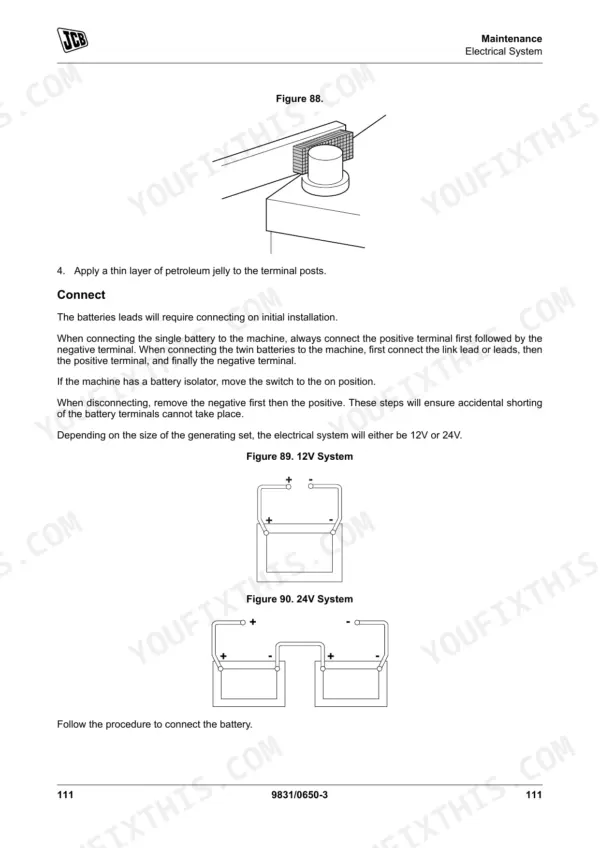
| Minimum battery voltage for 12V system to start | 12.4V | p. 124 |
| Fuel filter replacement interval | 500h, 1000h, 2000h, 5000h, 6000h | p. 97 |
| Fuel filter/water separator check interval | 10h, 50h, 250h, 500h, 1000h, 2000h, 5000h, 6000h | p. 97 |
| External cartridge dry type air filter check interval | 250h, 500h, 1000h, 2000h, 5000h, 6000h | p. 97 |
| Coolant hoses change interval | 1000h, 2000h, 5000h, 6000h | p. 97 |
| Starter Motor power | 2kW | p. 177 |
| Coolant level/radiator heat exchanger surface check interval | 10h, 50h, 250h, 500h, 1000h, 2000h, 5000h, 6000h | p. 97 |
| Radiator heat-exchange surface check interval | 250h, 500h, 1000h, 2000h, 5000h, 6000h | p. 97 |
JCB G20–G45 Series Common Problems This Manual Covers
JCB G20 generator engine will not start or only cranks weakly in cold weather
Check battery voltage using a multimeter to verify it meets the 12.4V minimum required to start on page 124. Inspect the battery cells and top up distilled water until the electrolyte level sits exactly 6mm above plates. Clean all terminal connections to ensure solid ground.
Manual Section: Engine Starting & Stopping Issues p. 124High engine temperature warning light flashing on control panel and unexpected overheating shutdown
Inspect the radiator heat exchange surface for dirt or blockages. Check the fluid level and verify the coolant mixture meets the antifreeze specification in the manual. Clear any debris from the air intakes to restore proper airflow across the cooling pack.
Manual Section: Cooling System Diagnostics p. 154Low oil pressure pre-alarm activates on module after safety timer expires and engine stops
Check the dipstick to confirm oil level is adequate. For G27 through G45 models, verify the engine oil capacity meets the specification shown on page 152. Inspect the filter housing for leaks and ensure the correct viscosity oil is being used.
Manual Section: Lubricating Oil System Diagnostics p. 152Engine starts briefly and then dies immediately after running out of fuel
Drain the water separator and check the service log on page 97 to confirm the fuel filter was replaced at the 500h interval. Prime the fuel system manually to bleed out any trapped air in the lines before attempting to crank the engine again.
Manual Section: Fuel System Diagnostics p. 97Excessive vibration and noise from the alternator mounting bracket during operation under heavy load
Inspect the alternator mounting hardware for damage or missing fasteners. Torque mount bolt B to exactly 25 N·m as directed on page 101. Verify the electrical frequency remains stable at 50/60 Hz to ensure the vibration has not damaged internal windings.
Manual Section: Electrical & Sensor System Diagnostics p. 101Frequently Asked Questions
How do I reset the controller on a JCB G20/G27/G33/G40/G45 generator?
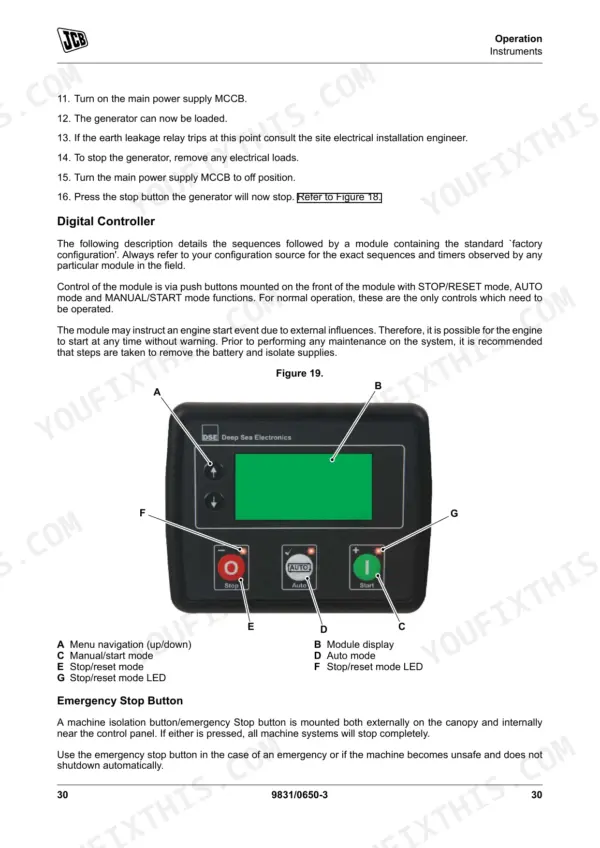
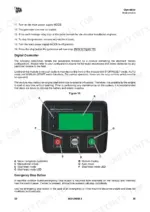
To reset the controller and clear any alarm conditions, press the STOP/RESET mode button. This action will also automatically instruct the generator to unload and the engine to come to a standstill. For latched alarms, ensure the fault condition is rectified before attempting to reset. p. 39
What does an alarm or fault code mean on a JCB QS generator?
Alarm icons are displayed on the LCD (Liquid Crystal Display) to indicate active warning, electrical trip, or shutdown alarms. Warning alarms are non-critical, while electrical trips and shutdowns are latching and stop the generator. For specific meanings, refer to Table 9 for Warning Alarm Icons, Table 10 for Electrical Trip Alarm Icons, Table 11 for Shutdown Alarm Icons, and Table 13 for Engine DTC descriptions, which list the fault and its description. p. 43
How do I clear an emergency stop or low oil pressure fault on a JCB generator?
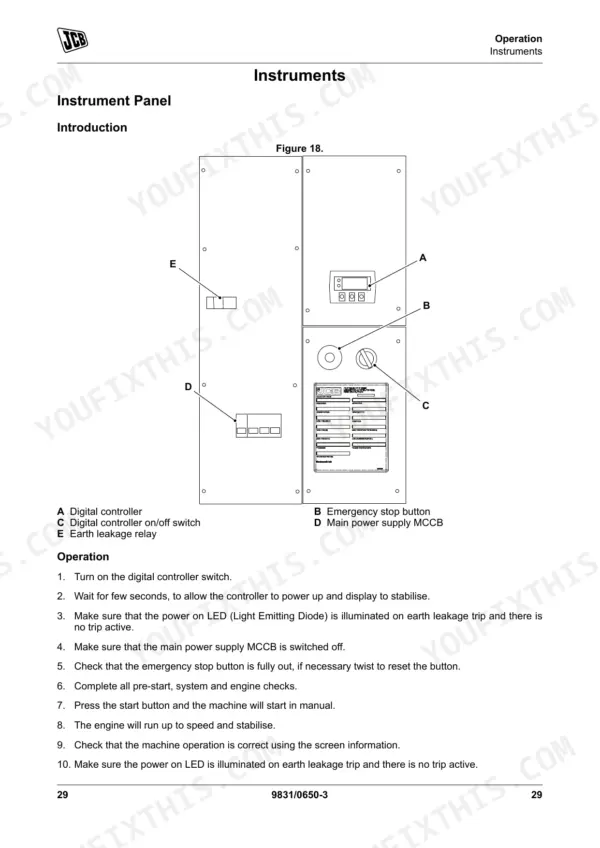
To clear an emergency stop, twist the emergency stop button to reset it. For a low oil pressure fault, which is a shutdown alarm, you must first rectify the underlying alarm condition (e.g., ensure oil pressure is not low with the engine at rest) and then press the STOP/RESET mode button to clear the latched alarm. p. 38
How do I troubleshoot starting problems on a JCB G20QS or G45QS?
To troubleshoot starting problems, first check the fuel level in the tank and ensure the fuel system is primed if it has run out or been reconnected. Verify the starter switch and electrical system, and check for aerated fuel or blocked fuel filters. If the engine cranks slowly, check battery charge and connections. For specific causes and remedies, refer to Table 22, Table 23, and Table 24 in the Fault-Finding section. p. 127
How will I receive this JCB G20–G45 Series Operator Manual?
You get a 178-page searchable PDF that downloads instantly after checkout. Open it on your laptop, tablet, or phone, and bring it right to the shop floor.
Can I print pages of this manual for my own shop?
Yes. Many mechanics print the section they need for their own shop and bring it to the bench.
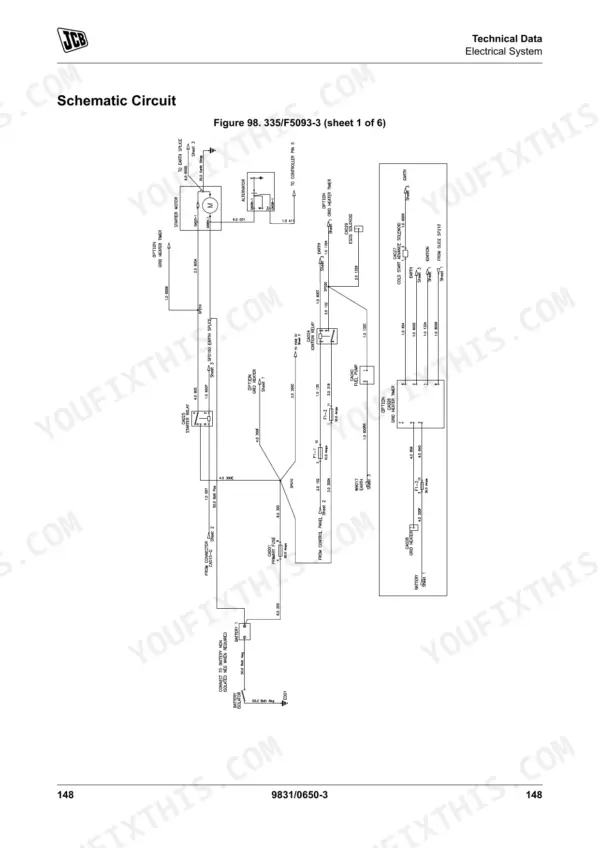
Are electrical wiring diagrams included in this JCB G20–G45 Series manual?
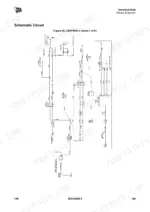
Yes, this JCB G20–G45 Series Operator Manual includes a wiring diagram for the electrical system.











Reviews
There are no reviews yet.