

Part of the JCB Operator Manuals.
Searching for the official JCB workmax 800d operator manual pdf? This 260-page factory guide (OEM #9811-5150) breaks down all the daily operations and cab controls for the utility vehicle. Inside, you get a complete breakdown of the drive controls, visibility aids, and dashboard instruments to keep your machine running smoothly. Open up to detailed fluid capacity charts, safety label guides, and step-by-step daily maintenance checklists covering everything from seat belts to beacons. Swap out your fuel filter every 500 hours and lock down those front wheel nuts to exactly 66 Nm before heading out to the site. Guessing on maintenance intervals just burns up good parts. Grab this bookmarked download, pull it up on your phone in the shed, and get to work.
Complete the set for your WORKMAX 800D
- Repair Manual: JCB Workmax 800D Service Manual (incl. Wiring)
What's Inside This JCB WORKMAX 800D Operator Manual
| System | Pages | Key Topics |
|---|---|---|
| Safety Notices | 15-16 | Important Information, Operator Manual, Safety Warnings |
| Introduction | 17-21 | Machine Model and Serial Number, Cab/Canopy, Machine Description, Intended Use, Component Location |
| Safety Check List | 6-27 | Safety - Yours and Others, General Safety, Operating Safety, Maintenance Safety |
| General Safety | 23-25 | Care and Alertness, Clothing, Alcohol and Drugs |
| Operating Safety | 26-33 | Machine Condition, Machine Limits, Engine/Steering Failure, Exhaust Gases |
| Maintenance Safety | 34-43 | Repairs, Electrical Circuits, Hydraulic Pressure, Fuel, Oil, Battery |
| Safety Labels | 44-54 | Safety Label Identification, Part Numbers and Description, Identifying Your Machine, Machine Identification Plate, Typical Product Identification Number Data Plate |
| Operation | 55-59 | Before Entering the Cab, Entering and Leaving the Cab (Introduction) |
| Seat Controls | 60-61 | Operator and Passenger Seat Usage, Adjustment |
| Seat Belts | 62-64 | Inertia Reel Seat Belt |
| Visibility Aids | 65-67 | Mirrors |
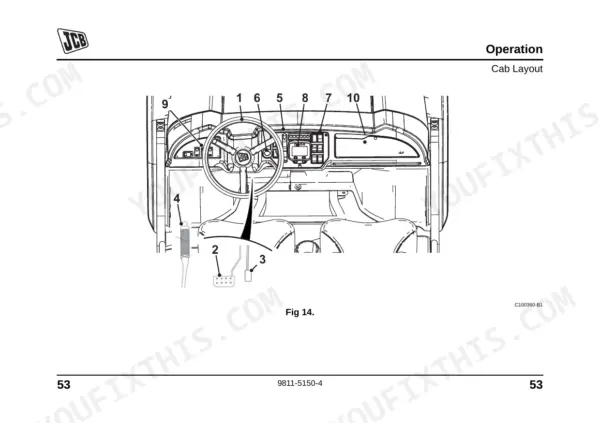
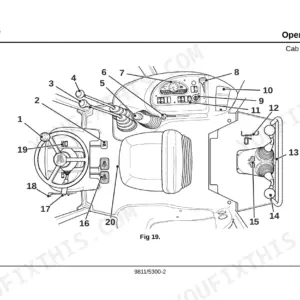
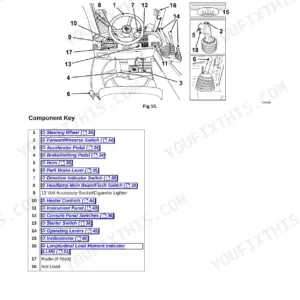
| Cab Layout | 68-69 | Component Key |
| Drive Controls, Switches and Instruments | 70-82 | Drive Controls, Switches, Instruments |
| Maintenance and Safety Equipment | 83-260 | Beacon, Fuel System, Fuel Filter Replacement, CVT Belt, Brake Fluid, Gearbox Oil, Coolant Mixture, Brake Pads, Front Disk, Alternator Drive Belt, Wheel Nut Torque, Tyres and Wheels |
Quick Reference Specifications
| Specification | Value | Page |
|---|---|---|
| Wheel Nut Torque (Front) | 66 Nm (59 lbf ft) | p. 230 |
| Wheel Nut Torque (Rear) | 66 Nm (59 lbf ft) | p. 230 |
| Fuel Filter Replacement Interval | Every 500 Hours or 5,000 miles (8,000 kilometres) | p. 140 |
| Brake Fluid Type | JCB Brake Fluid, Dot 4 | p. 150 |
| Brake Fluid Container Size | 1 litre | p. 150 |
| Gearbox Oil Type | JCB Gear Oil EP 80W90 | p. 150 |
| Gearbox Oil Capacity | 1.0 (0.22) litres (UK Gal) | p. 150 |
| Coolant Mixture (Standard) | 50% Concentration protects against damage down to -40 °C (-39 °F) | p. 154 |
| Coolant Mixture (Extreme Conditions) | 60% Concentration protects against damage down to -56 °C (-68 °F) | p. 154 |
| Front Disk Minimum Thickness | 5.58 mm | p. 178 |
| Brake Pad Minimum Thickness | 1 mm | p. 162 |
| New Alternator Drive Belt Tension (movement) | 8 to 12 mm | p. 204 |
JCB WORKMAX 800D Common Problems This Manual Covers
JCB Workmax 800D engine cranks but fails to start or stalls immediately after starting
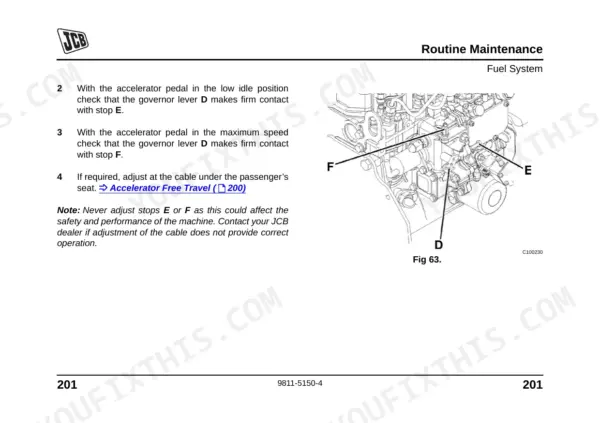
Replace the filter element every 500 hours or 5,000 miles (8,000 kilometres) as shown on page 140. Bleed air from the system after changing the filter or running the fuel tank dry. Verify the fuel lines are secure and free of leaks before starting.
Manual Section: Fuel System Bleeding p. 140Engine overheating during normal operation with temperature warning light on dashboard
Inspect the radiator and verify coolant levels. Use a 50% concentration mixture to protect against damage down to -40 °C (-39 °F) as detailed on page 154. Check the alternator drive belt tension and ensure movement is between 8 to 12 mm to maintain proper water pump operation.
Manual Section: Alternator Drive Belt Inspection/Adjustment/Replacement p. 154Grinding noise when applying brakes and vehicle takes longer to stop completely
Inspect brake components for wear. Verify the brake pad thickness is above the 1 mm minimum requirement listed on page 162. Check the front disk minimum thickness is at least 5.58 mm. Top up the 1 litre reservoir with JCB Brake Fluid, Dot 4.
Manual Section: Brake Pad/Disk Inspection/Replacement p. 162Unusual noise from transmission during operation or CVT belt slipping under heavy load
Examine the CVT belt for fraying or cracks and replace if worn, following the minimum thickness specification on page 145. Drain the gearbox and refill with 1.0 litres of JCB Gear Oil EP 80W90 at the interval specified in the manual.
Manual Section: CVT Belt Inspection/Replacement p. 145Frequently Asked Questions
What are the torque specs for JCB Workmax 800D wheel nuts?
The correct torque specifications for the wheel nuts on the JCB Workmax 800D are 66 Nm (59 lbf ft) for both the front and rear wheels. Check these torques daily before work and at two-hour intervals when the machine is new or a wheel has been removed until the values are constant. p. 230
What do error codes on JCB Workmax 800D mean?
The JCB Workmax 800D display panel provides audible and visual warnings through indicator lights, rather than alphanumeric error codes. These lights include warnings for high beam, direction indicators, low engine oil pressure, engine pre-heat, glow plug, and no charge. If any of these warnings activate while the engine is running, stop the machine and rectify the fault. p. 80
How to apply correct torque specs JCB Workmax 800D wheels
To apply the correct torque specifications for the JCB Workmax 800D wheels, tighten the wheel nuts to 66 Nm (59 lbf ft) for both front and rear. When replacing a wheel, make sure the valve stem is towards the outside and rotation arrows are correct, then torque the wheel nuts to these specified values. p. 230
What brake fluid does the JCB Workmax 800D use?
For the brake system, the manual specifies JCB Brake Fluid, Dot 4. The JCB Part Number is 4002/0404, available in a 1 litre container. p. 150
What do I get after purchasing this JCB Workmax 800D manual?
You get a 260-page searchable PDF that downloads instantly after checkout. Open it on your laptop, tablet, or phone, and bring it right to the shop floor.
Am I able to print pages from this manual?
Yes. Many buyers print one chapter at a time for their own shop and keep the rest on a tablet.











Reviews
There are no reviews yet.