
Part of the JCB Operator Manuals.
Need the factory operating guidelines for your JCB wheeled loader? This 234-page JCB 426E, 434S, 436E, 456E Operator Manual PDF (OEM #9811-7000) covers every daily check, control layout, and maintenance interval required to keep your machine earning. You get complete dashboard indicator guides, fluid capacity charts, and step-by-step daily maintenance routines. Open to the operations section for detailed loader arm controls, smooth ride system usage, and safe site travel procedures. Verify your PF1 front work lights are running on a 60A fuse, then grab your wrench and lock down those wheel nuts to exactly 600 Nm (443 lbf ft) before hitting the dirt. Stop relying on guesswork to keep your loader moving. Download this bookmarked file right to your tablet, jump straight to the daily checklist, and get your crew to work.
Complete the set for your 426E, 434S, 436E…
What's Inside This JCB 426E, 434S, 436E, 456E Operator Manual
| System | Pages | Key Topics |
|---|---|---|
| Safety Notices | 9-10 | Important Information (Operator Manual, Safety Warnings) |
| Operation | 31-47 | Introduction, Before Entering the Cab, Entering and Leaving the Cab (Emergency Exit, Glazing Breaker) |
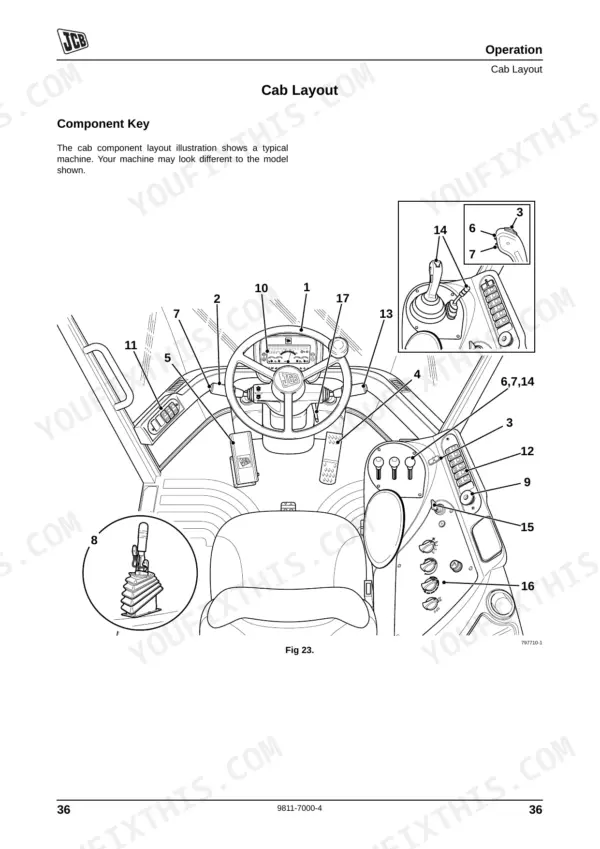
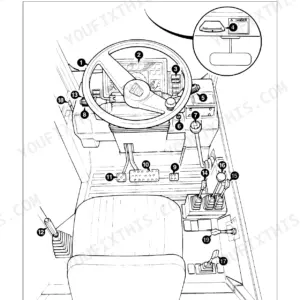
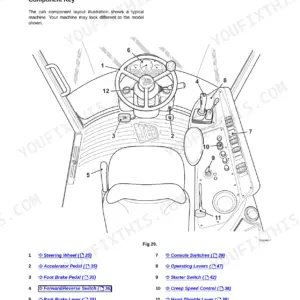
| Drive Controls, Switches and Instruments | 48-66 | Drive Controls, Switches, Instrument Panel, Heater/Air Conditioning Controls |
| Operating Levers | 67-71 | Introduction, Control Layouts, Loader Arm Controls, Auxiliary Controls |
| Safety Equipment | 72-74 | Control Lever Locks, Fire Extinguisher, Beacon |
| Before Starting the Engine | 75-76 | Park Brake, Attachment Position, Pre-Start Inspection, Cab Interior Cleanliness, ROPS/FOPS Structure, Seat Belt Condition, Controls and Visibility Aids Check |
| Starting the Engine | 77 | Transmission Cold Start Procedure |
| Preparing the Machine for Travel | 78-79 | Introduction, Preparing for Road Travel, Preparing for Site Travel, Smooth Ride System |
| Working with the Machine | 83-97 | |
| Moving a Disabled Machine | 98-103 | |
| Storage of the Machine | 104-234 |
Quick Reference Specifications
| Specification | Value | Page |
|---|---|---|
| Wheel Nut Torque | 600 Nm (443 lbf ft) | p. 179 |
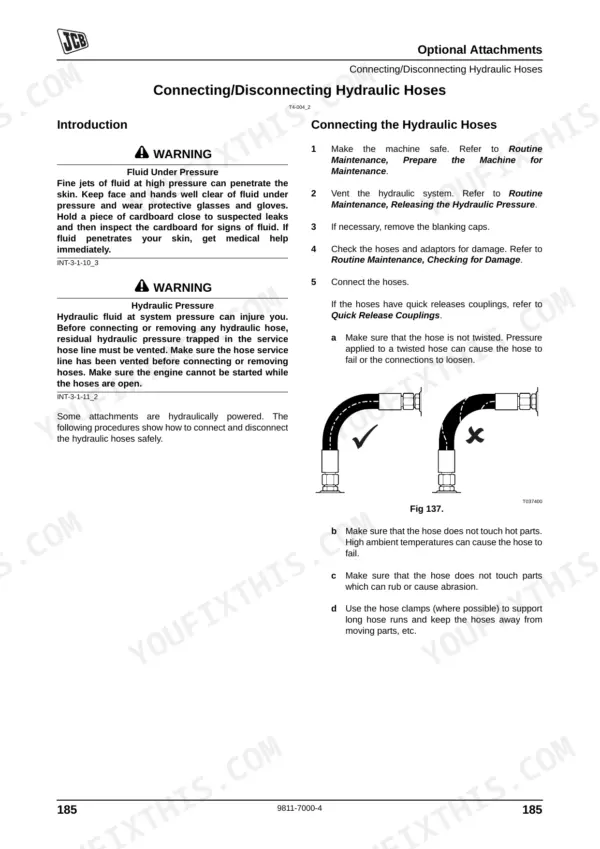
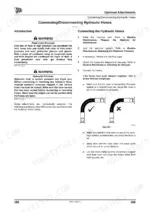
| Hydraulic Hose Clearance (Hot Parts) | Hose must not touch hot parts. | p. 195 |
| Hydraulic Hose Clearance (Rubbing/Abrasion) | Hose must not touch parts which can rub or cause abrasion. | p. 195 |
| PF1 Front Work Lights Fuse Rating | 60A | p. 155 |
| PF2 Hazard Indicators Fuse Rating | 40A | p. 155 |
| Relay Function (Ignition 1) | Ignition 1 | p. 157 |
| Relay Function (Brake Lights) | Brake Lights | p. 157 |
| Cab Air Filter Replacement Condition | Renew the filter if damaged. | p. 136 |
| Cab Air Filter Cleaning Method | Shake out loose dust and clean using low pressure compressed air. | p. 136 |
| Tyre Pressure (Front) | 2.75 bar (39.9 psi) | p. 221 |
JCB 426E, 434S, 436E, 456E Common Problems This Manual Covers
JCB 426E hydraulic loader functions are slow, erratic, or unresponsive under load
Inspect the hydraulic fluid level in the sight glass. Cloudy fluid as warned on page 163 indicates water or air contamination. Release system pressure before opening the tank, then drain and refill to restore proper operation.
Manual Section: Hydraulic System Maintenance p. 163Engine overheating warning light illuminated on the dashboard accompanied by sudden coolant loss
Check that the COOLANT TEMP message appears on the instrument panel as shown on page 64. Examine the header tank and confirm coolant is visible at the cold MIN mark. Top up with the correct coolant mixture per the manual's specification for your climate conditions.
Manual Section: Drive Controls, Switches and Instruments p. 64Front work lights will not turn on and frequently blow fuses during operation
Check the PF1 front work lights fuse in the electrical panel. Fit a new 60A fuse as specified on page 155. Before switching the ignition back on, trace the wiring harness for visible shorts or rubbing points to prevent repeat failures.
Manual Section: Electrical System Diagnostics p. 155Unsafe steering control, poor handling, and abnormal front tire wear during road travel
Measure front tire pressure with an accurate gauge. Set the front tires on the 426 model to exactly 2.75 bar (39.9 psi) per page 221. Confirm wheel nuts are torqued to 600 Nm for proper rim seating and to prevent wobbling.
Manual Section: Getting the Machine Moving p. 221Frequently Asked Questions
What is the torque spec for JCB 436E wheel loader wheel nuts?
The torque specification for wheel nuts on the JCB 436E wheel loader is 600 Nm (443 lbf ft) for both front and rear wheels. On new machines, and whenever a wheel has been removed, check the wheel nut torques every two hours until they stay correct. p. 189
How do I reset JCB 434S service light?
The "Service Required" warning light on a JCB 434S resets when diagnostic data is downloaded by your JCB Dealer. It is not a user-resettable feature and requires dealer intervention. p. 63
What are the replacement specifications for hydraulic hoses?
Replacement hydraulic hoses must be of the same size and standard as the original hoses. Regularly inspect hoses for damage such as chafed or ballooned outer covers, kinks, crushed areas, embedded armouring, or displaced end fittings. p. 133
What are the replacement specifications for fuses?
Fuses must always be replaced with ones of the correct ampere rating to prevent electrical system damage. For example, the Front Work Lights (PF1) require a 60A fuse, and Hazard Indicators (PF2) require a 40A fuse. p. 154
How is this JCB 426E Operator Manual delivered?
Immediate download of the complete 234-page searchable Operator Manual. Access it on any device, from a laptop at your desk to a phone in the field.
Am I able to print pages from this manual?
Yes. Many mechanics print the section they need for their own shop and bring it to the bench.











Reviews
There are no reviews yet.