
Part of the JCB Operator Manuals.
Before you fire up the machine, make sure you have the exact factory facts found in this 182-page JCB G65–G141 series operator manual pdf (OEM #9821/7700). It covers the complete generator lineup, including the G65, G90, G115, G116QS, and G140 variants. Inside, you get detailed operating procedures, dashboard module display guides, and complete maintenance schedules to keep your site powered. Open to the technical data section to decode fault codes, review the factory wiring diagrams, and check exact fluid capacities. Verify your battery charging voltage does not exceed 15.8 V and torque the engine oil drain plug to 40-60 N-m during your next service interval. Stop guessing on routine maintenance. Download the bookmarked file directly to your phone, jump straight to the right fluid specs, and keep the lights on.
What's Inside This JCB G65–G141 Series Operator Manual
| System | Pages | Key Topics |
|---|---|---|
| Acronyms Glossary | 7-8 | Controller Area Network, Crankcase Ventilation, Electronic Control Unit, Front End Accessory Drive, Liquid Crystal Display, Light Emitting Diode |
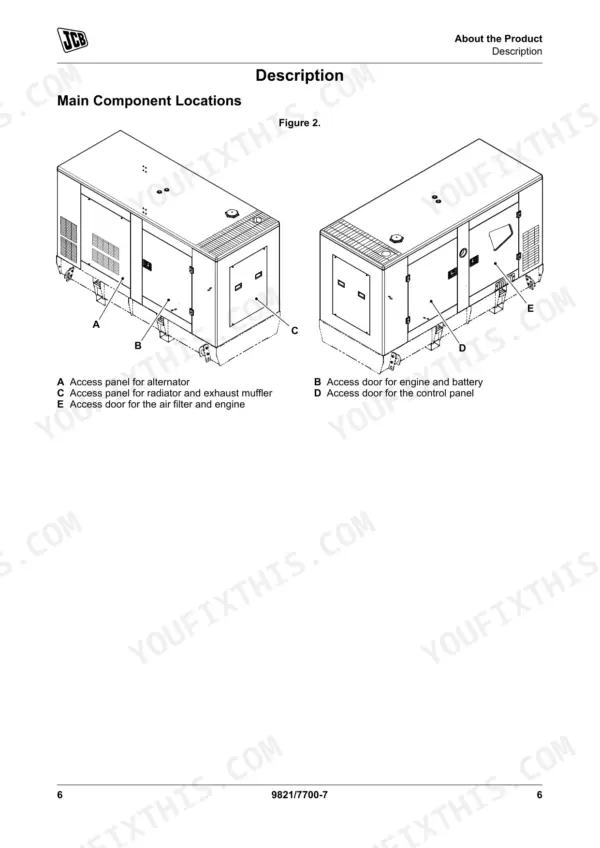
| About the Product | 13-32 | Introduction (Name and Address of the Manufacturer, Product Compliance), Description (Main Component Locations), Product and Component Identification (General, Engine) |
| Operation | 33-64 | Operating Safety (General), Battery Isolator (General), Before Starting the Engine (General), Starting the Engine (General), Instruments (General, Control Panel, Module Display) |
| Attachments | 65-82 | Working with Attachments (Attachments for Your Machine) |
| Preservation and Storage | 83 | Cleaning (General) |
| Maintenance | 84-132 | Maintenance Safety (General, Fluids and Lubricants) |
| Technical Data | 133-182 | Static Dimensions (Weights), Fluids, Lubricants and Capacities (General, Fuel, Coolant), Electrical System (General, Schematic Circuit), Engine (General) |
Quick Reference Specifications
| Specification | Value | Page |
|---|---|---|
| Engine oil drain plug torque | 40 –60 N·m | p. 93 |
| Filter housing drain plug torque | 40 –60 N·m | p. 93 |
| Electrolyte level above plates | 6 mm | p. 113 |
| Maximum charging voltage | 15.8 V | p. 113 |
| Power cable minimum diameter (terminals 1, 2, 3, 9) | 1.5 mm | p. 98 |
| Signal cable minimum diameter | 0.5 mm | p. 98 |
| Coolant mixture (standard) | 50 % antifreeze, protects down to -40 °C | p. 130 |
| Coolant mixture (extreme conditions) | 60 % antifreeze, protects down to -56 °C | p. 130 |
| Alternator Poles | 4 | p. 139 |
| Alternator Winding Connections | star | p. 139 |
| Maintenance Interval (Daily) | 10 h | p. 88 |
| Engine Oil Capacity | Maximum 15 L | p. 134 |
JCB G65–G141 Series Common Problems This Manual Covers
JCB G115QS engine starts but stops immediately or runs roughly under load
Inspect the fuel pre-filter and water separator for contamination. Drain any trapped water. Verify the engine fuel filter strap retaining screw is tightened to 24 N·m as shown on page 109. Check the 10 h daily maintenance schedule on page 88 to ensure proper service intervals.
Manual Section: Engine - Starts then StopsGenerator trips offline with OL error code on the module display during operation
Check the error code reference on page 58. Remove excess load from the generator set immediately. Ensure the connected load matches the correct output rating and verify the electrical frequency remains stable at 50/60 Hz. Reset the breaker only after reducing the demand.
Manual Section: Operation p. 58Engine will not crank or cranks slowly during cold weather startup attempts
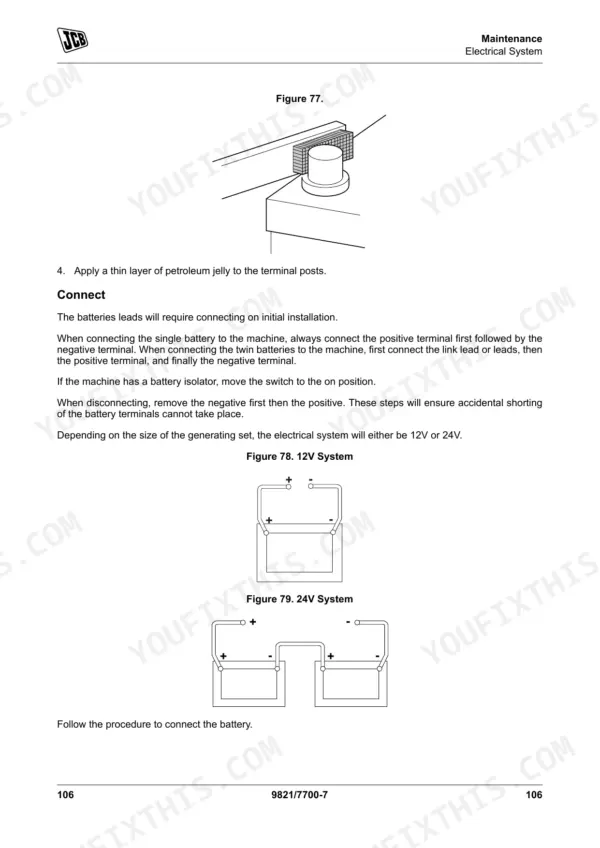
Inspect the battery terminals for corrosion and tight connections. Verify the electrolyte level is 6 mm above the plates as specified on page 113. Measure the battery output and ensure the charging required voltage for a 24V system is not below 24.8 V. Recharge if necessary.
Manual Section: Engine - Will Not Crank or Cranks SlowlyHigh temperature warning light flashes and the engine shuts down after running
Inspect the radiator matrix for blockages and ensure adequate airflow around the enclosure. Check the fluid capacities on page 134 and verify the coolant level is correct. If topping off, use a 50 % antifreeze mixture that protects down to -40 °C as detailed on page 130.
Manual Section: Coolant - Over TemperatureFrequently Asked Questions
How do I reset the JCB G115QS generator fault codes?
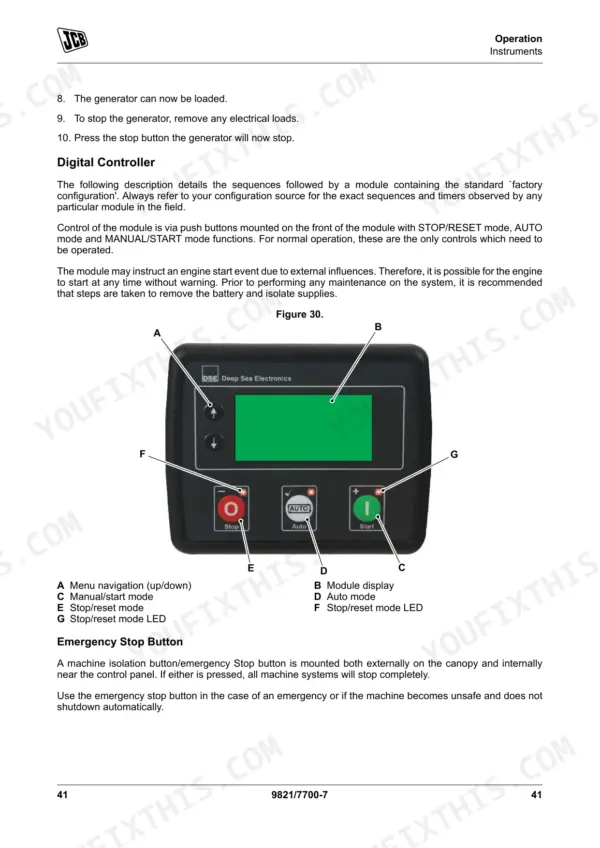
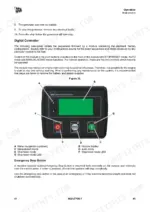
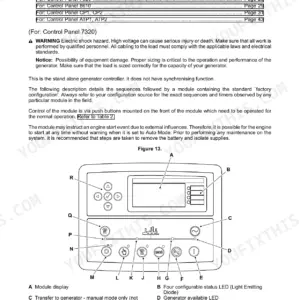
To reset fault codes on a JCB G115QS generator, press the 'stop/reset' button on the control panel. This action places the module into its STOP/RESET mode and clears any active alarm conditions once the triggering criteria have been removed. For example, in Stand-Alone Manual Mode, pressing this button clears any alarms. p. 39
What do the JCB G140QS error codes mean?
The JCB G140QS generator displays various alarm conditions on its LCD, which are detailed in the manual. These include Warning Alarms (Table 8, page 56), Electrical Trip Alarms (Table 9, page 57), Shutdown Alarms (Table 10, page 58), and ECU Alarms (CAN Fault Codes /DTC) (Table 11, page 59), each with a description of the fault. For instance, a 'Low Fuel Level' warning indicates the fuel level sensor is below the pre-set alarm setting. p. 56
How do I clear an alarm on a JCB G90S or G91QS?
To clear an alarm on a JCB G90S or G91QS, press the 'stop/reset' button on the module. For audible alarms, pressing the alarm 'mute/lamp' test button will silence them. Latching electrical trip and shutdown alarms require the fault condition to be cleared and then the 'stop/reset' button to be pressed. p. 55
How do I reset the controller on a JCB G65QS?
To reset the controller on a JCB G65QS, press the 'stop/reset' button on the front of the module. This action places the module into its STOP/RESET mode and clears any alarm conditions that were active, provided their triggering criteria have been removed. This is one of the primary controls for normal operation. p. 49
What do I get after purchasing this JCB G65–G141 Series manual?
Instant PDF download. You get the full 182-page searchable Operator Manual immediately after payment. Open it on your laptop, tablet, or phone right in the shop.
Can I print this manual?
Yes. Print a chapter or just the pages for the job at hand, for use in your own shop. Any home or office printer works.
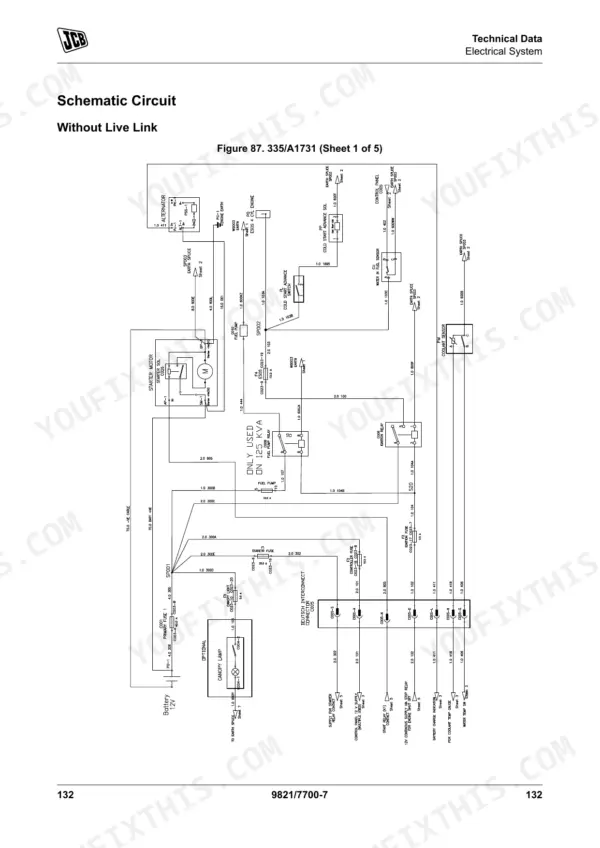
Can I find wiring schematics in this JCB G65–G141 Series manual?
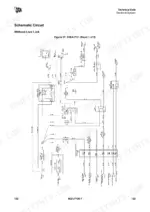
Yes, this JCB G65–G141 Series Operator Manual includes a wiring diagram for the electrical system.











Reviews
There are no reviews yet.