
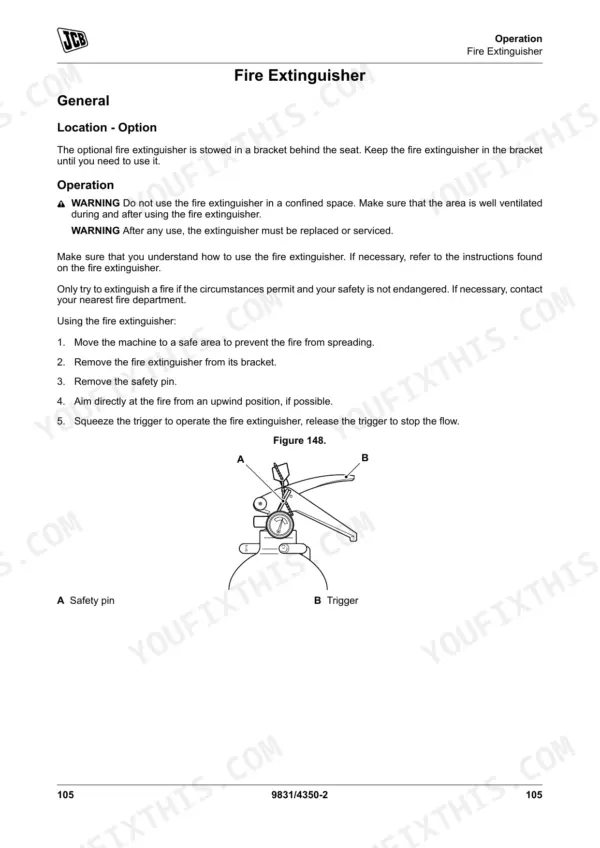



Part of the JCB Operator Manuals.
If you want to keep your JCB 135 Skidsteer Loader out of the shop, this 278-page JCB 215 operator manual PDF (OEM #9831/4350) gives you the factory operating guidelines and daily service schedules for the entire model family, including the 150T, 155, 175, 190T, 205T, and 210 variants. Inside, you get complete cab control breakdowns, attachment handling procedures, and clear maintenance intervals to keep your machine earning. Open up to instructions for viewing error codes on the LCD screen, walk-around inspection checklists, and fluid capacity tables for every major system. Swap out both the charge and return hydraulic filters at 500-hour intervals, and release auxiliary hydraulic pressure safely by deflecting the couplers inwards for exactly five seconds. A neglected machine is a broken machine. Grab this bookmarked file, pull it up on your phone in the cab, and get to work.
Complete the set for your 135–215
Other editions of this manual
- JCB 150T, 155, 175, 210, 210T, 215, 215T Skid Steer Loader Operator Manual Original price was: $32.99.$19.99Current price is: $19.99.
- JCB 205, 135, 190T, 150T, 155, 175, 190, 205T Skid Steer Loader Operator Manual Original price was: $26.99.$19.99Current price is: $19.99.
- JCB 205, 135, 190T, 150T, 155, 175, 190, 205T Skid Steer Loader Operator Manual Original price was: $30.99.$19.99Current price is: $19.99.
What's Inside This JCB 135–215 Operator Manual
| System | Pages | Key Topics |
|---|---|---|
| Acronyms Glossary | 11-12 | Cesar, DEF, ECU, FOPS, HVAC, ROPS |
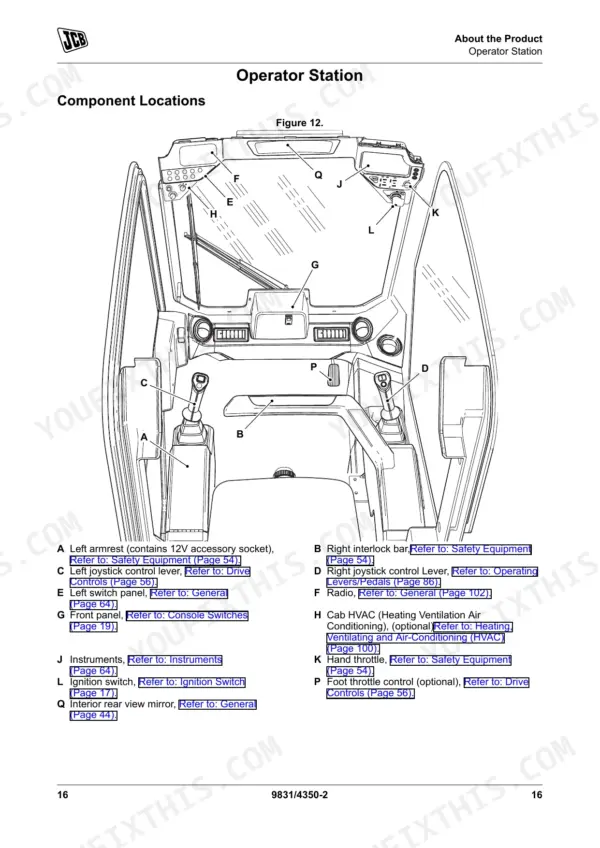
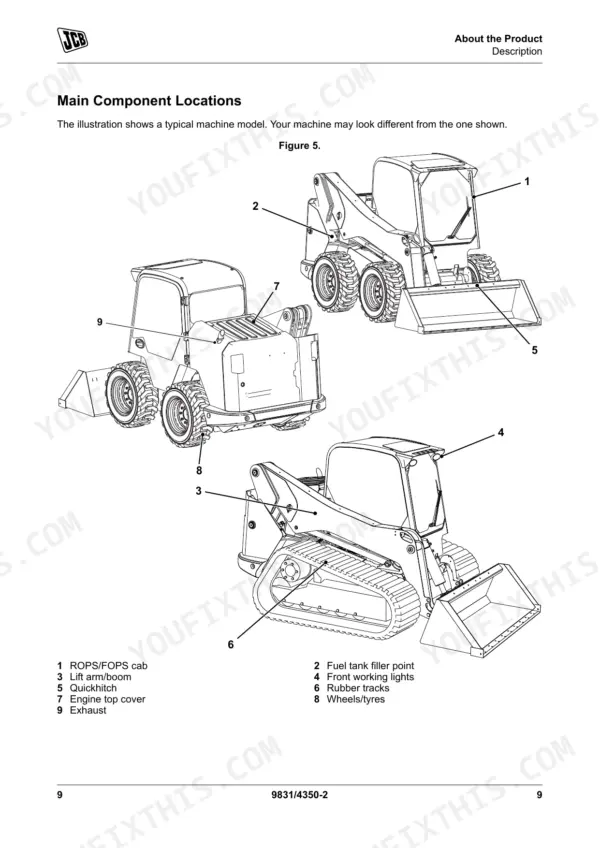
| About the Product | 19-32 | Introduction, Product and Component Identification, Safety Labels, Operator Station, Interior Switches, Console Switches |
| Operation | 33-128 | Introduction, Operating Safety, Walk-Around Inspection, Entering and Leaving the Operator Station, Doors, Windows, Battery Isolator, Before Starting the Engine |
| Attachments | 129-161 | Working with Attachments, Attachment Frame, Quickhitch, Shovels, Forks, Manure Forks, Snow Blade |
| Preservation and Storage | 162-168 | Cleaning, Checking for Damage, Storage, Security |
| Maintenance | 169-236 | Introduction, Service/Maintenance Agreements, Maintenance Safety, Maintenance Schedules, Maintenance Positions, Service Points, Access Apertures, Tools |
| Technical Data | 237-278 | Static Dimensions, Performance Dimensions, Noise Emissions, Vibration Emissions, Fluids, Lubricants and Capacities, Torque Values, Electrical System |
Quick Reference Specifications
| Specification | Value | Page |
|---|---|---|
| Procedure to release auxiliary hydraulic pressure | Push the two auxiliary couplers inwards firmly with/without the hydraulic hoses attached. The couplers must each deflect for 5s (5mm). | p. 227 |
| Procedure to disengage auxiliary flow | Turn off the auxiliary flow circuit by pressing the 'AUX' hydraulics isolate switch on the right hand panel or turning 'on' the lift arm isolate. | p. 102 |
| Charge filter replacement interval | 500h, 1000h, 1500h, 2000h | p. 178 |
| Return filter replacement interval | 500h, 1000h, 1500h, 2000h | p. 178 |
| Hose bend clearance (guideline) | Do not clamp at the bend; the curve absorbs the change. | p. 140 |
| Outer air filter replacement interval | 500h, 1000h, 1500h, 2000h | p. 177 |
| Inner air filter replacement interval | 2000h | p. 177 |
| Main fuel filter/sedimenter replacement interval | 500h, 1000h, 1500h, 2000h | p. 177 |
| Main fuel filter/sedimenter cleaning interval | 50h, 500h, 1000h, 1500h, 2000h | p. 177 |
| A/C compressor belt check interval (if fitted) | 50h, 500h, 1000h, 1500h, 2000h | p. 177 |
| FEAD belt check interval | 50h, 500h, 1000h, 1500h, 2000h | p. 177 |
| Battery voltage/system voltage | 12V | p. 259 |
JCB 135–215 Common Problems This Manual Covers
JCB 135 engine overheats quickly under load and dashboard coolant warning indicator flashes constantly
Inspect the radiator and cooling pack for debris. Verify the coolant level is within the normal range on the sight glass. Fill the system to the 10L maximum capacity outlined on page 254. Check the drive belt tension movement limit on page 208, ensuring it deflects less than 10mm.
Manual Section: Engine Drive Belt Check & Adjustment p. 208Auxiliary hydraulic attachments will not couple correctly because the supply lines remain highly pressurized
Disengage the auxiliary flow circuit by pressing the AUX hydraulics isolate switch. Push the two auxiliary couplers inwards firmly to release the 230bar standard flow pressure. Follow the procedure on page 227 to ensure each coupler deflects for 5s or 5mm before attaching the implement hoses.
Manual Section: Hydraulic System Pressure Discharge p. 227Track pulls to one side or slips off the sprocket during heavy turning maneuvers
Inspect the undercarriage for trapped debris and clean the drive components thoroughly. Measure the track droop and adjust the tension to maintain the 25mm minimum track tension specification. Refer to page 265 to verify this clearance applies specifically to the 150T, 190T, and 205T tracked models.
Manual Section: Track Tension Adjustment p. 265Warning lights illuminate and machine functions lock out due to clogged hydraulic filtration systems
Check the dashboard error codes to confirm a restriction fault. Replace the charge filter and return filter at the strict 500h service interval outlined on page 178. Inspect the hydraulic system components for leaks and verify the fluid levels before returning the skidsteer to regular service.
Manual Section: Maintenance p. 178Frequently Asked Questions
How do I reset the hydraulics on a JCB 135/150T/155/175/190T/205T/210/215 skid steer?
To release the auxiliary hydraulic pressure, push the two auxiliary couplers inwards firmly for 5 seconds, with or without the hydraulic hoses attached. This procedure is used to vent the hydraulics before carrying out maintenance on the machine. For more details, refer to the 'Discharge' section on page 215. p. 227
How do I clear a fault code on a JCB skid steer loader?
The manual describes how to view error codes by cycling through them using the Up or Down buttons on the right-hand switch panel. However, it does not provide a procedure for an operator to clear fault codes. If a fault code is active, it implies that the issue needs to be addressed, potentially by a dealer. p. 88
What does the error code mean on a JCB 135/150T/155/175/190T/205T/210/215?
The manual indicates that error codes are displayed on the LCD screen, and you can cycle through them using the Up or Down buttons. For example, an error code might appear as '1/S 0204'. However, the manual does not provide a list or explanation of what specific error codes mean. p. 88
What are the torque specs for the wheel nuts/track components on a JCB skid steer?
The torque specification for wheel nuts is 220N·m for both front and rear. For track components, the access plate bolts require 140N·m, and the track sprocket bolts require 368N·m. These values are listed in the 'Torque Values' section of the manual. p. 258
How do I reset the service light on a JCB skid steer loader?
To reset the service light, which displays the time to the next service, press and hold the information switch for 3 seconds. The service display illuminates for 3 seconds when showing the time to next service. p. 79
How quickly can I access this manual after buying?
A 278-page Operator Manual in searchable PDF format, available the moment you complete checkout. View on computer, tablet, or phone, with no shipping wait.
Is this JCB 135 & variants Operator Manual printable?
Yes. Print the pages you need for the job in your own shop, and bin them when they get greasy.










Reviews
There are no reviews yet.